uconn-color-font-example.texRead-only preview
% Written by Bibby AI
\documentclass{beamer}

\usepackage[utf8]{inputenc}
\usepackage[T1]{fontenc}

\useinnertheme{default}
\useoutertheme[footline=authorinstitute,subsection=true]{miniframes}
%\useoutertheme{sidebar}
\usecolortheme{uconn}
\usefonttheme{uconn}

\setbeamercolor*{titlelike}{
  bg=uconn navy blue,
  fg=uconn white
}

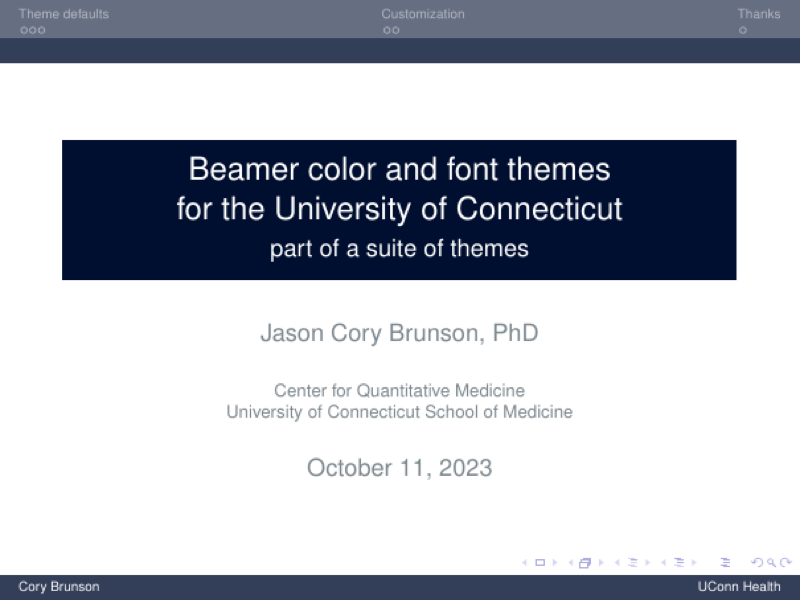
\title[Beamer colors and fonts for UConn]{Beamer color and font themes\\ for the University of Connecticut}
\subtitle{part of a suite of themes}
\author[Cory Brunson]{Jason Cory Brunson, PhD}
\institute[UConn Health]{Center for Quantitative Medicine\\ University of Connecticut School of Medicine}
\date{\today}

\newtheorem{remark}{Remark}

\begin{document}


\begin{frame}
\titlepage
\end{frame}


\begin{frame}{Table of contents}
\tableofcontents
\end{frame}


\section{Theme defaults}


\begin{frame}[fragile]{Default font family}

The default Helvetica font family is provided by the {\ttfamily helvet} package.
It is equivalent to Arial, which is used in the PowerPoint templates (see the \hyperlink{slide:acknowledgments}{Acknowledgments slide}).

Block titles are rendered in \href{http://mirrors.ibiblio.org/CTAN/fonts/montserrat/doc/montserrat-doc.pdf}{{\montserratsb Montserrat semibold}}, a free alternative to \href{https://brand.uconn.edu/standards/fonts/}{the Gothic bold} used in campus-, college-, and school-specific woodmarks provided by the {\ttfamily montserrat} package.

Two shortcuts render text in Montserrat semibold:
\begin{itemize}
\item \verb|\montserratsb| (with no argument)
\item \verb|\campus{}| (with a text argument)
\end{itemize}

\end{frame}


\begin{frame}[fragile]{Palette colors}

The palette colors used by outer themes interpolate between navy blue and white:

\vfill

\begin{columns}
\begin{column}{.5\textwidth}

\centering
\verb|palette|
\vspace{1ex}

\begin{beamercolorbox}[sep=4pt,center]{palette primary}
\usebeamerfont{palette primary}primary
\end{beamercolorbox}

\begin{beamercolorbox}[sep=4pt,center]{palette secondary}
\usebeamerfont{palette secondary}secondary
\end{beamercolorbox}

\begin{beamercolorbox}[sep=4pt,center]{palette tertiary}
\usebeamerfont{palette tertiary}tertiary
\end{beamercolorbox}

\begin{beamercolorbox}[sep=4pt,center]{palette quaternary}
\usebeamerfont{palette quaternary}quaternary
\end{beamercolorbox}

\end{column}
\begin{column}{.5\textwidth}

\centering
\verb|palette sidebar|
\vspace{1ex}

\begin{beamercolorbox}[sep=4pt,center]{palette sidebar primary}
\usebeamerfont{palette sidebar primary}primary
\end{beamercolorbox}

\begin{beamercolorbox}[sep=4pt,center]{palette sidebar secondary}
\usebeamerfont{palette sidebar secondary}secondary
\end{beamercolorbox}

\begin{beamercolorbox}[sep=4pt,center]{palette sidebar tertiary}
\usebeamerfont{palette sidebar tertiary}tertiary
\end{beamercolorbox}

\begin{beamercolorbox}[sep=4pt,center]{palette sidebar quaternary}
\usebeamerfont{palette sidebar quaternary}quaternary
\end{beamercolorbox}

\end{column}
\end{columns}

\vspace{2ex}
For example, \verb|palette secondary| is defined using
\begin{verbatim}
bg=uconn navy blue!80!uconn white,fg=uconn white
\end{verbatim}

\end{frame}


\begin{frame}{Frame element colors}

The symbol colors for itemized and enumerated lists progress
\begin{itemize}
\item from purple,
\begin{itemize}
\item through orange-gold,
\begin{itemize}
\item to green.
\end{itemize}
\end{itemize}
\end{itemize}
\alert{Alerted text is rendered in orange-gold.}

\vfill\begin{remark}
Block and caption titles are boldfaced and rendered in dark red.
\end{remark}

\vfill
Hyperlinks and buttons are rendered in teal blue.
See \hyperlink{sec:customization}{Customization} and \hyperlink{slide:acknowledgments}{Acknowledgments} for examples.

\end{frame}


\section{Customization}
\label{sec:customization}


\begin{frame}[fragile]{Manually assigning colors}

Type
\begin{verbatim}
{\color{uconn purple} purple}
\end{verbatim}
(with brackets) to render {\color{uconn purple} purple}, or set
\begin{verbatim}
\color{uconn health bright teal}
\end{verbatim}
\color{uconn health bright teal}
(without brackets) to color all text in a slide the bright teal in the UConn Health palette.

\color{black}\vfill
Color names are based on the UConn Brand color palette.

\center\href{http://brand.uconn.edu/standards/color-palette/}{\beamerbutton{Visit the Brand Standards website}}

\end{frame}


\begin{frame}[fragile]{Changing the theme}

You can change the default colors by using setbeamercolor in the preamble, as i did:
\begin{verbatim}
\setbeamercolor*{titlelike}{
  bg=uconn navy blue,
  fg=uconn white
}
\end{verbatim}
\ldots or by editing the color theme file {\tt beamercolorthemeuconn.sty}.
Please \hyperlink{mailto:brand@uconn.edu}{check with the Brands office} about using the derivative theme, e.g.\ one with the colors themselves altered.

\end{frame}


\section{Thanks}


\begin{frame}{Acknowledgments}
\label{slide:acknowledgments}

I relied heavily on the following resources:
\begin{itemize}
\item the \href{http://texdoc.net/texmf-dist/doc/latex/beamer/doc/beameruserguide.pdf}{Beamer class users guide}
\item Thierry Masson's Beamer \href{http://www.cpt.univ-mrs.fr/~masson/latex/Beamer-appearance-cheat-sheet.pdf}{cheat sheet}
\item UConn Brand Standards (\url{http://brand.uconn.edu/})
\begin{itemize}
\item the \href{http://brand.uconn.edu/standards/color-palette/}{color palettes} defined in {\tt beamercolorthemeuconn.sty}
\item several \href{http://brand.uconn.edu/resources/powerpoint-templates/}{PowerPoint templates}
\end{itemize}
\end{itemize}

\vfill
If you have suggestions for improvement, please let me know!

\center\href{mailto:cornelioid@gmail.com}{\beamerbutton{Email Cory}}

\end{frame}


% Written by Bibby AI
\end{document}
Preview

PDF Preview
Create an account to compile and preview