ufl-color-font-example.texRead-only preview
% Written by Bibby AI
\documentclass{beamer}

\usepackage[utf8]{inputenc}
\usepackage[T1]{fontenc}

\useinnertheme{default}
\useoutertheme[footline=authorinstitute,subsection=true]{miniframes}
%\useoutertheme{sidebar}
\usecolortheme{ufl}
\usefonttheme{ufl}

\setbeamercolor*{date}{fg=ufl blue}

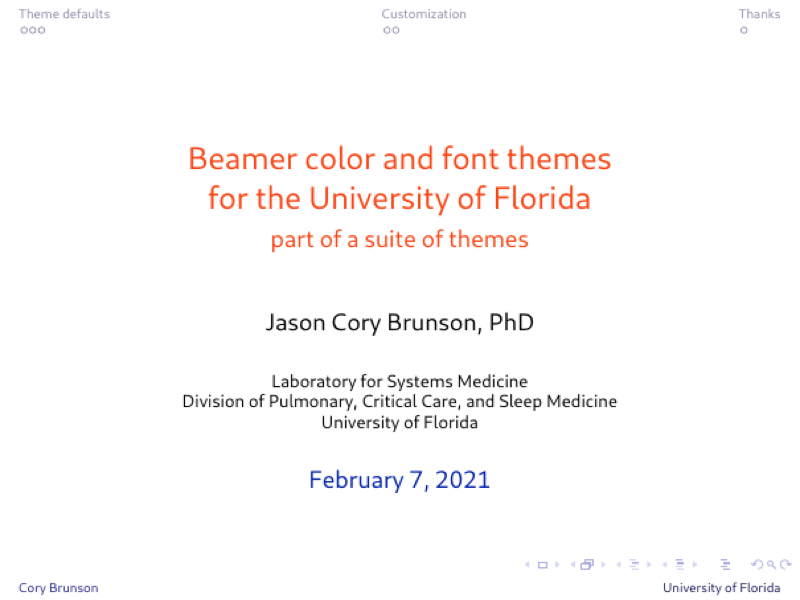
\title[Beamer colors and fonts for UF]{Beamer color and font themes\\ for the University of Florida}
\subtitle{part of a suite of themes}
\author[Cory Brunson]{Jason Cory Brunson, PhD}
\institute[University of Florida]{Laboratory for Systems Medicine\\ Division of Pulmonary, Critical Care, and Sleep Medicine\\ University of Florida}
\date{\today}

\newtheorem{remark}{Remark}

\begin{document}


\begin{frame}
\titlepage
\end{frame}


\begin{frame}{Table of contents}
\tableofcontents
\end{frame}


\section{Theme defaults}


\begin{frame}[fragile]{Default font family}

%The default Helvetica font family is provided by the {\ttfamily helvet} package.
%It is equivalent to Arial, which is used in the PowerPoint templates (see the \hyperlink{slide:acknowledgments}{Acknowledgments slide}).

The default font family is set to sans-serif, and the sans-serif default Cantarell is provided by \href{https://www.ctan.org/tex-archive/fonts/cantarell}{the {\ttfamily cantarell} package}. This is a free alternative to \href{http://identity.ufl.edu/typography/}{Gentona}, one of two official typefaces of the UF brand.

Block titles are rendered in {\cantarelleb Cantarell extra bold}, and two shortcuts are available to render any text in this style:
\begin{itemize}
\item \verb|\cantarelleb| (with no argument)
\item \verb|\primarytype{}| (with a text argument)
\end{itemize}

\end{frame}


\begin{frame}{Frame element colors: text blocks}

The default title, symbol, and text colors derive from the UF Bright Color Palette.

\begin{remark}
Block and caption titles are rendered in UF blue and Cantarell extra bold.
Other UF colors are used for alert (orange) and example (green) blocks.
\end{remark}

\begin{example}
Example block titles are rendered in UF green.
\end{example}

\begin{alertblock}{Alert block}
Alerted block titles are rendered in UF red, which is somewhat close to UF orange.
\end{alertblock}

\end{frame}


\begin{frame}{Frame element colors: symbols and text}

{\ttfamily local structure} elements like itemization symbols progress
\begin{itemize}
\item from UF blue,
\begin{itemize}
\item through green,
\begin{itemize}
\item to purple.
\end{itemize}
\end{itemize}
\end{itemize}

\alert{Alerted text, like alerted block titles, is rendered in red.}

\vfill
Hyperlinks and buttons are rendered in muted UF blue.
See \hyperlink{sec:customization}{Customization} and \hyperlink{slide:acknowledgments}{Acknowledgments} for examples.
(The muted color palette also has muted UF orange.)

\end{frame}


\section{Customization}
\label{sec:customization}


\begin{frame}[fragile]{Manually assigning colors}

To again showcase colors from the Bright Color Palette, type
\begin{verbatim}
{\color{ufl violet} violet}
\end{verbatim}
(with brackets) to render {\color{ufl violet} violet}, or set
\begin{verbatim}
\color{ufl green}
\end{verbatim}
\color{ufl green}
(without brackets) to color all text in a slide green.

\color{black}\vfill
Names for the Neutral and Preeminence Color Palettes were obtained with help from the website \href{https://www.color-blindness.com/color-name-hue/}{Color Name \& Hue}.

\center\href{http://identity.ufl.edu/color/}{\beamerbutton{Visit the Brand website}}

\end{frame}


\begin{frame}[fragile]{Changing the theme}

You can change the default colors by using setbeamercolor in the preamble, as i did:
\begin{verbatim}
\setbeamercolor*{date}{fg=ufl blue}
\end{verbatim}
\ldots or by editing the color theme file {\tt beamercolorthemeufl.sty}.
Please \hyperlink{http://identity.ufl.edu/support/contact/}{contact the Brands office} about using the derivative theme, e.g.\ one with the colors themselves altered.

\end{frame}


\section{Thanks}


\begin{frame}{Acknowledgments}
\label{slide:acknowledgments}

I relied heavily on the following resources:
\begin{itemize}
\item the \href{http://texdoc.net/texmf-dist/doc/latex/beamer/doc/beameruserguide.pdf}{Beamer class users guide}
\item Thierry Masson's Beamer \href{http://www.cpt.univ-mrs.fr/~masson/latex/Beamer-appearance-cheat-sheet.pdf}{cheat sheet}
\item University of Florida Brand (\url{http://identity.ufl.edu/})
\begin{itemize}
\item the \href{http://identity.ufl.edu/color/}{color palettes} defined in {\tt beamercolorthemeufl.sty}
\item the \href{http://identity.ufl.edu/typography/}{typefaces} approximated in {\tt beamerfontthemeufl.sty}
\item presentation tools at the \href{http://identity.ufl.edu/our-brand/}{Branding Guidelines}
\end{itemize}
\end{itemize}

\vfill
If you have suggestions for improvement, please let me know!

\center\href{https://github.com/corybrunson/beamerthemeufl/issues}{\beamerbutton{Open an issue on GitHub}}

\end{frame}


% Written by Bibby AI
\end{document}
Preview

PDF Preview
Create an account to compile and preview