cookbook.texRead-only preview
% =============================================
% COOKBOOK.TEX
% Made by Bruno Belotti.
%
% Parts of this code and files in the repo werecreated with some AI help.
%
%
% To use the template, the only change you should have to do in this
% cookbook.tex file is specifying "OL" or "EN" in \newcommand{\LangMode}{}
% on line 49.
% All other changes are done directly in your recipe folders: You can
% change Change the titles of the folders containing the individual .tex
% recipes, you can add more folders (e.g., "Starters"), or delete folders.
% The code will automatically update these changes with each compilation
% directly into the final "cookbook.pdf". (Do not use special chaacters!)
%
% =============================================

% !TEX program = xelatex

\documentclass[10pt]{article}

\usepackage[T1]{fontenc}
\usepackage{ragged2e}
\usepackage{enumitem}
\usepackage{titlesec}   % small-caps rule headers
\usepackage{changepage}
\usepackage{multicol}
	\raggedcolumns
\usepackage{hyperref}
\usepackage[stable,bottom]{footmisc}   % neat footnotes
\usepackage{xfrac} % neat text fractions
\usepackage{etoolbox}
\usepackage{wasysym}
\usepackage{fancyhdr}
\usepackage{fnpct} % Automatically separates multiple footnotes with a comma
\usepackage{l3sys-query} % Search directories inside LaTeX
\usepackage{xparse}
\usepackage{xstring}
\usepackage{titletoc}
\usepackage{fontspec}
\newfontfamily\japanesefont{NotoSansJP-Regular.ttf}[Path=./fonts/]


\RaggedRight

 % ======================================================================
%  LANGUAGE SWITCH --> Change to "OL" (Oiginal Language) or "EN" (English)
\newcommand{\LangMode}{EN} % "OL" or "EN"
% =======================================================================

% \part{} is used for recipe CATEGORIES (Starters, Main Courses, ...)
\titleformat{\part}
  {\centering\normalfont\Large\scshape}
  {}{1em}{}
\titlespacing*{\part}{0pt}{2em}{2em}

% \section{} is used for individual RECIPES
\titleformat{\section}
  {\normalfont\large\scshape}
  {}{0em}{}
  [\vspace{2pt}\titlerule\vspace{4pt}]
\titlespacing*{\section}{0pt}{2.2em}{0.6em}

% \subsection*{} is used for "Ingredients" / "Preparation" within a recipe
\titleformat{\subsection}
  {\normalfont\normalsize\bfseries\scshape}
  {}{0em}{}
\titlespacing*{\subsection}{0pt}{1.2em}{0.4em}

\hypersetup{
    pdfauthor   = {Bruno Belotti},
    pdftitle    = {Il Chubby Babi},
    colorlinks  = true,
    linkcolor   = black,
    urlcolor    = black,
}

\newbool{showpagenumbers}
\booltrue{showpagenumbers}   % set to \boolfalse{showpagenumbers} to hide page numbers

\pagestyle{fancy}
\renewcommand{\headrulewidth}{0pt}
\fancyhf{}                              % clear all header/footer fields
\fancyhead[L]{\small \scshape Il Chubby Babi}
\fancyhead[R]{\small \scshape Bruno's recipe book}
\ifbool{showpagenumbers}{\fancyfoot[C]{\thepage}}{\fancyfoot[C]{}}

% Make sure pages that reset to "plain" style (e.g. after \part) keep the same look
\fancypagestyle{plain}{%
	\renewcommand{\headrulewidth}{0pt}
	\fancyhf{}
	\fancyhead[L]{\small \scshape \scshape Il Chubby Babi}
	\fancyhead[R]{\small \scshape Bruno's recipe book}
	\ifbool{showpagenumbers}{\fancyfoot[C]{\thepage}}{\fancyfoot[C]{}}
}

\newlength{\AbsoluteWidth}
\setlength{\AbsoluteWidth}{17cm} % Change this to your desired absolute width

\newenvironment{recipeblock}{%
	\par\smallskip\noindent
	% Center the wider block relative to the physical page
	\hspace*{\dimexpr0.5\linewidth-0.5\AbsoluteWidth\relax}%
	\begin{minipage}{\AbsoluteWidth}%
	\centering
	}{%
	\end{minipage}\par\smallskip
}

% ----------------------------------
%  \recipe{Name}{Time}{Servings}{Source} -- recipe header
%  Use this at the top of every recipe file, followed by
%  \subsection*{Ingredients} / \subsection*{Preparation} blocks.
% ----------------------------------
\newcommand{\recipe}[4]{%
	\setcounter{footnote}{0}
	\section[#1]{\hyperlink{mytoc}{#1}}
	\begingroup\itshape\small
	#2 \quad$ #3 \quad$ #4\par
	\endgroup
	\medskip
}
\AfterEndEnvironment{multicols}{%
	\par\vspace{\medskipamount}%
	\leftskip=0pt
	\rightskip=0pt
	\parfillskip=0pt plus 1fil
	\justifying
}

\setcounter{secnumdepth}{0} % Remove all section #s.

\newenvironment{ingredients}
{\begin{itemize}[leftmargin=1.2em,itemsep=1.5pt,topsep=1pt,parsep=0pt,partopsep=0pt]}
	{\end{itemize}}

\newenvironment{equipment}
{\begin{itemize}[leftmargin=1.2em,itemsep=1.5pt,topsep=1pt,parsep=0pt,partopsep=0pt]}
	{\end{itemize}}

\newenvironment{preparation}
{\begin{enumerate}[leftmargin=1.6em,itemsep=3pt,topsep=1pt,parsep=0pt,partopsep=0pt]}
	{\end{enumerate}}

\titleformat{\subsubsection}
{\normalfont\normalsize\itshape}
{}{0em}{}
\titlespacing*{\subsubsection}{0pt}{0.8em}{0.0em}

% Automatically loads all recipes in a given folder that match the current LangMode
% #1 = Path to directory (e.g., recipes/starters/)
\newcommand{\loadcategory}[1]{%
	\QueryFiles{#1/\LangMode_*.tex}{\input{##1}}%
}

\contentsmargin{0pt}

\titlecontents{part}
[0em]{\vspace{1.2em}\scshape\large}
{}{}
{}

\titlecontents{section}
[1em]{\vspace{0.3em}\normalfont\normalsize}
{}{}
{\titlerule*[0.5pc]{.}\thecontentspage}


% Convert a recipes/ subfolder name into a \part title.
% Also replaces " and " with " \& " and stores the result globally in \CategoryTitle.
\newcommand{\FormatCategoryTitle}[1]{%
	\StrSubstitute{#1}{ and }{ \& }[\catnameB]%
	\xdef\CategoryTitle{\catnameB}%
}

% ================================
%  DOCUMENT
% ================================
\begin{document}

% --------------------------------
%  TITLE PAGE
% --------------------------------
\begin{titlepage}
    \centering
    \vspace*{3cm}

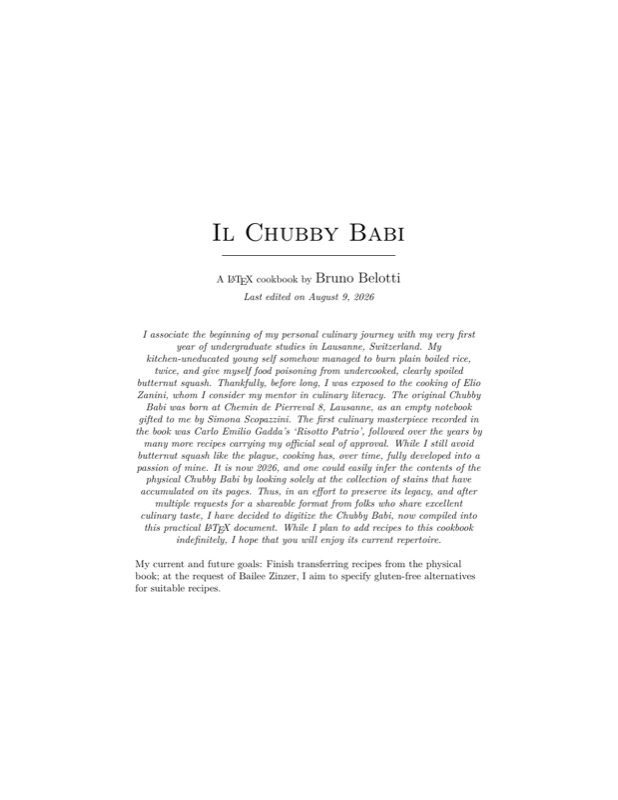
    {\Huge\scshape Il Chubby Babi}\\[0.3em]
    \rule{0.5\textwidth}{0.4pt}\\[1.5em]

    {A \LaTeX \ cookbook by \Large Bruno Belotti}\\[0.5em]
    {\itshape Last edited on \today}

    \vfill

\vspace*{0.4cm}
\begin{minipage}{1\textwidth}
	\centering\itshape
	I associate the beginning of my personal culinary journey with my very first year of undergraduate studies in Lausanne, Switzerland.
	My kitchen-uneducated young self somehow managed to burn plain boiled rice, twice, and give myself food poisoning from undercooked, clearly spoiled butternut squash.
	Thankfully, before long, I was exposed to the cooking of Elio Zanini, whom I consider my mentor in culinary literacy.
	The original \textit{Chubby Babi} was born at Chemin de Pierreval 8, Lausanne, as an empty notebook gifted to me by Simona Scopazzini.
	The first culinary masterpiece recorded in the book was Carlo Emilio Gadda's `\textit{Risotto Patrio}', followed over the years by many more recipes carrying my official seal of approval.
	While I still avoid butternut squash like the plague, cooking has, over time, fully developed into a passion of mine.
	It is now 2026, and one could easily infer the contents of the physical Chubby Babi by looking solely at the collection of stains that have accumulated on its pages.
	Thus, in an effort to preserve its legacy, and after multiple requests for a shareable format from folks who share excellent culinary taste, I have decided to digitize the Chubby Babi, now compiled into this practical \LaTeX\ document.
	While I plan to add recipes to this cookbook indefinitely, I hope that you will enjoy its current repertoire. \linebreak

	\par
	{\normalfont\raggedright
		My current and future goals: Finish transferring recipes from the physical book; at the request of Bailee Zinzer, I aim to specify gluten-free alternatives for suitable recipes.
	\par}

\end{minipage}

    \vspace*{3cm}
\end{titlepage}

% ------------------------------------
%  TABLE OF CONTENTS
% ------------------------------------
\hypertarget{mytoc}{}
\begingroup
\setlength{\columnsep}{35pt} % <--- Increase separation between columns
\begin{multicols}{2}
	\small
	\tableofcontents
\end{multicols}
\endgroup
\clearpage


% Auto-generate a \part for every subfolder of ./recipes/ (alphabetical
% order): derive its title from the folder name, then load its recipes.
% Add, rename, or delete a folder there and this updates on next compile.
\QueryFiles[type=d,sort=name]{recipes/*}{%
	\StrBehind{#1}{recipes/}[\categoryfolder]%
	\FormatCategoryTitle{\categoryfolder}%
	\newpage \hfill \\
	\par\RaggedRight
	\setlength{\parskip}{0.6em plus 2pt minus 1pt}
	\setlength{\parindent}{0pt}
	\part*{\Large \CategoryTitle}
	\hfill \newpage
	\loadcategory{#1}
}

\end{document}
Preview

PDF Preview
Create an account to compile and preview