circular_text_logo.texRead-only preview
\documentclass{standalone}
% 'standalone' is ideal for small graphics or logos
% It produces a tightly cropped PDF output (no page margins)

\let\swdefault\relax
\usepackage{allrunes} % Optional: for runic text (\textara{})
\usepackage{pstricks,pst-text,amssymb,graphicx,xcolor}
% pstricks: vector graphics
% pst-text: text along paths/arcs
% xcolor: color support
% amssymb: extra math symbols (for \mathbb{})

\begin{document}

% The main drawing area: (-4,-4) to (4,4) defines the visible coordinate box
\begin{pspicture}(-4,-4)(4,4)

    % ===== CIRCLES =====
    % These are guide circles (optional) to show your logo boundary
    \pscircle[linewidth=1pt,linecolor=green](0,0){3}   % Outer circle (radius 3)
    \pscircle[linewidth=1pt,linecolor=purple](0,0){2.5} % Inner circle (radius 2.5)

    % ===== UPPER ARC TEXT =====
    % This uses pstextpath to place text along an invisible arc
    % The \scalebox and coordinate flips make the text curve correctly (upright)
    \scalebox{1}[-1]{% Mirror vertically so top text is not upside-down
        \rput{0}(0,0){%
            % (0, -0.15) is a vertical offset tweak — adjusts how the text sits on the arc
            \pstextpath[c](0,-0.15){\psarc[linestyle=none](0,0){2.75}{180}{0}}{%
                \scalebox{1}[-1]{% Flip again so letters aren’t mirrored
                    \textbf{\textcolor{red}{Top Text \textara{also}~\textara{in}~\textara{runes}}}%
                }%
            }%
        }%
    }

    % ===== LOWER ARC TEXT =====
    % Similar to above, but not flipped vertically — it follows the lower half of the circle
    \rput{0}(0,0){%
        % (0, -0.1) is again a fine offset for text alignment
        \pstextpath[c](0,-0.1){\psarc[linestyle=none](0,0){2.75}{180}{0}}{%
            \textbf{\textcolor{blue}{$\mathbb{THIS~IS~THE~BOTTOM~TEXT}$}}%
        }%
    }

    % ===== CENTER TEXT =====
    % A parbox centers multi-line text at the middle of the logo
    \rput(0,0){%
        \parbox{5cm}{\centering
            \textbf{\large $\mathbb{CENTER~TEXT}$}\\[6pt]
            \textit{This part can be a few lines long.}
        }%
    }

\end{pspicture}

\end{document}
Preview
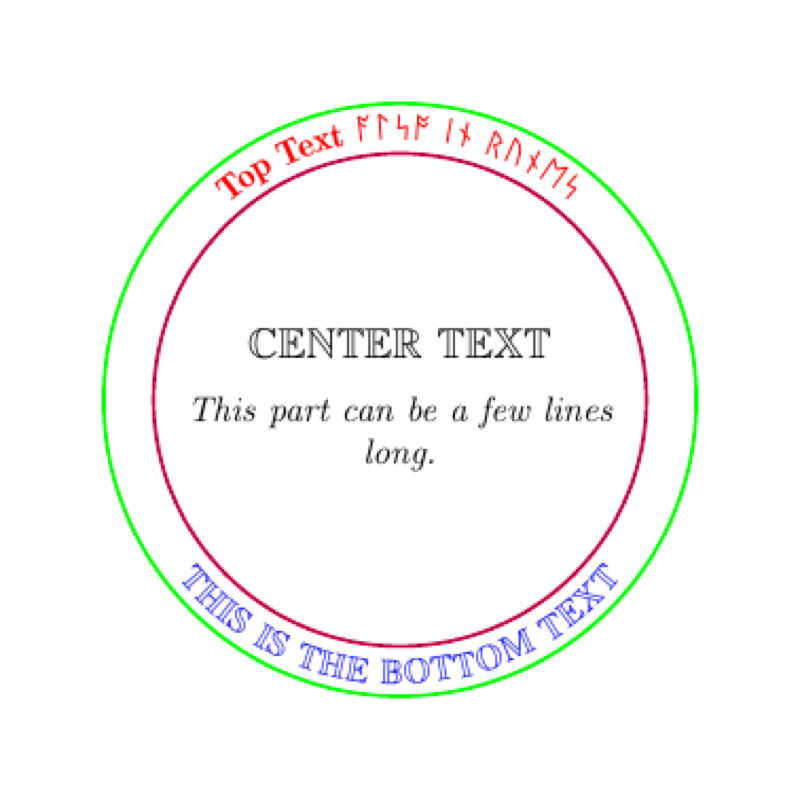

PDF Preview
Create an account to compile and preview