main.texRead-only preview
%-----------------------------------------------------------------------------------------------------------------------------------------------%
% The MIT License (MIT)
%
% Copyright (c) 2020 Alvaro Revuelta
%
% Permission is hereby granted, free of charge, to any person obtaining a copy
% of this software and associated documentation files (the "Software"), to deal
% in the Software without restriction, including without limitation the rights
% to use, copy, modify, merge, publish, distribute, sublicense, and/or sell
% copies of the Software, and to permit persons to whom the Software is
% furnished to do so, subject to the following conditions:
%
% THE SOFTWARE IS PROVIDED "AS IS", WITHOUT WARRANTY OF ANY KIND, EXPRESS OR
% IMPLIED, INCLUDING BUT NOT LIMITED TO THE WARRANTIES OF MERCHANTABILITY,
% FITNESS FOR A PARTICULAR PURPOSE AND NONINFRINGEMENT. IN NO EVENT SHALL THE
% AUTHORS OR COPYRIGHT HOLDERS BE LIABLE FOR ANY CLAIM, DAMAGES OR OTHER
% LIABILITY, WHETHER IN AN ACTION OF CONTRACT, TORT OR OTHERWISE, ARISING FROM,
% OUT OF OR IN CONNECTION WITH THE SOFTWARE OR THE USE OR OTHER DEALINGS IN
% THE SOFTWARE.
%
% ************* RESOURCES USED ********************
%
% http://tex.stackexchange.com/questions/5718/package-for-pie-charts
% http://tex.stackexchange.com/questions/183087/draw-colored-world-us-map-in-latex#183138
% http://www.texample.net/tikz/examples/simple-flow-chart/
% http://vizualize.me/#
% http://devnet.kentico.com/getattachment/fd511a92-e164-40f5-ba51-07c228a49fed/Kentico_fortune500_infographics_FINAL.png
%
%-----------------------------------------------------------------------------------------------------------------------------------------------%
%============================================================================%
%
% DOCUMENT DEFINITION
%
%============================================================================%
%we use article class because we want to fully customize the page
\documentclass[10pt,A4]{article}
%----------------------------------------------------------------------------------------
% ENCODING
%----------------------------------------------------------------------------------------
%we use utf8 since we want to build from any machine
\usepackage[utf8]{inputenc}
%----------------------------------------------------------------------------------------
% LOGIC
%----------------------------------------------------------------------------------------
\usepackage{xifthen}
\usepackage{calc}
%----------------------------------------------------------------------------------------
% FONT
%----------------------------------------------------------------------------------------
% some tex-live fonts - choose your own
%\usepackage[defaultsans]{droidsans}
%\usepackage[default]{comfortaa}
%\usepackage{cmbright}
\usepackage[default]{raleway}
%\usepackage{fetamont}
%\usepackage[default]{gillius}
%\usepackage[light,math]{iwona}
%\usepackage[thin]{roboto}
% set font default
\renewcommand*\familydefault{\sfdefault}
\usepackage[T1]{fontenc}
% more font size definitions
\usepackage{moresize}
% awesome font
\usepackage{fontawesome}
%----------------------------------------------------------------------------------------
% PAGE LAYOUT DEFINITIONS
%----------------------------------------------------------------------------------------
%debug page outer frames
%\usepackage{showframe}
%define page styles using geometry
\usepackage[a4paper]{geometry}
% for example, change the margins to 2 inches all round
\geometry{top=1cm, bottom=1cm, left=1cm, right=1cm}
% use customized header
\usepackage{fancyhdr}
\pagestyle{fancy}
%less space between header and content
\setlength{\headheight}{-5pt}
% customize header entries
\lhead{}
\rhead{}
\chead{}
%indentation is zero
\setlength{\parindent}{0mm}
%----------------------------------------------------------------------------------------
% TABLE /ARRAY DEFINITIONS
%----------------------------------------------------------------------------------------
%extended aligning of tabular cells
\usepackage{array}
% custom column width
\newcolumntype{x}[1]{%
>{\raggedleft\hspace{0pt}}p{#1}}%
%----------------------------------------------------------------------------------------
% GRAPHICS DEFINITIONS
%----------------------------------------------------------------------------------------
\usepackage{graphicx}
\usepackage{wrapfig}
% for drawing graphics and charts
\usepackage{tikz}
\usetikzlibrary{shapes, backgrounds}
% use to vertically center content
% credits to: http://tex.stackexchange.com/questions/7219/how-to-vertically-center-two-images-next-to-each-other
\newcommand{\vcenteredinclude}[1]{\begingroup
\setbox0=\hbox{\includegraphics{#1}}%
\parbox{\wd0}{\box0}\endgroup}
% use to vertically center content
% credits to: http://tex.stackexchange.com/questions/7219/how-to-vertically-center-two-images-next-to-each-other
\newcommand*{\vcenteredhbox}[1]{\begingroup
\setbox0=\hbox{#1}\parbox{\wd0}{\box0}\endgroup}
%----------------------------------------------------------------------------------------
% ICON-SET EMBEDDING
%----------------------------------------------------------------------------------------
% at this point we simplify our icon-embedding by simply referring to a set of png images.
% if you find a good way of including svg without conflicting with other packages you can
% replace this part
\newcommand{\icon}[2]{\colorbox{thirdcol}{\makebox(#2, #2){\textcolor{sectcol}{\csname fa#1\endcsname}}}} %icon shortcut
\newcommand{\icontext}[3]{ %icon with text shortcut
\vcenteredhbox{\icon{#1}{#2}} \vcenteredhbox{\textcolor{textcol}{#3}}
}
%----------------------------------------------------------------------------------------
% Color DEFINITIONS
%----------------------------------------------------------------------------------------
\usepackage{xcolor}
%defineColors
\definecolor{orange}{RGB}{255,150,0}
\definecolor{lblue}{RGB}{0,178,255}
\definecolor{darkblue}{RGB}{0,80,130}
\definecolor{darkerblue}{RGB}{0,100,160}
\definecolor{lgray}{RGB}{0,120,200}
\definecolor{powderblue}{RGB}{190,220,255}
\definecolor{darkestblue}{RGB}{0,50,80}
%main color
\colorlet{maincol}{orange}
%secondary colors
\colorlet{secondcol}{lblue}
\colorlet{thirdcol}{darkblue}
\colorlet{fourthcol}{darkerblue}
\colorlet{fifthcol}{lgray}
\colorlet{sixthcol}{darkblue}
%background color
\colorlet{bgcol}{powderblue}
%textcolor
\colorlet{textcol}{darkestblue}
%titletextcolor
\colorlet{titletext}{white}
%sectioncolor
\colorlet{sectcol}{white}
%set a background col for whole page
\pagecolor{bgcol}
%----------------------------------------------------------------------------------------
% HEADER
%----------------------------------------------------------------------------------------
% remove top header line
\renewcommand{\headrulewidth}{0pt}
%remove botttom header line
\renewcommand{\footrulewidth}{0pt}
%remove pagenum
\renewcommand{\thepage}{}
%remove section num
\renewcommand{\thesection}{}
%----------------------------------------------------------------------------------------
%
% TIKZ GRAPHICS
%
%----------------------------------------------------------------------------------------
% the chart graphics are outsourced into own files
%----------------------------------------------------------------------------------------
% PIE CHART
%----------------------------------------------------------------------------------------
\input{./g/piechart.tex}
%----------------------------------------------------------------------------------------
% BAR CHART
%----------------------------------------------------------------------------------------
\input{./g/barchart.tex}
%----------------------------------------------------------------------------------------
% BUBBLE CHART
%----------------------------------------------------------------------------------------
\input{./g/bubbles.tex}
%----------------------------------------------------------------------------------------
% SQUARE CHART
%----------------------------------------------------------------------------------------
\input{./g/squares.tex}
%----------------------------------------------------------------------------------------
% TIMELINE CHART
%----------------------------------------------------------------------------------------
\input{./g/timeline.tex}
%----------------------------------------------------------------------------------------
% FACT BUBBLE
%----------------------------------------------------------------------------------------
\input{./g/factbubble.tex}
%----------------------------------------------------------------------------------------
% custom sections
%----------------------------------------------------------------------------------------
% create a coloured box with arrow and title as cv section headline
% param 1: section title
%
\newcommand{\cvsection}[2] {
\textcolor{sectcol}{\uppercase{\textbf{#1}}}
}
\newcommand{\cvsect}[4]{
\textcolor{#3}{\hrule}
\colorbox{#3}{ {\cvsection{#1}{#4}}}
}
% create a coloured arrow with title as cv meta section section
% param 1: meta section title
%
\newcommand{\metasection}[2] {
\begin{tabular*}{1\textwidth}{ l l }
#1\\[12pt]
\end{tabular*}
}
%----------------------------------------------------------------------------------------
% CV EVENT
%----------------------------------------------------------------------------------------
% creates a stretched box as
\newcommand{\cveventmeta}[2] {
\mbox{\mystrut \hspace{87pt}\textit{#1}}\\
#2
}
%----------------------------------------------------------------------------------------
% STRUTS AND RULES
%----------------------------------------- -----------------------------------------------
% custom strut
\newcommand{\mystrut}{\rule[-.3\baselineskip]{0pt}{\baselineskip}}
% colored rule and text for chart legends, wrapped in parbox
% param 1: text
% param 2: width in cm or pt, em ...
% param 3: color
\newcommand{\legend}[3]{\parbox[t]{#2}{\textcolor{#3}{\rule{#2}{4pt}}\\#1}}
%----------------------------------------------------------------------------------------
% CUSTOM LOREM IPSUM
%----------------------------------------------------------------------------------------
\newcommand{\lorem}{Lorem ipsum dolor sit amet, consectetur adipiscing elit. Donec a diam lectus.}
%============================================================================%
%
%
%
% DOCUMENT CONTENT
%
%
%
%============================================================================%
\begin{document}
%use our custom fancy header definitions
\pagestyle{fancy}
%----------------------------------------------------------------------------------------
% TITLE HEADLINE
%----------------------------------------------------------------------------------------
\mystrut
\vspace{-12pt}
\begin{tabular*}{1\textwidth}{ c c c}
\parbox[c]{0.4\linewidth}{
\colorbox{thirdcol}{\HUGE{\textcolor{titletext}{\textbf{\uppercase{Álvaro Revuelta}}} }}\\
\Large{\textcolor{thirdcol}{\textsc{doble grado en Ingenieria Informática y ADE en la Univerisad Politecnica de Madrid}}}\\
}&
\parbox{0.25\textwidth}{
\Large{\textcolor{thirdcol}{\textsc{}}}\\
}&
\parbox{0.20\textwidth}{
\includegraphics[width=\linewidth,height=3cm]{myfoto.jpg} %trimming relative to image size
}
\end{tabular*}
% manage space by reducing font size
\small
\vspace{16pt}
\begin{minipage}{0.59\textwidth}
%----------------------------------------------------------------------------------------
% FACTS
%----------------------------------------------------------------------------------------
\mbox{
\parbox[c][3cm][c]{0.32\textwidth}{
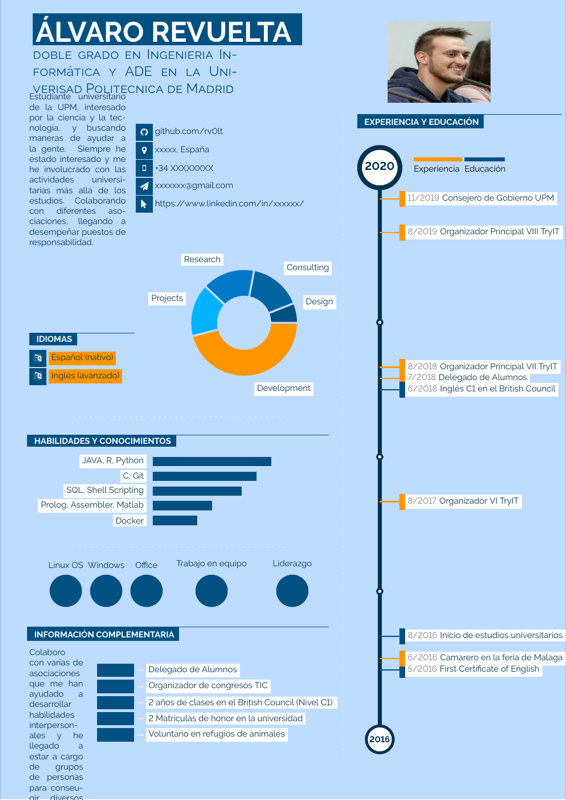
\textcolor{textcol}{ Estudiante universitario de la UPM, interesado por la ciencia y la tecnología, y buscando maneras de ayudar a la gente. Siempre he estado interesado y me he involucrado con las actividades universitarias más allá de los estudios. Colaborando con diferentes asociaciones, llegando a desempeñar puestos de responsabilidad.
}
}
\hspace{6pt}
\parbox{0.7\textwidth}{
\icontext{Github}{12}{github.com/rv0lt}\\
\icontext{MapMarker}{12}{xxxxx, España}\\
\icontext{MobilePhone}{12}{+34 XXXXXXXX}\\
\icontext{Send}{12}{xxxxxxx@gmail.com}\\
\icontext{MousePointer}{12}{https://www.linkedin.com/in/xxxxxx/}\\
}
%Activar cuando me gradue
%\parbox[c][3cm][c]{0.32\textwidth}{
% \begin{center}
% \factbubble{\huge{\textcolor{sectcol}{\textbf{M.Sc.}}}\\\small{\textcolor{sectcol}{\textbf{Digital Media}}}}{1}{maincol}{sectcol}{thirdcol}\\
% \textcolor{textcol}{as latest degree from}\\
% \textcolor{textcol}{\textbf{University of Bremen}}
% \end{center}
%}
}
\vspace{34pt}
%----------------------------------------------------------------------------------------
% SKILLS AND TECHNOLOGIES
%----------------------------------------------------------------------------------------
\mbox{
% TEXT BOX
\parbox[b][80pt][c]{0.35\textwidth}{
% LANGUAGES
\cvsect{Idiomas}{0.49}{thirdcol}{textcol}\\[4pt]
\icontext{Language}{12}{\colorbox{maincol}{Español (nativo)}}\\
\icontext{Language}{12}{\colorbox{maincol}{Inglés (avanzado)}}\\
}
% PIE CHART
\begin{piechart}{360}{2}{bgcol}{textcol}{sectcol}
\slice{6}{Design}{thirdcol}
\slice{16}{Consulting}{fourthcol}
\slice{16}{Research}{fifthcol}
\slice{16}{Projects}{secondcol}
\slice{46}{Development}{maincol}
\end{piechart}\\
}
\begin{center}
\begin{tikzpicture}
\draw[draw=sectcol,dashed, opacity=0.5] (4,0) -- (-4,0);
\end{tikzpicture}
\end{center}
\cvsect{Habilidades y conocimientos}{0.49}{thirdcol}{textcol}\\[4pt]
% BAR CHART
\mbox{\hspace{-3pt}
\begin{barchart}{10}{5.5}{sectcol}{textcol}{sectcol}{maincol}{secondcol}{thirdcol}
\baritem{50}{JAVA, R, Python}{0}{0}{80}
\baritem{80}{C, Git}{0}{0}{70}
\baritem{80}{SQL, Shell Scripting}{0}{0}{60}
\baritem{50}{Prolog, Assembler, Matlab}{0}{0}{40}
\baritem{50}{Docker}{0}{0}{30}
\end{barchart}
\hspace{10pt}
% TEXTBOX
}
\begin{center}
\begin{tikzpicture}
\draw[draw=sectcol,dashed, opacity=0.5] (4,0) -- (-4,0);
\end{tikzpicture}
\end{center}
\begin{center}
\mbox{
\bubbles{5/Linux OS, 5/Windows, 5/Office}\\
\bubbles{5/Trabajo en equipo, 0/ , 5/Liderazgo}{\cvsection{Technologies}}
}
\end{center}
%---------------------------------------------------------------------------------------
% ACTIVITIES
%----------------------------------------------------------------------------------------
\cvsect{Información complementaria}{0.49}{thirdcol}{textcol}\\[20pt]
\mbox{
% TEXT BOX
\parbox[b][1cm][c]{2cm}{
\textcolor{textcol}{Colaboro con varias de asociaciones que me han ayudado a desarrollar habilidades interpersonales y he llegado a estar a cargo de grupos de personas para conseugir diversos objetivos}
}
% SQUARE BARS
\squares{20/Voluntario en refugios de animales, 20/2 Matrículas de honor en la universidad,20/2 años de clases en el British Council (Nivel C1) , 20/Organizador de congresos TIC, 20/Delegado de Alumnos}{1}
}
\end{minipage}
\begin{minipage}{0.05\textwidth}
\begin{center}
\begin{tikzpicture}
\draw[draw=sectcol,dashed, opacity=0.5] (0,-12) -- (0,12);
\end{tikzpicture}
\end{center}
\end{minipage}
\begin{minipage}{0.4\textwidth}
%---------------------------------------------------------------------------------------
% EXPERIENCE / EDUCATION
%----------------------------------------------------------------------------------------
\cvsect{Experiencia y educación}{0.4}{thirdcol}{textcol}\\[16pt]
\hspace{60pt}\mbox{\legend{Experiencia}{1.8cm}{maincol} \legend{Educación}{1.5cm}{thirdcol}}
\vspace{-40pt}
\begin{center}
% TIMELINE
\begin{cvtimeline}{2016}{2020}{20}{\linewidth}
\cvevent{8/2016}{12/2020}{Inicio de estudios universitarios}{UPM}
{text a}{thirdcol}{1}
\cvevent{5/2016}{12/2020}{First Certificate of English}{UPM}
{text a}{thirdcol}{1}
\cvevent{6/2016}{12/2016}{Camarero en la feria de Malaga}{Malaga}
{text a}{maincol}{1}
\cvevent{7/2018}{7/2020}{Delegado de Alumnos}{DA-ETSIINF}
{Jefe de equipo}{maincol}{1}
\cvevent{6/2018}{12/2020}{Inglés C1 en el British Council}{UPM}
{text a}{thirdcol}{1}
\cvevent{8/2017}{5/2017}{Organizador VI TryIT} {UPM}
{a }{maincol}{1}
\cvevent{8/2018}{5/2018}{Organizador Principal VII TryIT} {UPM}
{a }{maincol}{1}
\cvevent{8/2019}{5/2019}{Organizador Principal VIII TryIT} {UPM}
{a }{maincol}{1}
\cvevent{11/2019}{5/2019}{Consejero de Gobierno UPM} {UPM}
{a }{maincol}{1}
\end{cvtimeline}
\end{center}
\end{minipage}
%============================================================================%
%
%
%
% DOCUMENT END
%
%
%
%============================================================================%
\end{document}
Preview

PDF Preview
Create an account to compile and preview