main.texRead-only preview
% !TeX program = xelatex
% 快速编译:仓库根目录存在空文件 thesis.fast.build 时,插图以占位框代替嵌入原图(定稿前请删除该文件并用 compile-final / 见 README)。
\IfFileExists{thesis.fast.build}{%
  \PassOptionsToPackage{draft}{graphicx}%
}{}%
% openright:各章从奇数页起排(必要时自动插入空白偶数页);第一章前见下方 \cleardoublepage 例外,避免正文首页被挤到第 3 页
\documentclass[UTF8,twoside,openright,fontset=none,zihao=-4]{ctexbook}

% ===== 页面与字体 =====
\usepackage[a4paper,margin=25mm]{geometry}
% 收紧页眉线与版心首行间距(默认 headsep 偏大时,章标题上方易显空)
\geometry{headsep=12pt}
\usepackage{fontspec}
% 允许非离散字号;避免 newtxmath / tabular 等与 wasysym 组合时出现
% “U/wasy/m/n in size <7.52812> not available”(声明页等)的替换告警
\usepackage{anyfontsize}
\usepackage{bm}

% 西文字体:按学校要求统一为 Times New Roman
\IfFontExistsTF{Times New Roman}{
  \setmainfont{Times New Roman}[
    BoldFont       = {Times New Roman Bold},
    ItalicFont     = {Times New Roman Italic},
    BoldItalicFont = {Times New Roman Bold Italic}
  ]
}{
  \setmainfont{TeX Gyre Termes}
}

% 中文字体:优先使用 Windows Word 常见字体,以尽量与 Word 导出的 PDF 对齐
% 若本机未安装 SimSun / SimHei / KaiTi / FangSong,则退回 macOS 字体继续编译
\IfFontExistsTF{SimSun}{
  \setCJKmainfont{SimSun}[
    BoldFont       = {SimHei},
    % ItalicFont     = {KaiTi},
    % BoldItalicFont = {KaiTi}
  ]
  \setCJKsansfont{SimHei}
  % \setCJKmonofont{FangSong}
  \setCJKfamilyfont{zhsong}{SimSun}[
    BoldFont = {SimHei},
  ]
  \setCJKfamilyfont{zhhei}{SimHei}
  \IfFontExistsTF{KaiTi}{%
    \setCJKfamilyfont{zhkai}{KaiTi}%
  }{%
    \setCJKfamilyfont{zhkai}{SimSun}%
  }
  % \setCJKfamilyfont{zhfs}{FangSong}
}{%
  \typeout{%
**********************************************************************^^J%
** THESIS FONT WARNING: SimSun not found on this system.            **^^J%
** Chinese body uses Songti SC / Heiti SC (macOS fallback).        **^^J%
** Install SimSun and SimHei to match Windows Word / school PDF.    **^^J%
**********************************************************************^^J%
  }%
  \PackageWarning{thesis}{%
    SimSun not found; using Songti SC / Heiti SC. Install SimSun/SimHei for Word-aligned output%
  }%
  \IfFontExistsTF{Kaiti SC}{%
    \setCJKmainfont{Songti SC Light}[
      BoldFont       = {Songti SC Bold},
      ItalicFont     = {Kaiti SC},
      BoldItalicFont = {Kaiti SC Bold}
    ]%
  }{%
    \setCJKmainfont{Songti SC Light}[
      BoldFont = {Songti SC Bold}
    ]%
  }
  \setCJKsansfont{Heiti SC}[
    BoldFont = {Heiti SC Medium}
  ]
  \IfFontExistsTF{STFangsong}{%
    \setCJKmonofont{STFangsong}%
  }{%
    \setCJKmonofont{Songti SC Light}%
  }
  \setCJKfamilyfont{zhsong}{Songti SC Light}[
    BoldFont = {Songti SC Bold}
  ]
  \setCJKfamilyfont{zhhei}{Heiti SC}[
    BoldFont = {Heiti SC Medium}
  ]
  \IfFontExistsTF{Kaiti SC}{%
    \setCJKfamilyfont{zhkai}{Kaiti SC}[
      BoldFont = {Kaiti SC Bold}
    ]%
  }{%
    \setCJKfamilyfont{zhkai}{Songti SC Light}[
      BoldFont = {Songti SC Bold}
    ]%
  }
  \IfFontExistsTF{STFangsong}{%
    \setCJKfamilyfont{zhfs}{STFangsong}%
  }{%
    \setCJKfamilyfont{zhfs}{Songti SC Light}[
      BoldFont = {Songti SC Bold}
    ]%
  }
}

% fontset=none 时手动定义宋体/黑体/楷体/仿宋切换命令
\newcommand{\songti}{\CJKfamily{zhsong}}
\newcommand{\heiti}{\CJKfamily{zhhei}}
\newcommand{\kaishu}{\CJKfamily{zhkai}}
% \newcommand{\fangsong}{\CJKfamily{zhfs}}

% 条、款、项标题辅助命令:标题用小四号黑体;正文继续保持小四号宋体
\newcommand{\itemhead}[1]{%
  \par\noindent{\heiti\zihao{-4}\selectfont #1}\par
}
\newcommand{\itemlead}[1]{%
  \noindent{\heiti\zihao{-4}\selectfont #1}%
}

\usepackage{indentfirst}
\setlength{\parindent}{2em}

% 正文:小四宋体,1.5 倍行距
\usepackage{setspace}
\setstretch{1.5}

% ===== 常用宏包 =====
\usepackage{enumitem}
\usepackage{ragged2e}% 科研成果页等:\RaggedRight 在 minipage 内固定词间空格,避免伪两端对齐行末大块空白
\usepackage{amsmath,amssymb}
\usepackage{wasysym}% 表单符号:\Square(空框)、\CheckedBox(打勾),见封面「学生类型」
\usepackage{newtxmath} % 数学环境采用 Times 风格字体,尽量与 Word 中英文字母/数字一致
\usepackage{graphicx}
% 封面「学生类型」、声明页「保密 / 不保密」共用(wasysym;依赖 graphicx 的 \resizebox)
\makeatletter
\newcommand{\gzuCoverBox}{%
  \leavevmode\hbox to 0pt{\wasyfamily\char50\hss}%
  \hbox{\phantom{\wasyfamily\char8}}%
}
\newcommand{\gzuCoverBoxChecked}{\CheckedBox}
% wasysym 仅有离散设计尺寸;若在 \f@size 为 7.xx 等非标准字号下排版再 \resizebox,会触发
% 「Font shape U/wasy/m/n in size <7.52812> not available」。先以标准字号(10pt)取字再缩放。
\newcommand{\gzuCoverChk}[1]{%
  \hbox to \ccwd{%
    \hss
    \raisebox{-0.06ex}[0.5\ccwd][0.46\ccwd]{%
      \resizebox{!}{0.88\ccwd}{%
        \fontsize{10}{10}\selectfont #1}%
    }%
    \hss
  }%
}
\makeatother
\usepackage[export]{adjustbox}
\graphicspath{{figures/ch1/}{figures/ch2/}{figures/ch3/}{figures/ch4/}}
\usepackage{longtable}
\usepackage{etoolbox}
\usepackage{array}
\usepackage{tabularx}
\usepackage{multirow}
\usepackage{makecell}
\usepackage[normalem]{ulem}
\usepackage{soul}
\usepackage{newunicodechar}
\newunicodechar{‑}{-} % U+2011 非断行连字符,Word 粘贴常见
\newunicodechar{ρ}{\ensuremath{\rho}}
\newunicodechar{▷}{\ensuremath{\triangleright}}
\newunicodechar{𝒟}{\ensuremath{\mathcal{D}}}
\newunicodechar{₀}{\textsubscript{0}}
\newunicodechar{₁}{\textsubscript{1}}
\newunicodechar{₂}{\textsubscript{2}}
\newunicodechar{₃}{\textsubscript{3}}
\usepackage{url}
\usepackage{booktabs}
\usepackage{tikz}
\usetikzlibrary{arrows.meta,positioning,fit,calc}
% 插图:快速模式(thesis.fast.build)使用 graphicx draft,可不准备真实文件;定稿模式下若文件名在 figures/ch1--ch4/ 任一目录下仍不存在,则排版提示框而非中断编译。
\makeatletter
\def\thesis@resolved{}
\newcommand{\thesis@resolvefigpath}[1]{%
  \def\thesis@resolved{}%
  \IfFileExists{figures/ch1/#1}%
    {\def\thesis@resolved{figures/ch1/#1}}%
    {%
      \IfFileExists{figures/ch2/#1}%
        {\def\thesis@resolved{figures/ch2/#1}}%
        {%
          \IfFileExists{figures/ch3/#1}%
            {\def\thesis@resolved{figures/ch3/#1}}%
            {%
              \IfFileExists{figures/ch4/#1}%
                {\def\thesis@resolved{figures/ch4/#1}}%
                {}%
            }%
        }%
    }%
}%
\newcommand{\ThesisPlaceholderFig}[1]{%
  \begingroup
  \fboxsep=8pt\relax\fboxrule=0.35pt\relax
  \fbox{%
    \parbox{0.94\linewidth}{%
      \centering\small\textbf{插图占位(未定稿时请放入 figures/ch1\textasciitilde ch4)}\\[0.35em]%
      \texttt{\detokenize{#1}}%
    }%
  }%
  \endgroup
}%
\newcommand{\ThesisIncludeOrPlaceholder}[1]{%
  \IfFileExists{thesis.fast.build}{%
    \includegraphics{#1}%
  }{%
    \thesis@resolvefigpath{#1}%
    \ifx\thesis@resolved\@empty
      \ThesisPlaceholderFig{#1}%
    \else
      \includegraphics{\thesis@resolved}%
    \fi
  }}%
\newcommand{\ThesisFig}[1]{%
  \adjustbox{max width=0.92\linewidth,max height=0.48\textheight,keepaspectratio,center}{%
    \ThesisIncludeOrPlaceholder{#1}}}%
\newcommand{\ThesisFigAblation}[1]{%
  \adjustbox{max width=\linewidth,max height=0.76\textheight,keepaspectratio,center}{%
    \ThesisIncludeOrPlaceholder{#1}}}%
\newcommand{\ThesisFigFillWidth}[1]{%
  \adjustbox{width=\linewidth,max height=0.76\textheight,keepaspectratio,center}{%
    \ThesisIncludeOrPlaceholder{#1}}}%
\makeatother
\usepackage{caption}
\usepackage{float}
\usepackage[section]{placeins}% 在 section 级别自动设置浮动体屏障,减少图、表漂到不相关小节的情况(编号仍由 \label/\ref 解析)
\usepackage{algorithm}
\usepackage{algpseudocode}
% 按广州大学格式:图、表、公式等用阿拉伯数字按章编号;算法题注亦采用「算法 章-序号」
\numberwithin{algorithm}{chapter}
\renewcommand{\thealgorithm}{\arabic{chapter}-\arabic{algorithm}}
\floatname{algorithm}{算法}
% algorithmicx 默认行号为 \footnotesize,与正文小四不一致
\algrenewcommand\alglinenumber[1]{\zihao{-4}\selectfont #1:}
\usepackage{fancyhdr}
\usepackage{titlesec}
\usepackage[square,numbers,sort&compress,super]{natbib}  % super:正文引用保持右上角上标格式
\setlength{\bibsep}{4pt plus 1pt minus 1pt}  % 参考文献条目间距(与截图格式一致)
\usepackage[hidelinks,bookmarksnumbered=true]{hyperref}
\setlength{\headheight}{14pt}

% 调整浮动体参数,使图片更容易放在文字页面上
\renewcommand{\topfraction}{0.9}
\renewcommand{\bottomfraction}{0.8}
\renewcommand{\textfraction}{0.1}
\renewcommand{\floatpagefraction}{0.7}

% ===== 标题格式(按学校要求) =====
% 章节编号使用中文数字,显示为"第一章"
% ctex 中文 book 方案默认 chapter/beforeskip≈50pt,与 titlesec 叠加后章标题上方留白过大,此处收紧
\ctexset{chapter={
  name={第,章},
  number=\chinese{chapter},
  beforeskip={0pt plus .2ex},
  afterskip={22pt plus 4pt minus 4pt},
}}
\titleformat{\chapter}[block]
  {\centering\heiti\zihao{-2}\linespread{1}\selectfont}
  {第\chinese{chapter}章}{1em}{}
% titlesec:章前垂直间距(第三参)再压到 0,避免与 ctex 重复留白
\titlespacing*{\chapter}{0pt}{0pt}{0.5\baselineskip}

\titleformat{\section}[block]
  {\heiti\zihao{-3}\linespread{1}\selectfont}
  {\thesection}{0.8em}{}
\titlespacing*{\section}{0pt}{0.5\baselineskip}{0.5\baselineskip}

\titleformat{\subsection}[block]
  {\heiti\zihao{4}\linespread{1}\selectfont}
  {\thesubsection}{0.8em}{}
\titlespacing*{\subsection}{0pt}{0.5\baselineskip}{0.5\baselineskip}

\titleformat{\subsubsection}[block]
  {\heiti\zihao{-4}\linespread{1}\selectfont}
  {\thesubsubsection}{0.8em}{}
\titlespacing*{\subsubsection}{0pt}{0.5\baselineskip}{0.5\baselineskip}

% 条、款、项标题:小四号黑体,居左
\titleformat{\paragraph}[block]
  {\heiti\zihao{-4}\linespread{1}\selectfont}
  {\theparagraph}{0.8em}{}
\titlespacing*{\paragraph}{0pt}{0.5\baselineskip}{0.5\baselineskip}

\titleformat{\subparagraph}[block]
  {\heiti\zihao{-4}\linespread{1}\selectfont}
  {\thesubparagraph}{0.8em}{}
\titlespacing*{\subparagraph}{0pt}{0.5\baselineskip}{0.5\baselineskip}

% ===== 页眉页脚与页码 =====
\fancypagestyle{gzufront}{
  \fancyhf{}
  \fancyfoot[C]{\zihao{5}\thepage}
  \renewcommand{\headrulewidth}{0pt}
}

\renewcommand{\chaptermark}[1]{\markboth{第\chinese{chapter}章\ #1}{}}
\fancypagestyle{gzubody}{
  \fancyhf{}
  \fancyhead[CO]{\zihao{5}\leftmark}
  % \fancyhead[CE]{\zihao{5}广州大学硕士学位论文}
  \fancyhead[CE]{\zihao{5}广州大学硕士学位论文}
  \fancyfoot[C]{\zihao{5}\thepage}
  \renewcommand{\headrulewidth}{0.4pt}
}

% ===== 图表公式编号 =====
\renewcommand{\thefigure}{\arabic{chapter}-\arabic{figure}}
\renewcommand{\thetable}{\arabic{chapter}-\arabic{table}}
\numberwithin{equation}{chapter}
\renewcommand{\theequation}{\arabic{chapter}-\arabic{equation}}
% 表题注字号在 \begin{document} 后与图一致设置(避免在导言区用 \zihao 触发 Bad space factor)

% ===== 目录显示到"节" =====
\setcounter{tocdepth}{1}
\setcounter{secnumdepth}{3}

% ===== 目录格式 =====
\usepackage{titletoc}
\contentsmargin{2em}
% 章条目:顶格,四号黑体;节条目:四号宋体。节缩进约两字宽(\ccwd),避免过宽(对齐示例目录图)
\titlecontents{chapter}
  [0em]{\addvspace{3pt}\zihao{4}\heiti}
  {\thecontentslabel\quad}{}
  {\titlerule*[0.5pc]{.}\contentspage}
\titlecontents{section}
  [2\ccwd]{\addvspace{3pt}\zihao{4}\songti}
  {\thecontentslabel\quad}{}
  {\titlerule*[0.5pc]{.}\contentspage}

% ===== 论文信息(请按需修改) =====
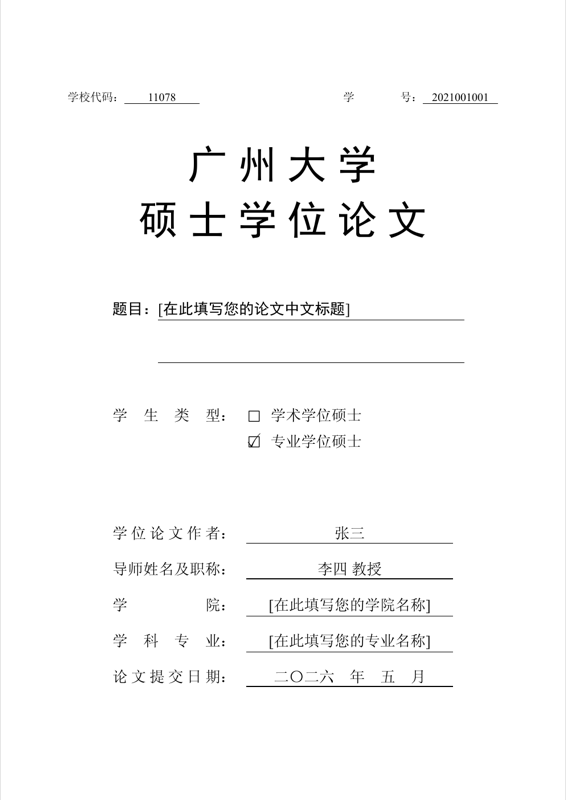
\newcommand{\gzuSchoolCode}{11078}
\newcommand{\gzuStudentID}{2021001001}
\newcommand{\gzuThesisTitleCN}{[在此填写您的论文中文标题]}
\newcommand{\gzuThesisTitleEN}{Thesis Title in English}
\newcommand{\gzuAuthor}{张三}
\newcommand{\gzuMajor}{[在此填写您的专业名称]}
\newcommand{\gzuDirection}{[在此填写您的研究方向]}
\newcommand{\gzuDefenseDate}{2026年5月20日}
\newcommand{\gzuCollege}{[在此填写您的学院名称]}
\newcommand{\gzuSupervisorTitle}{教授}
\newcommand{\gzuSupervisor}{李四}

% 封面「论文提交日期」下划线上显示的全部文字;留空则仅空白横线
\newcommand{\gzuSubmitDateText}{二〇二六\quad 年\quad 五\quad 月}
\newif\ifgzuAcademicDegree
\gzuAcademicDegreetrue
\newcommand{\gzuChair}{}
\newcommand{\gzuMemberA}{}
\newcommand{\gzuMemberB}{}
\newcommand{\gzuMemberC}{}
\newcommand{\gzuMemberD}{}

\newcommand{\gzuFill}[2]{\underline{\makebox[#1][l]{#2}}}
% 扉页中部:下划线内属性值水平居中
\newcommand{\gzuCoverUnderC}[2]{\underline{\makebox[#1][c]{#2}}}
% 扉页中部标签:以最长标签(不含冒号)定宽,短标签用 \hfil 分散对齐
\newlength{\gzuCoverLblW}
\newlength{\gzuCoverColW}

\begin{document}
% 数字型参考文献:编号与「首次出现」顺序一致。将 2025 年文献置于参考文献表前部(与 content/references.bib 中年份为 2025 的条目对应)。
\nocite{%
cn_backdoor_survey_jos_2025,cn_backdoor_survey_cjc_2024,cn_defense_survey_jisa_2024,cn_backdoor_attack_survey_jisa_2022,ref29,
ref20,add02,add06,cn_backdetc_jisa_2022,cn_single_param_backdoor_jisa_2026,cn_subgraph_backdoor_jisa_2025,cn_physical_patch_survey_jisa_2025,cn_fl_backdoor_survey_cjc_2025,cn_mde_survey_jig_2022,%
add07,ref19,add01,%
exa01,exa02,exa03,exa04,exa05,exa06%
}

\input{content/00-cover}
\input{content/01-declaration}
\input{content/02-titlepage}

% 扉页与中文摘要之间插入一页空白(不显示页码;仍处 gobble,直至下方 \pagenumbering{Roman})
\clearpage
\thispagestyle{empty}
\null
\clearpage

% ===== 摘要、目录(罗马数字页码) =====
\pagestyle{gzufront}
\pagenumbering{Roman}
\setcounter{page}{1}
% 前置部分不用 \flushbottom,避免页内纵向胶拉伸在摘要等页顶/段间形成大块留白
\raggedbottom
\input{content/03-abstract-cn}
\input{content/04-abstract-en}
% twoside+openright 下 \tableofcontents 经 \chapter* 会在章首执行 \cleardoublepage;
% 英文摘要末页若为偶数页时会在摘要与目录之间多出一空白偶数页,此处仅对目录改为 \clearpage
% 目录页不显示页码:\chapter* 默认 \thispagestyle{plain},故将 plain 等同 empty;目录延续页用 \pagestyle{empty}
\begingroup
\let\cleardoublepage\clearpage
\pagestyle{empty}
\makeatletter
\let\ps@plain\ps@empty
\makeatother
\input{content/05-table-of-contents}
\endgroup

% ===== 主体部分(阿拉伯数字页码) =====
\pagestyle{gzubody}
\makeatletter
\let\ps@plain\ps@gzubody
\makeatother
\pagenumbering{arabic}
\setcounter{page}{1}
% twoside 下默认 \flushbottom 会在页末拉伸段落间距以对齐页脚,易在图、表与正文之间产生大块空白
\raggedbottom
\setlength{\textfloatsep}{10pt plus 2pt minus 2pt}
\setlength{\floatsep}{8pt plus 2pt minus 2pt}
\setlength{\intextsep}{10pt plus 2pt minus 2pt}

% 图题注:置于图下方、居中;编号与标题之间用空格(不用冒号),与表格题注一致
\captionsetup[figure]{position=bottom,justification=centering,singlelinecheck=false,font=normalsize,labelfont=normalsize,textfont=normalsize,labelsep=space}
% 表题注:置于表上方、居中;编号与标题之间用空格(不用「表 x-x:」冒号,与学校 Word 版式一致)
\captionsetup[table]{position=top,justification=centering,singlelinecheck=false,font=normalsize,labelfont=normalsize,textfont=normalsize,format=plain,labelsep=space}
\captionsetup[longtable]{position=top,justification=centering,singlelinecheck=false,font=normalsize,labelfont=normalsize,textfont=normalsize,format=plain,labelsep=space}
\captionsetup[algorithm]{position=top,justification=centering,singlelinecheck=false,font=normalsize,labelfont=normalsize,textfont=normalsize,labelsep=space}
\AtBeginEnvironment{longtable}{%
  \setlength{\LTcapwidth}{\linewidth}%
  \normalsize
}
% 算法环境内伪代码与题注统一为正文小四(与文档类 zihao=-4 一致)
\AtBeginEnvironment{algorithm}{\zihao{-4}\selectfont}

% 图、表按章编号:章内从 1 递增,显示为「阿拉伯章号-序号」(如 3-1、3-2;章标题仍为中文「第三章」)
\renewcommand{\thefigure}{\arabic{chapter}-\arabic{figure}}
\renewcommand{\thetable}{\arabic{chapter}-\arabic{table}}

% 使用 \input 而非 \include:引用与目录信息写入根目录 main.aux,
% BibTeX 可直接看到 \citation,避免子章节 .aux 与根 .aux 不同步时 latexmk 误跑 BibTeX 报错。
% 第一章:若直接 openright,\chapter 前的 \@cleardoublepage 会在页码已为 1(奇数)时再插空白页,导致绪论从第 3 页开始;此处仅对第一章临时等同 \clearpage。
\makeatletter
\let\cleardoublepage@thesis\cleardoublepage
\let\cleardoublepage\clearpage
\makeatother
\input{content/06-ch1-intro}
\makeatletter
\let\cleardoublepage\cleardoublepage@thesis
\makeatother
\input{content/07-ch2-theory}
\input{content/08-ch3-body}
\input{content/09-ch4-body}
\input{content/10-ch5-conclusion}

\input{content/11-references}

% 科研成果、致谢:twoside 下从奇数页起排(必要时自动插入空白偶数页)
\cleardoublepage
\input{content/12-achievements}

\cleardoublepage
\input{content/13-acknowledgments}

\end{document}
Preview

PDF Preview
Create an account to compile and preview