main.texRead-only preview
% Written by Bibby AI
%!TEX root = main.tex

% Inject configuration (config.tex)
\include{config}

% Inject glossary (glossary.tex)
\include{glossary}

\begin{document}

% Inject title page (titlepage.tex)
\include{titlepage}

% Blank page
\afterpage{\blankpage}

% Figures table
\listoffigures

% Table of contents
\tableofcontents


\chapter{Example chapter}
Example chapter

\section{Paragraph}
Example paragraph in subsection. Lorem ipsum dolor sit amet, consectetur adipisicing elit, sed do eiusmod tempor incididunt ut labore et dolore magna aliqua. Ut enim ad minim veniam.

\section{Non indented paragraph}
\noindent
Example non indented paragraph in subsection. Lorem ipsum dolor sit amet, consectetur adipisicing elit, sed do eiusmod tempor incididunt ut labore et dolore magna aliqua. Ut enim ad minim veniam.

\section{Cited text (french only)}
\noindent
% \og{}Example cited text\fg{}

\section{Glossary word}
\noindent
Example of using a word from the glossary: \gls{js}.

\section{Referenced figure}
\noindent
Reference example: \ref{fig:example-reference}.\\
Full reference maccro: \fullref{fig:example-reference}.

\begin{figure}[H]
  \centering
  \includegraphics[width=0.5\textwidth]{image-placeholder}
  \caption{Example caption}
  \label{fig:example-reference}
\end{figure}

\section{Itemized list}
\noindent
Example itemized list:

\begin{itemize}
  \item First item
  \item Second item
  \item Third item
\end{itemize}

\section{Enumerated list}
\noindent
Example enumerated list:

\begin{enumerate}
  \item One
  \item Two
  \item Three
\end{enumerate}

\section{Symbols}
\noindent
Some symbols and cursive example:

\begin{itemize}
  \item Gamma: \textgamma
  \item Epsilon: \textepsilon
  \item Sigma: \textsigma
  \item Inline formula: $\frac{C}{m^{-3}}$
  \item Cursive text: $L$, $hello$
\end{itemize}

\section{Formula}
\noindent
Example formula:
\[V(M) = \frac{\sigma R^2}{\varepsilon} \times (\frac{1}{O_{1}M} - \frac{1}{O_{2}M})\]

\section{Footnote}
\noindent
\emph{Example footnote}\footnote{Footnote content}

\section{Code block}
\noindent
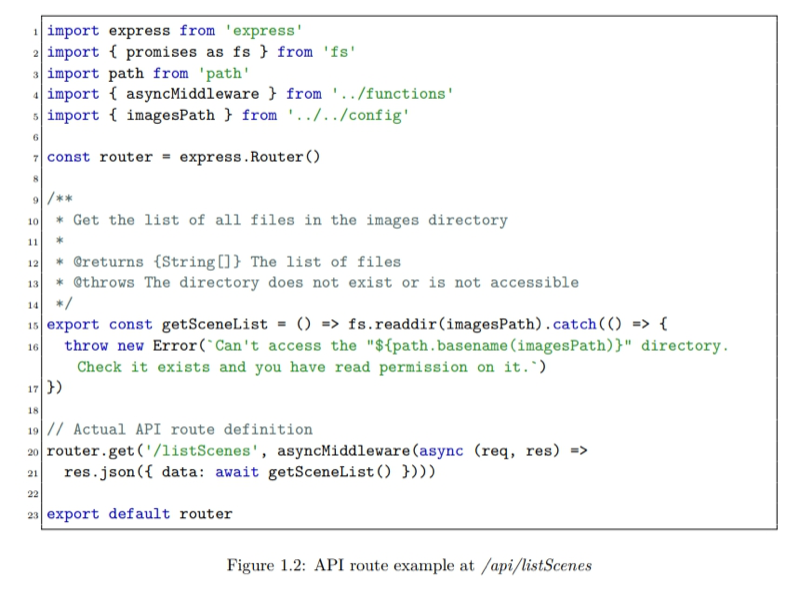
Block of code with JavaScript ES6 support: \fullref{fig:es6-route-api}.

\begin{figure}[hbt!]
\begin{lstlisting}[style=ES6]
import express from 'express'
import { promises as fs } from 'fs'
import path from 'path'
import { asyncMiddleware } from '../functions'
import { imagesPath } from '../../config'

const router = express.Router()

/**
 * Get the list of all files in the images directory
 *
 * @returns {String[]} The list of files
 * @throws The directory does not exist or is not accessible
 */
export const getSceneList = () => fs.readdir(imagesPath).catch(() => {
  throw new Error(`Can't access the "${path.basename(imagesPath)}" directory. Check it exists and you have read permission on it.`)
})

// Actual API route definition
router.get('/listScenes', asyncMiddleware(async (req, res) =>
  res.json({ data: await getSceneList() })))

export default router
\end{lstlisting}
\caption{API route example at \emph{/api/listScenes}}
\label{fig:es6-route-api}
\end{figure}


\chapter{Chapter}
\section{Section}
\subsection{Sub section}
\subsection{Sub section}
\section{Section}
\subsection{Sub section}
\subsection{Sub section}


% Glossary (Remove it at the top of the main.tex file too if you don't want it)
\printglossaries

% Written by Bibby AI
\end{document}
Preview

PDF Preview
Create an account to compile and preview