resume-template.texRead-only preview
% !TeX encoding = UTF-8
% !TeX spellcheck = en

% Load the class file:
%     Option [color]: titles have a constrasting color.
%     No options: titles have the same color as the text.
%     Colors are defined in the class file “resume-twopanels.cls”, around line 60.
\documentclass[color]{resume-twopanels}

% Set the PDF title and author:
\hypersetup{
    pdftitle={Resume: Author name},
    pdfauthor={Author name},
}

% This is only used to generate example text (you can delete this):
\usepackage{lipsum}


\begin{document}
\begin{resume}
    % THIS IS THE HEADER PANEL
    % Custom command syntax:
    % \printheader{Full Name}{Job Title}{photo_image_file}

    \printheader{Full Name}
    {Job Title}
    {photo\_circle.png}

    \begin{leftpanel}
        % THIS IS THE LEFT PANEL
        % You can change the contents as you wish.
        % It will automatically distribute the content to fill the vertical space.
        % Use \paragraph{} for the (color) titles.

        \paragraph{Contact} \ \vspace{1em} % I don't know why it isn't spaced automatically

            \begin{description}[left=1em]
                % Custom command syntax (it replaces \item):
                %\contactitem{image_file}{text to display}

                \contactitem{location\_white.png}
                {Location, Country}

                \contactitem{phone\_white.png}
                {(+00) 123 456 789}

                \contactitem{email\_white.png}
                {\url{e-mail@site.com}}

                \contactitem{github\_white.png}
                \url{github.com/profile}

                \contactitem{linkedin\_white.png}
                \url{linkedin.com/in/profile}
            \end{description}


        \paragraph{Soft Skills}

            \begin{itemize}
                \item Skill (group 1)
                \item Skill (group 1)
                \vspace{1em}

                \item Skill (group 2)
                \item Skill (group 2)
                \item Skill (group 2)
                \item Skill (group 2)
                \vspace{1em}

                \item Skill (group 3)
                \item Skill (group 3)
                \item Skill (group 3)
            \end{itemize}


        \paragraph{Hard Skills}

            \begin{itemize}
                \item Skill (group 1)
                \item Skill (group 1)
                \vspace{1em}

                \item Skill (group 2)
                \item Skill (group 2)
                \item Skill (group 2)
                \item Skill (group 2)
                \vspace{1em}

                \item Skill (group 3)
                \item Skill (group 3)
                \item Skill (group 3)
            \end{itemize}


        \paragraph{Languages}

            \begin{itemize}
                \item Language (level)
                \item Language (level)
            \end{itemize}

    \end{leftpanel}
    & % DON'T DELETE THIS! This is actually a tabular environment.
    \begin{rightpanel}
        % THIS IS THE RIGHT PANEL
        % You can change the contents as you wish.
        % It will automatically distribute the content to fill the vertical space.
        % Use \paragraph{} for the (color) titles.

        \paragraph{Summary} \ \vspace{1em}  % Force a space to match the lists style

            This example is only a suggestion.
            You can change all the sections as you want.
            The colored titles are set with the \verb*|\paragraph{}| command.
            \lipsum[75]
            \newline


        \paragraph{Achievements} \ \vspace{1em}  % I don't know why it isn't spaced automatically

            \begin{itemize}
                \item Here you can describe one achievement in relation to your previous jobs or personal-growth.
                \item Here you can describe another achievement.
            \end{itemize}


        \paragraph{Work History}

            \begin{itemize}
                % Custom command syntax (it replaces \item):
                % \resumeitem{job title}{dates}{company name}{job description (can be left blank)}

                \resumeitem
                {Job title}
                {start date – end date}
                {Company name}
                {Description of the work performed,
                maybe include some highliths of your results.}

                \resumeitem
                {Latex developer :)}
                {02/2023 – 02/2023}
                {Writing My Resume Industries, Inc.}
                {Write a template for a cool resume
                that will win you all the jobs.}

                \resumeitem
                {Job with no description}
                {start date – end date}
                {Company name}
                {}% You can leave the description blank.

                \resumeitem
                {Job with a long description}
                {start date – end date}
                {Company name}
                {\lipsum[66]}

                \resumeitem
                {Another job with a long description}
                {start date – end date}
                {Company name}
                {\lipsum[66]}
            \end{itemize}


        \paragraph{Education}

            \begin{itemize}
                % Custom command syntax (it replaces \item):
                % \resumeitem{title}{dates}{entity}{description (can be left blank)}

                \resumeitem
                {Studies title}
                {start date – end date}
                {University or entity}
                {}

                \resumeitem
                {Another title}
                {start date – end date}
                {University or entity}
                {}
                \vspace{1em}

                \resumeitem
                {Some course}
                {date}
                {University or entity}
                {}

                \resumeitem
                {Some other course}
                {date}
                {University or entity}
                {}

                \resumeitem
                {Yet another course}
                {date}
                {University or entity}
                {}
            \end{itemize}

    \end{rightpanel}
\end{resume}
\end{document}
Preview
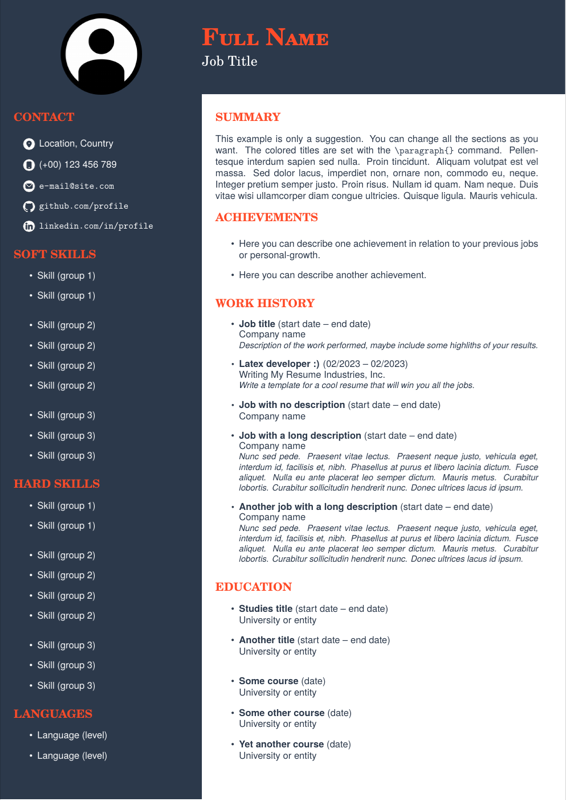

PDF Preview
Create an account to compile and preview