example.texRead-only preview
%! TEX program = xelatex
\documentclass[a4paper,12pt]{report}

\usepackage{packages/packs}
\usepackage{packages/mainstyle}
\usepackage{packages/colors}
\usepackage{packages/macros}
\usepackage{packages/title}
\usepackage{packages/simpletitles}

\usepackage{packages/frameboxes}
\usepackage{packages/noteboxes}
\usepackage{packages/roundboxes}

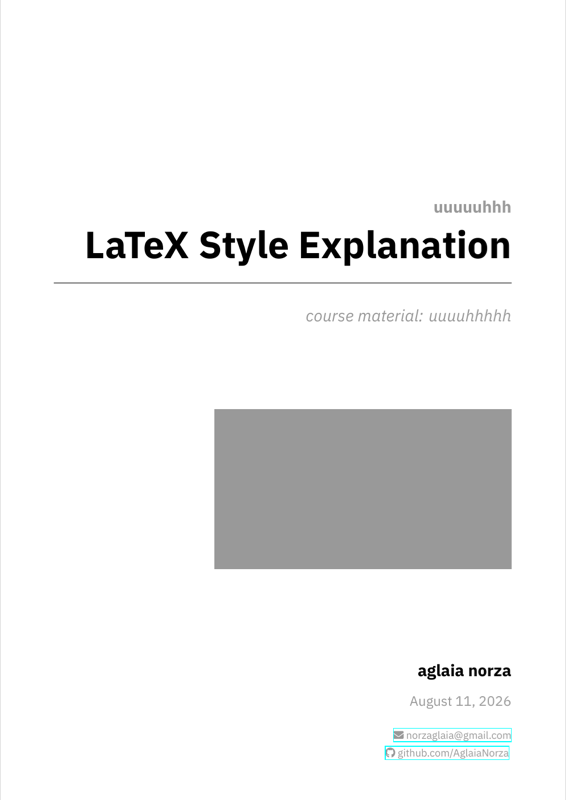
\setcoursename{LaTeX Style Explanation}
\setcoursebook{uuuuhhhhh}
\setauthorname{aglaia norza}
\setauthoremail{norzaglaia@gmail.com}
\setauthorgithub{AglaiaNorza}
\setuniversity{uuuuuhhh}

\begin{document}

\makecustomcover

\tableofcontents

\chapter{General}

The \texttt{mainstyle.sty} package configures the overall visual appearance (fonts, margins, sectioning etc.)

I'm currently trying the IBM Plex Sans font (for a modern vibe - to have a different vibe, IBM Plex Serif is also nice) for text and STIX Two Math for mathematics.

\section{Colors (\texttt{colors.sty})}
Colors are named by their purpose. The box packages automatically mix primary colors with white for the lighter backgrounds.

The core colors are:
\begin{itemize}
    \item \texttt{ColorDef}: used for definitions (Purple).
    \item \texttt{ColorLemma}: used for lemmas (Blue).
    \item \texttt{ColorThm}: used for theorems and propositions (Green).
    \item \texttt{ColorProof}: used for proofs (Red).
    \item \texttt{ColorGen}: used for generic boxes and text (Grey).
    \item \texttt{ColorCor}: used for corollaries (Bright Green).
\end{itemize}
Additional colors include \texttt{ColorEx} (examples), \texttt{ColorNote} (remarks), \texttt{ColorWarn} (warnings), and \texttt{ColorQues} (questions/exercises).

\section{Macros (\texttt{macros.sty})}

This package defines commands for specific symbols and mathematical sets. There aren't very many, as i am still defining which ones i need (and most of the heavy lifting is done by my nvim config).

Pretty basic:
\begin{itemize}
    \item \texttt{\textbackslash xor}: XOR symbol ($\oplus$).
    \item \texttt{\textbackslash textcircled}: improved version that provides better vertical alignment for single characters
    \item \texttt{\textbackslash N}, \texttt{\textbackslash R}, \texttt{\textbackslash Q}, \texttt{\textbackslash Z}: Standard sets ($\mathbb{N}$, $\mathbb{R}$, $\mathbb{Q}$, $\mathbb{Z}$).
    \item \texttt{\textbackslash mc\{X\}}: wrapper for \texttt{\textbackslash mathcal\{X\}}, + \texttt{\textbackslash Aa,\textbackslash Bb etc} for \texttt{mathcal{A}} etc
\end{itemize}

\section{Package dependencies (\texttt{packs.sty})}

The \texttt{packs.sty} file includes the core packages i use in my notes (mainly maths and formatting packages).

\section{Title pages}
\texttt{title.sty, simpletitles.sty, title-centered.sty}

Title page is always a work in progress. My new ``main'' one (\texttt{title.sty}) (the cover of this document) is pretty slick, but i also have simpler ones for quick notes, and my old one (centered).

Examples follow.

\makeinpagetitle{title}{subtitle}{more}

\makefullpagetitle{title}{subtitle}{more}{even more}

\chapter{Boxes}

All of the boxes in my template are very similar (the designs are different, but the box types are the same). That is because they are iterations of me deciding which style i like best. Right now, I only use ``frame boxes'', but at different points i used both ``round'' and ``note'' boxes, too (note boxes are kinda ugly ngl).


\section{Frame Boxes}

The boxes defined in \texttt{frameboxes.sty} are:

\begin{itemize}
        \item \texttt{defframe}
        \begin{defframe}{Title}{}
            This is a definition.
        \end{defframe}

    \item \texttt{cdefframe}
        \begin{cdefframe}{ColorDef}{Title}
            This definition allows you to pass a specific semantic color as input. Its counter is shared with \texttt{defframe}.

            The syntax is: \texttt{\textbackslash begin\{cdefframe\}\{ColorName\}\{title\}}
        \end{cdefframe}

    \item \texttt{cframe}
        \begin{cframe}{ColorEx}{Custom Title}
            This is a custom-colored frame. A color is passed as input like with \texttt{cdefframe}, but without any numbering or ``Def.''

            The syntax is: \texttt{\textbackslash begin\{cframe\}\{ColorName\}\{title\}}
        \end{cframe}

    \item \texttt{lemmaframe}

        \begin{lemmaframe}{The Fundamental Lemma}{label:fund-lemma}
            Is blue, includes ``Lemma <counter>''.
        \end{lemmaframe}

    \item \texttt{thmframe}

        \begin{thmframe}{Pythagorean Theorem}{label:pythag}
            Just like \texttt{lemmaframe}, but green and with a different counter.
        \end{thmframe}


    \item \texttt{corframe}
        \begin{corframe}{Pythagoras Something}
            Corollary! Automatically references the last theorem created and uses \texttt{ColorCor}.

            Syntax is simply: \texttt{\textbackslash begin\{corframe\}\{title\}}
        \end{corframe}

    \item \texttt{propframe}

        \begin{propframe}{Commutativity}{label:commute}
            Just like \texttt{thmframe}, but with a different counter.
        \end{propframe}

    \item \texttt{proofframe}

        \begin{pframe}
            Can be used without title... (useful in nested boxes)
        \end{pframe}

        \begin{pframe}[title=Title Example]
            But it takes in one input that can be used to override the \texttt{notitle} option like so:

            \texttt{\textbackslash begin\{pframe\}[title=Title Example]}
        \end{pframe}

    \item \texttt{gframe}
        \begin{gframe}{With title}
            General-purpose gray note. Uses the \texttt{ColorGen} base.
        \end{gframe}

        \begin{gframe}{}
            Title can be left empty (\texttt{\{\}}).
        \end{gframe}

\end{itemize}

The \texttt{framed} \texttt{shaded} environment is also redefined via tcb (in light gray):
\begin{shaded}
    Usage: \texttt{\textbackslash begin\{shaded\}[text]\textbackslash end\{shaded\}}
\end{shaded}

and also in an inline version \shade{\texttt{\textbackslash shade\{[text]\}}}


\section{Round Boxes}
The boxes defined in \texttt{roundboxes.sty} are:

\begin{itemize}
    \item \texttt{defbox}
        \begin{defbox}{Title}{label:optional-label}
            This is a definition box. Title is preceded by ``Def. <counter>''. Uses the \texttt{ColorDef} base.
        \end{defbox}

    \item \texttt{lemmabox}
        \begin{lemmabox}{The Fundamental Lemma}{label:fund-lemma}
            Is blue, includes ``Lemma <counter>''. It uses the \texttt{ColorLemma} base.
        \end{lemmabox}

    \item \texttt{thmbox}
        \begin{thmbox}{Pythagorean Theorem}{label:pythag}
            Just like \texttt{lemmabox}, but green and includes ``Thm. <counter>''. Uses the \texttt{ColorThm} base.
        \end{thmbox}

    \item \texttt{proofbox}
        \begin{proofbox}
            Can be used without options. Has a fixed default title: ``Proof''. Uses the \texttt{ColorProof} base.
        \end{proofbox}

        \begin{proofbox}[title=Alternative Title]
            It takes one optional argument to override options (e.g., the title).

            Syntax: \texttt{\textbackslash begin\{proofbox\}[title=Alternative Title]}
        \end{proofbox}

    \item \texttt{gbox}
        \begin{gbox}{With title}
            General-purpose gray note. It uses the \texttt{ColorGen} base.

            Syntax: \texttt{\textbackslash begin\{gbox\}[optional-args]\{title\}}
        \end{gbox}

        \begin{gbox}{}
            Title can be left empty (\texttt{\{\}}).
        \end{gbox}
\end{itemize}

\section{Note Boxes}
(Hugely inspired by \href{https://xyquadrat.ch/blog/latex-boxes/}{\underline{these}}).

The boxes defined in \texttt{noteboxes.sty} are:

\begin{itemize}
    \item \texttt{defnote}
        \begin{defnote}{Title}{label:optional-label}
            This is a definition. It uses the \texttt{ColorDef} base.
        \end{defnote}

    \item \texttt{lemmanote}
        \begin{lemmanote}{The Fundamental Lemma}{label:fund-lemma}
            Is blue, includes ``Lemma''. It uses the \texttt{ColorLemma} base.
        \end{lemmanote}

    \item \texttt{thmnnote}
        \begin{thmnnote}{Pythagorean Theorem}{label:pythag}
            Just like \texttt{lemmanote}, but green and with a different counter. It uses the \texttt{ColorThm} base.
        \end{thmnnote}

    \item \texttt{propnote}
        \begin{propnote}{Commutativity}{label:commute}
            Just like \texttt{thmnnote}, but with a different counter. It uses the \texttt{ColorThm} base.
        \end{propnote}

    \item \texttt{proofnote}

        \begin{proofnote}
            Can be used without options, or with an option to override style (like title). Otherwise has a fixed title: ``Proof!''. Uses the \texttt{ColorProof} base.
        \end{proofnote}

        \begin{proofnote}[title=Title Example]
            Example of title overriding.

            Syntax: \texttt{\textbackslash begin\{proofnote\}[title=Title Example]}
        \end{proofnote}

    \item \texttt{gnote}
        \begin{gnote}{With title}
            General-purpose gray note. It uses the \texttt{ColorGen} base.

            Syntax: \texttt{\textbackslash begin\{gnote\}[optional-args]\{title\}}
        \end{gnote}

        \begin{gnote}{}
            Title can be left empty (\texttt{\{\}}).
        \end{gnote}

    \item \texttt{pnote}
        \begin{pnote}
            A simple, red-colored box without a title by default. Uses the \texttt{ColorProof} base.
        \end{pnote}

        \begin{pnote}[title=Title Example]
            It takes one optional argument, which can be used to set a title via \texttt{[title=Title Example]}
        \end{pnote}
\end{itemize}


\end{document}
Preview

PDF Preview
Create an account to compile and preview