doc.texRead-only preview
\documentclass[12pt]{article}

\usepackage[english]{babel}
\usepackage{fontspec}

\usepackage{layout} % show a page layout
\usepackage{blindtext}  % dummy text
\usepackage{tikz}
\usepackage{xcolor}
\usepackage{sectsty}
\usepackage{fancyhdr}
\usepackage{parskip}
\usepackage{enumitem}
\usepackage{tcolorbox}
\usepackage{wrapfig}
\usepackage{soul}
\usepackage[labelformat=empty]{caption}
\usepackage[
	% showframe,
	a4paper, top=2.5cm, left=2.5cm, right=2.5cm, bottom=4.25cm%, headheight=60pt
]{geometry}
\usepackage{hyperref}

\setmainfont[Path=assets/KelsonSans/]{KelsonSans}[
	Extension = .ttf ,
	UprightFont = *-Normal ,
	ItalicFont = *-Light ,
	BoldFont = *-Bold ,
]
\setsansfont[Path=assets/	/]{Lato}[
	Extension = .ttf ,
	UprightFont = *-Regular ,
	ItalicFont = *-Italic ,
	BoldFont = *-Bold ,
	BoldItalicFont = *-BoldItalic ,
]
\renewcommand{\familydefault}{\sfdefault}
\chapterfont{\rmfamily\selectfont}
\sectionfont{\rmfamily\selectfont}
\subsectionfont{\rmfamily\selectfont}
\subsubsectionfont{\rmfamily\selectfont}

%https://tex.stackexchange.com/questions/6388/how-to-scale-a-tikzpicture-to-textwidth
\usepackage{environ}
\makeatletter
\newsavebox{\measure@tikzpicture}
\NewEnviron{scaletikzpicturetowidth}[1]{%
  \def\tikz@width{#1}%
  \def\tikzscale{1}\begin{lrbox}{\measure@tikzpicture}%
  \BODY
  \end{lrbox}%
  \pgfmathparse{#1/\wd\measure@tikzpicture}%
  \edef\tikzscale{\pgfmathresult}%
  \BODY
}
\makeatother

\linespread{1.4}

\definecolor{Blue}{HTML}{00AEEF}
\definecolor{Pink}{HTML}{EC008C}
\definecolor{Green}{HTML}{7AC143}
\definecolor{Orange}{HTML}{F47B20}
\definecolor{Violet}{HTML}{2E3192}
\definecolor{Gray}{HTML}{D6D6D6}

\hypersetup{colorlinks=true,allcolors=Violet}

\setlength\headheight{62pt}
\setlist[description]{style=nextline}
\renewcommand{\thesection}{\Roman{section}}
\renewcommand{\thesubsection}{\thesection\Roman{subsection}}

\renewcommand{\headrulewidth}{0pt}
\pagestyle{fancyplain}
\fancyhf{}
\rhead{\includegraphics[height=2cm,clip,trim={8pt 8pt 8pt 8pt}]{assets/esn-logo.pdf}}
\cfoot{
	\centering
	\begin{scaletikzpicturetowidth}{\textwidth}
		\begin{tikzpicture}[scale=\tikzscale]
			\draw[Gray, line cap=round, line width=0.05cm] (-7.5,0) -- (-5.3,0);
			%
			\draw[Orange, line cap=round, line width=0.1cm] (-4.9,0) -- (-3.2,0);
			\draw[Green, line cap=round, line width=0.1cm] (-2.8,0) -- (-1.1,0);
			\draw[Blue, line cap=round, line width=0.1cm] (-0.8,0) -- (0.8,0);
			\draw[Pink, line cap=round, line width=0.1cm] (1.1,0) -- (2.8,0);
			\draw[Violet, line cap=round, line width=0.1cm] (3.2,0) -- (4.9,0);
			%
			\draw[Gray, line cap=round, line width=0.05cm] (5.3,0) -- (7.5,0);
		\end{tikzpicture}
	\end{scaletikzpicturetowidth}\\
	\vspace{10pt}
	\thepage
}

\newif\ifquoteopen
\catcode`\"=\active % lets you define `"` as a macro
\DeclareRobustCommand*{"}{%
   \ifquoteopen
     \quoteopenfalse ''%
   \else
     \quoteopentrue ``%
   \fi
}


\pagestyle{fancy}
\begin{document}
	\begin{center}
		\section*{ESN \LaTeX{} Template}
	\end{center}

	\section*{\setulcolor{Pink}\ul{Heading}}

	\blindmathtrue
	\renewcommand{\blindmarkup}[1]{\emph{#1}}
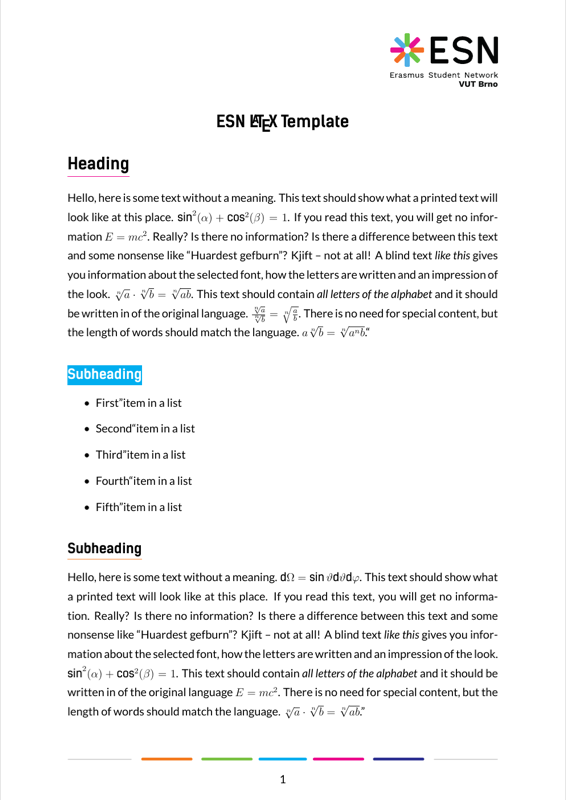
	\blindtext

	\subsection*{\sethlcolor{Blue}\color{white}\hl{Subheading}}

	\blinditemize

	\subsection*{\setulcolor{Orange}\ul{Subheading}}

	\blindtext

	\subsection*{\setulcolor{Blue}\ul{Subheading}}

	\blinddescription

	\section*{\sethlcolor{Green}\color{white}\hl{Heading}}

	\blindtext

\end{document}
Preview

PDF Preview
Create an account to compile and preview