main.texRead-only preview
%LATEX script to create a block of code in article
%AUTHOR: Jishan Shaikh
%COPYRIGHT @jishanshaikh4
%THIS TEMPLATE IS DOWNLOADED FROM Github.com/jishanshaikh4/latex-templates
%WRITTEN and TESTED in TeXStudio (Plasma | Kali Linux)

\documentclass[12pt]{article}

\usepackage{listings}
\usepackage[usenames,dvipsnames]{color}

\definecolor{DarkGreen}{rgb}{0.0, 0.4, 0.0}
\definecolor{highlight}{RGB}{255, 251, 204}

\lstdefinestyle{Style1}{ % Define a style for your code snippet, multiple definitions can be made if, for example, you wish to insert multiple code snippets using different programming languages into one document
	language=C, % Detects keywords, comments, strings, functions, etc for the language specified
	backgroundcolor=\color{highlight}, % Set the background color for the snippet - useful for highlighting
	basicstyle=\footnotesize\ttfamily, % The default font size and style of the code
	breakatwhitespace=false, % If true, only allows line breaks at white space
	breaklines=true, % Automatic line breaking (prevents code from protruding outside the box)
	captionpos=b, % Sets the caption position: b for bottom; t for top
	commentstyle=\usefont{T1}{pcr}{m}{sl}\color{DarkGreen}, % Style of comments within the code - dark green courier font
	deletekeywords={}, % If you want to delete any keywords from the current language separate them by commas
	%escapeinside={\%}, % This allows you to escape to LaTeX using the character in the bracket
	firstnumber=1, % Line numbers begin at line 1
	frame=single, % Frame around the code box, value can be: none, leftline, topline, bottomline, lines, single, shadowbox
	frameround=tttt, % Rounds the corners of the frame for the top left, top right, bottom left and bottom right positions
	keywordstyle=\color{Blue}\bf, % Functions are bold and blue
	morekeywords={}, % Add any functions no included by default here separated by commas
	numbers=left, % Location of line numbers, can take the values of: none, left, right
	numbersep=10pt, % Distance of line numbers from the code box
	numberstyle=\tiny\color{Gray}, % Style used for line numbers
	rulecolor=\color{black}, % Frame border color
	showstringspaces=false, % Don't put marks in string spaces
	showtabs=false, % Display tabs in the code as lines
	stepnumber=5, % The step distance between line numbers, i.e. how often will lines be numbered
	stringstyle=\color{Purple}, % Strings are purple
	tabsize=4, % Number of spaces per tab in the code
}

% Create a command to cleanly insert a snippet with the style above anywhere in the document
\newcommand{\insertcode}[2]{
	\begin{itemize}
		\item[]
		\lstinputlisting[caption=#2,label=#1,style=Style1]{#1}
	\end{itemize}}
	% The first argument is the script location/filename and the second is a caption for the listing

\title{Simple Article with a code snippet}
\author{Jishan Shaikh}
\date{August 18}

\begin{document}

	\maketitle
	\begin{abstract}
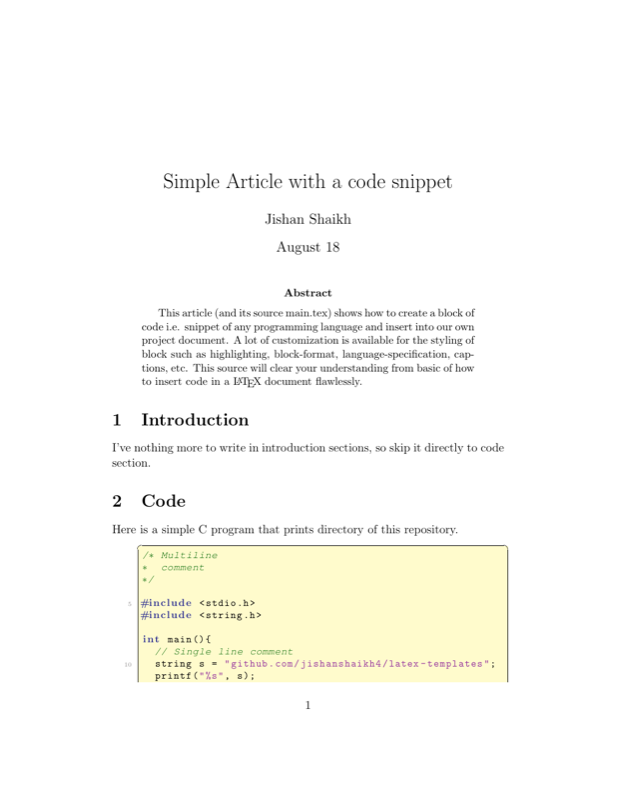
		This article (and its source main.tex) shows how to create a block of code i.e. snippet of any programming language and insert into our own project document. A lot of customization is available for the styling of block such as highlighting, block-format, language-specification, captions, etc. This source will clear your understanding from basic of how to insert code in a \LaTeX \  document flawlessly.
	\end{abstract}
	\section{Introduction}
		I've nothing more to write in introduction sections, so skip it directly to code section.

	\section{Code}
		Here is a simple C program that prints directory of this repository.
		\insertcode{"Scripts/example.c"}{C program template-1.}

		Here is another example of Python3 program that also prints the same. Note that comments are not recognized as comments, thats because of fact that we have written "C" in language column of defining style; see source main.tex for more information.
		\insertcode{"Scripts/example.py"}{Python program template-1}

	\section{Conclusions}
		Inserting code inside a \LaTeX document is been learnt.

	\section{References}
		\LaTeX \ community, stackoverflow.com, and latex-templates.com

\end{document}
Preview

PDF Preview
Create an account to compile and preview