example.texRead-only preview
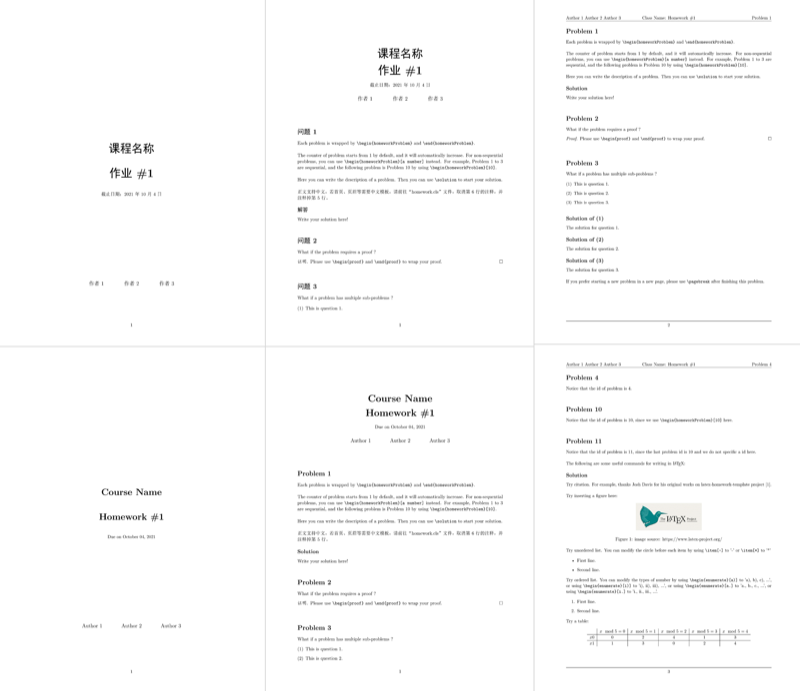
\documentclass[UTF8]{homework}


%
% Homework Details
%   - Title
%   - Due date
%   - Class
%   - Author
%
\newcommand{\hmwkTitle}{Homework\ \#1}
\newcommand{\hmwkDueDate}{October 04, 2021}
\newcommand{\hmwkClass}{Course Name}
\newcommand{\hmwkAuthorName}{Author 1 \and Author 2 \and Author 3}


%
% 中文版 - 基础信息 (仅在homework.cls第6行未被注释时启用)
%   - 标题
%   - 截止日期
%   - 课程
%   - 作者
%
\newcommand{\hmwkTitleCN}{作业\#1}
\newcommand{\hmwkDueDateCN}{2021年10月4日}
\newcommand{\hmwkClassCN}{课程名称}
\newcommand{\hmwkAuthorNameCN}{作者 1 \and 作者 2 \and 作者 3}


\begin{document}
\maketitle
\if\hmwkCoverPage 1
    \pagebreak
\fi


%
% first problem, id is automatically set to 1
%
\begin{homeworkProblem}
    Each problem is wrapped by \verb|\begin{homeworkProblem}| and \verb|\end{homeworkProblem}|.\\

    The counter of problem starts from 1 by default, and it will automatically increase.
    For non-sequential problems, you can use \verb|\begin{homeworkProblem}[a number]| instead.
    For example, Problem 1 to 3 are sequential, and the following problem is Problem 10 by using \verb|\begin{homeworkProblem}[10]|.\\

    Here you can write the description of a problem.
    Then you can use \verb|\solution| to start your solution.\\

    正文支持中文,若首页、页眉等需要中文模板,请前往“homework.cls”文件,取消第6行的注释,并注释掉第5行。

    \solution

    Write your solution here!

\end{homeworkProblem}


%
% second problem, id is automatically set to 2
%
\begin{homeworkProblem}
    What if the problem requires a proof ?

    \begin{proof}
        Please use \verb|\begin{proof}| and \verb|\end{proof}| to wrap your proof.
    \end{proof}

\end{homeworkProblem}


%
% third problem, id is automatically set to 3
%
\begin{homeworkProblem}
    What if a problem has multiple sub-problems ?

    \begin{enumerate}[(1)]
        \item This is question 1.
        \item This is question 2.
        \item This is question 3.
    \end{enumerate}

    \solution[1]
    The solution for question 1.

    \solution[2]
    The solution for question 2.

    \solution[3]
    The solution for question 3.\\

    If you prefer starting a new problem in a new page, please use \verb|\pagebreak| after finishing this problem.

\end{homeworkProblem}


% new page
\pagebreak


%
% fourth problem, id is 4
%
\begin{homeworkProblem}
    Notice that the id of problem is 4.
\end{homeworkProblem}


%
% fifth problem, id is set to 10
%
\begin{homeworkProblem}[10]
    Notice that the id of problem is 10, since we use \verb|\begin{homeworkProblem}[10]| here.
\end{homeworkProblem}


%
% sixth problem, id is automatically set to 11,
% since the last problem id is 10 and we do not specific a id here
%
\begin{homeworkProblem}

    Notice that the id of problem is 11, since the last problem id is 10 and we do not specific a id here. \\

    The following are some useful commands for writing in \LaTeX:

    \solution

    Try citation. For example, thanks Josh Davis for his original works on latex-homework-template project \cite{LatexHomeworkTemplate}. \\

    Try inserting a figure here:

    \begin{figure}[h]
        \centering
        \includegraphics[scale=0.42]{figures/example.png}
        \caption{image source: https://www.latex-project.org/}
    \end{figure}

    Try unordered list. You can modify the circle before each item by using \verb|\item[-]| to '-' or \verb|\item[*]| to '*'

    \begin{itemize}
        \item First line.
        \item Second line.
    \end{itemize}
    % \begin{itemize}
    %    \item[-] First line.
    %    \item[-] Second line.
    % \end{itemize}
    % \begin{itemize}
    %    \item[*] First line.
    %    \item[*] Second line.
    % \end{itemize}

    Try ordered list. You can modify the types of number by using \verb|\begin{enumerate}[a)]| to 'a), b), c), ...',
    or using \verb|\begin{enumerate}[i)]| to 'i), ii), iii), ...',
    or using \verb|\begin{enumerate}[a.]| to 'a., b., c., ...',
    or using \verb|\begin{enumerate}[i.]| to 'i., ii., iii., ...'.

    \begin{enumerate}
        \item First line.
        \item Second line.
    \end{enumerate}
    % \begin{enumerate}[a)]
    %    \item First line.
    %    \item Second line.
    % \end{enumerate}
    % \begin{enumerate}[a.]
    %     \item First line.
    %     \item Second line.
    % \end{enumerate}
    % \begin{enumerate}[i)]
    %     \item First line.
    %     \item Second line.
    % \end{enumerate}
    % \begin{enumerate}[i.]
    %     \item First line.
    %     \item Second line.
    % \end{enumerate}

    Try a table:

    \begin{table}[ht]
        \centering
        \begin{tabular}{c | c | c | c | c | c}
            & \(x \mod 5 = 0\)
            & \(x \mod 5 = 1\)
            & \(x \mod 5 = 2\)
            & \(x \mod 5 = 3\)
            & \(x \mod 5 = 4\)
            \\
            \hline
            \(x0\) & 0 & 2 & 4 & 1 & 3 \\
            \hline
            \(x1\) & 1 & 3 & 0 & 2 & 4 \\
        \end{tabular}
    \end{table}

\end{homeworkProblem}


%
% seventh problem, id is automatically set to 12
%
\begin{homeworkProblem}
    The following are some useful commands for mathematics in \LaTeX.

    \solution

    Try inline formula $x^2+y^2=1$. \\

    Try single line formula with auto id \ref{eq1}:
    \begin{equation}\label{eq1}
        \int_0^1f(t)dt = \iint_Dg(x,y)dxdy.
    \end{equation}

    Try single line formula without auto id:
    \begin{equation*}
        n^2 - \dfrac{c}{n} + 1 \leq n^2
    \end{equation*}

    Try multiple lines formula with auto id \ref{eq2}:
    \begin{equation}\label{eq2}
        \begin{split}
            n^2 + n + 1 &\leq n^2 + n^2 + n^2 \\
            &= 3n^2 \\
            &\leq c \cdot 2n^3
        \end{split}
    \end{equation}

    or
    \begin{align}
        n^2 + n + 1 &\leq n^2 + n^2 + n^2 \\
        &= 3n^2 \\
        &\leq c \cdot 2n^3
    \end{align}

    Try multiple lines formula without auto id:
    \begin{equation*}
        \begin{cases}
            \frac{dS}{dt} = \Lambda - \beta SI - \mu S -\mu_1 mZS + \delta_0R, \\
            \frac{dI}{dt} = \beta SI - (\mu+\delta+\gamma)I.
        \end{cases}
    \end{equation*}

    Try bold text in equations:
    \begin{align*}
        \min_{\bm{x}} \; \bm{x}^T A \bm{x} \\
        s.t. \; \bm{c}^T \bm{x} = 0
    \end{align*}

\end{homeworkProblem}


% new page
\pagebreak


%
% eighth problem, id is automatically set to 13
%
\begin{homeworkProblem}

    The following are some useful commands for algorithms in \LaTeX.

    \solution

    Try an algorithm in pseudo code:

    \begin{algorithm}[]
        \begin{algorithmic}
            \Require $list$
            \Ensure a sorted $list$
            \Function{Quick-Sort}{$list, start, end$}
                \If{$start \geq end$}
                    \State{} \Return{}
                \EndIf{}
                \State{} $mid \gets \Call{Partition}{list, start, end}$
                \State{} \Call{Quick-Sort}{$list, start, mid - 1$}
                \State{} \Call{Quick-Sort}{$list, mid + 1, end$}
            \EndFunction{}
        \end{algorithmic}
        \caption{Start of QuickSort}
    \end{algorithm}

    Try draw a graph:

    \begin{figure}[h]
        \centering
        \begin{tikzpicture}[shorten >=1pt,node distance=2cm,on grid,auto]
            \node[state, accepting, initial] (q_0)   {$q_0$};
            \node[state] (q_1) [right=of q_0] {$q_1$};
            \node[state] (q_2) [right=of q_1] {$q_2$};
            \node[state] (q_3) [right=of q_2] {$q_3$};
            \node[state] (q_4) [right=of q_3] {$q_4$};
            \path[->]
                (q_0)
                    edge [loop above] node {0} (q_0)
                    edge node {1} (q_1)
                (q_1)
                    edge node {0} (q_2)
                    edge [bend right=-30] node {1} (q_3)
                (q_2)
                    edge [bend left] node {1} (q_0)
                    edge [bend right=-30] node {0} (q_4)
                (q_3)
                    edge node {1} (q_2)
                    edge [bend left] node {0} (q_1)
                (q_4)
                    edge node {0} (q_3)
                    edge [loop below] node {1} (q_4);
        \end{tikzpicture}
        \caption{This is really beautiful!}
    \end{figure}

    Try some python codes. When the code language is not python, remember to change the coding language option when using \verb|\begin{lstlisting}|:

\begin{lstlisting}[language=python,title={A example of python codes}]
count = 0
while (count < 9):                          # loop every number
    print('The count is:'+str(count))       # print current number
    count = count + 1                       # update number
print("Good bye!")
\end{lstlisting}

\end{homeworkProblem}


%
% for references, if you do not need any citation, please comment the following 2 lines
%
\bibliographystyle{abbrv}
\bibliography{references.bib}


\end{document}
Preview

PDF Preview
Create an account to compile and preview