lawtex-doc.texRead-only preview
\documentclass[letterpaper]{article}
\usepackage[margin=1in]{geometry}
\usepackage[]{bluebook}
\usepackage{shortvrb,fancyvrb,setspace}
\usepackage{newcent,microtype,hyperref}
\usepackage{xparse}
\let\articleMaketitle=\maketitle
\let\articleSection=\section
\let\articleSubsection=\subsection
\let\articleSubsubsection=\subsubsection
\let\articleThesection=\thesection
\let\articleThesubsection\thesubsection

\makeatletter
\makeandletter
\def\SuppressClass{}
\input lawbrief.cls\relax

\def\LawTeX{%
L\kern-.36em
{\setbox0=\hbox{T}%
\vbox to \ht0{\hbox{\the\scriptfont0 A}\vss}}%
\kern-.15em {\hbox{\the\scriptfont0 W}}\kern-.3em\TeX
}

\MakeShortVerb{_} %that's an underscore
%\catcode9=13	 %that's a tab
%\def	{\hspace*{1.5em}} %ditto
\renewcommand{\arg}[1]{\texttt{\{}\emph{#1}\texttt{\}}}
\newcommand{\opt}[1]{\texttt{[}\emph{#1}\texttt{]}}

%========================================================
\def\Example{%
\catcode`\^^M=\active
\parindent=0pt

Example:
\vspace{-7pt}
\VerbatimEnvironment
\catcode`\^^M=5\begin{VerbatimOut}[codes={\catcode`\^^a3=12\catcode`\^^a7=12\catcode`\^^b5=12\catcode`\^^b6=12}]{\jobname.tmp}}

%========================================================
\def\endExample{%
\end{VerbatimOut}%
\VerbatimInput[gobble=0,commentchar=^^a3,commandchars=^^a7^^b5^^b6,numbersep=3pt]{\jobname.tmp}%
\catcode`\^^a3=9\relax%
\vspace{-6pt}%
Results (Normal Mode):
\vspace{6pt}

\let\@parskip=\parskip
\parskip=0pt
\leftskip=1.5em
\input{\jobname.tmp}
\par

\leftskip=0em

\vspace{6pt}
\noindent Results (Law-Review Mode):%
\nopagebreak

\vspace{5pt}%
\begingroup%
\@bbSetLawReview%
\xdef\@bbLastSource{}%
\def\newmisc##1##2{\setboolean{##1@FirstUse}{true}}%
\def\newstatute##1##2{\setboolean{##1@FirstUse}{true}}%
\def\newbook##1##2##3##4{\setboolean{##1@FirstUse}{true}}%
\def\newincollection##1##2##3##4##5##6{
	\begingroup
		\def\textit####1{####1}
		\def\emph####1{####1}
		\xdef\@HandleName{##1}
	\endgroup
	\setboolean{\@HandleName @FirstUse}{true}
	\setboolean{##4@FirstUse}{true}}%
\def\newinsingleauthorcollection##1##2##3##4##5##6{
	\begingroup
		\def\textit####1{####1}
		\def\emph####1{####1}
		\xdef\@HandleName{##1}
	\endgroup
	\setboolean{\@HandleName @FirstUse}{true}
	\setboolean{##4@FirstUse}{true}}%
\def\newarticle##1##2##3##4##5##6{%
	\begingroup%
		\def\textit####1{####1}%
		\def\emph####1{####1}%
		\xdef\@HandleName{##1}%
	\endgroup%
	\setboolean{\@HandleName @FirstUse}{true}}%
\def\footnote##1{%
	\setboolean{@bbInFootnote}{true}%
	\stepcounter{footnote}\textsuperscript{\thefootnote} ##1%
	\setboolean{@bbInFootnote}{false}%
}%
\input{\jobname.tmp}
\parskip=0pt%
\leftskip=1.5em%


\par
\endgroup}

%\def\Example{%
%\catcode`\^^M=\active
%\@ifnextchar[{\catcode`\^^M=5\Example@}{\catcode`\^^M=5\Begin@Example}}
%
%\def\endExample{%
%\end{VerbatimOut}%
%\Below@Example{\input{\jobname.tmp}}
%\Below@LRExample{\input{\jobname.tmp}}}
%
%%========================================================
%\renewcommand{\Begin@Example}{%
%\parindent=0pt
%\VerbatimEnvironment
%
%\noindent Example: \vspace{-12pt plus 0pt minus 0pt}%
%\begin{VerbatimOut}[codes={\catcode`\^^a3=12\catcode`\^^a7=12\catcode`\^^b5=12\catcode`\^^b6=12}]{\jobname.tmp}}
%
%%========================================================
%\renewcommand{\Below@Example}[1]{%
%\VerbatimInput[gobble=0,commentchar=^^a3,commandchars=^^a7^^b5^^b6,numbersep=3pt]{\jobname.tmp}%
%\catcode`\^^a3=9\relax%
%\noindent Results:
%
%\let\@parskip=\parskip
%\parskip=0pt
%\leftskip=1.5em
%#1%
%
%\let\parskip=\@parskip
%\leftskip=0em
%~
%
%}

%========================================================
\def\StripCmds#1{%
	\begingroup%
		\def\textit##1{##1}%
		\def\textsc##1{##1}%
		\def\emph##1{##1}%
		\xdef\@HandleName{#1}%
	\endgroup%
	\@HandleName%
}

%\newcommand{\Below@LRExample}[1]{%
%\catcode`\^^a3=9\relax%
%\noindent Results (Law-Review Mode): \par ~\par
%
%\parskip=0pt
%\leftskip=1.5em
%\begingroup
%\@bbSetLawReview
%\xdef\@bbLastSource{}
%\def\newmisc##1##2{\setboolean{##1@FirstUse}{true}}%
%\def\newstatute##1##2{\setboolean{##1@FirstUse}{true}}%
%\def\newbook##1##2##3##4{\setboolean{##1@FirstUse}{true}}%
%%
%\def\newincollection##1##2##3##4##5##6{
	%\begingroup
		%\def\textit####1{####1}
		%\def\emph####1{####1}
		%\xdef\@HandleName{##1}
	%\endgroup
	%\setboolean{\@HandleName @FirstUse}{true}
	%\setboolean{##4@FirstUse}{true}}%
%%
%\def\newarticle##1##2##3##4##5##6{
	%\begingroup
		%\def\textit####1{####1}
		%\def\emph####1{####1}
		%\xdef\@HandleName{##1}
	%\endgroup
	%\setboolean{\@HandleName @FirstUse}{true}}%
%%
%\def\footnote##1{%
	%\setboolean{@bbInFootnote}{true}%
	%\stepcounter{footnote}\textsuperscript{\thefootnote} ##1%
	%\setboolean{@bbInFootnote}{false}%
%}%
%#1%
%\par
%\endgroup}

%=========================================================
\DeclareDocumentCommand{\cmd}{m O{} G{} G{} G{} G{} G{} G{} o}{%
\addvspace{16pt}
\noindent\texttt{\large\bf\textbackslash{}#1} --- #9

\penalty10000
\noindent Usage:

\penalty10000
\texttt{\textbackslash{}#1}\ifempty{#2}{}{[\emph{#2}]}\ifempty{#3}{}{\{\emph{#3}\}}\ifempty{#4}{}{\{\emph{#4}\}}\ifempty{#5}{}{\{\emph{#5}\}}\ifempty{#6}{}{\{\emph{#6}\}}\ifempty{#7}{}{\{\emph{#7}\}}\ifempty{#8}{}{\{\emph{#8}\}}}
%==========================================================

\title{Law\TeX{}: Automated \LaTeX{} Legal Citations}
\author{Christopher De Coro}
\date{October 7, 2014}

\citecase{Lochner v. New York, 198 U.S. 45 (1905)}

\let\section=\articleSection
\let\subsection=\articleSubsection
\let\thesection=\articleThesection
\let\thesubsection=\articleThesubsection

\begin{document}
\singlespacing
\frenchspacing
\articleMaketitle

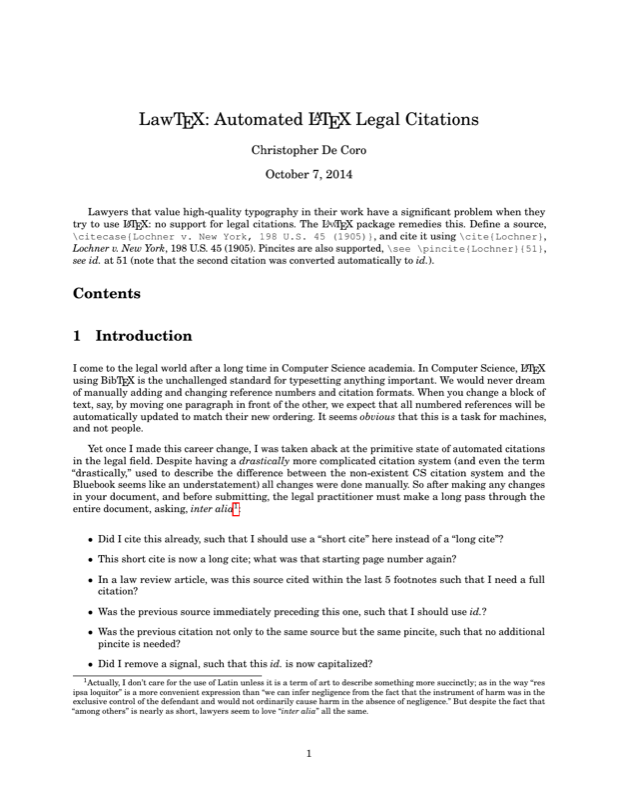
Lawyers that value high-quality typography in their work have a significant problem when they try to use \LaTeX{}: no support for legal citations.
The \LawTeX{} package remedies this. Define a source, \texttt{\textbackslash{}citecase\{Lochner v. New York, 198 U.S. 45 (1905)\}}, and cite it using \texttt{\textbackslash{}cite\{Lochner\}}, \cite{Lochner}. Pincites are also supported, \texttt{\textbackslash{}see \textbackslash{}pincite\{Lochner\}\{51\}}, \see\pincite{Lochner}{51} (note that the second citation was converted automatically to \id.).

\section*{Contents}
\begingroup
\renewcommand*\l@section[2]{%
    \addpenalty\@secpenalty%		Prefer to break before or after the tocline, not during
    \setlength\@tempdima{1em}%		Size of the space reserved for section number (which isn't there, so 0)
	{
      \parindent=0pt%				Dont automatically indent
	  \@tocline{{#1}}{#2}
	}
}
\tableofcontents
\endgroup

\parskip=8pt

\section{Introduction}
I come to the legal world after a long time in Computer Science academia. In Computer Science, \LaTeX{} using Bib\TeX{} is the unchallenged standard for typesetting anything important. We would never dream of manually adding and changing reference numbers and citation formats. When you change a block of text, say, by moving one paragraph in front of the other, we expect that all numbered references will be automatically updated to match their new ordering. It seems \emph{obvious} that this is a task for machines, and not people.

Yet once I made this career change, I was taken aback at the primitive state of automated citations in the legal field. Despite having a \emph{drastically} more complicated citation system (and even the term ``drastically,'' used to describe the difference between the non-existent CS citation system and the Bluebook seems like an understatement) all changes were done manually. So after making any changes in your document, and before submitting, the legal practitioner must make a long pass through the entire document, asking, \emph{inter alia}\footnote{Actually, I don't care for the use of Latin unless it is a term of art to describe something more succinctly; as in the way ``res ipsa loquitor'' is a more convenient expression than ``we can infer negligence from the fact that the instrument of harm was in the exclusive control of the defendant and would not ordinarily cause harm in the absence of negligence.'' But despite the fact that ``among others'' is nearly as short, lawyers seem to love ``\emph{inter alia}'' all the same.}:

\begin{itemize}
\item Did I cite this already, such that I should use a ``short cite'' here instead of a ``long cite''?
\item This short cite is now a long cite; what was that starting page number again?
\item In a law review article, was this source cited within the last 5 footnotes such that I need a full citation?
\item Was the previous source immediately preceding this one, such that I should use \emph{id.}?
\item Was the previous citation not only to the same source but the same pincite, such that no additional pincite is needed?
\item Did I remove a signal, such that this \emph{id.} is now capitalized?
\item I deleted the last cite on a page to a particular source, so my former \emph{passim} now needs numbers again. What pages were there?
\item And perhaps worst of all, is this cite on a different page than before, such that I need to update the Table of Authorities?
%\item ---Volume number, etc.---
\end{itemize}

Some of these seem trivial, of course. We get quite good at scanning through and applying Bluebook rules after extended practice. But that fact that there is \emph{any} work for us to do after a change means that we must re-read through it all to make sure that it is correct---we can't trust the machine to do this automatically.

\section{A Simple Example}
All that's really necessary to use \LawTeX{} is the directive \verb+\usepackage{bluebook}+ in the document preamble. There are also a few convenient document classes that are provided that you can use; some modifications to the class files will likely be necessary to fit your jurisdiction (and they're missing parameters to control some of the information). The classes are \verb+lawbrief.cls+ for standard briefs (with a table of authorities), and a simple \verb+lawmemo.cls+ for legal memos.

For now, consult the file {\tt postal-tro-motion.tex} in the {\tt samples/} folder for an example. This is the most thorough example, with {\tt hosanna-tabor.tex} another good example. You can compile it with the following commands (the _makeindex_ commands are not necessary if _\write18_ is enabled, as this is done automatically by the package):

\begin{verbatim}
pdflatex postal-tro-motion
makeindex -s ../lawcitations.ist -r Case.idx
makeindex -s ../lawcitations.ist -r Statute.idx
pdflatex postal-tro-motion
\end{verbatim}

There are additional files in the {\tt samples/} directory. LaW\TeX{} has two modes: Normal Mode (that is, for court submissions and most other legal documents) and Law Review Mode. As it's name would suggest, Normal Mode is the default; to select Law Review Mode, pass the _lawreview_ option to the _bluebook.sty_ or the class file. I have provided each of the sample files in both Normal Mode and Law Review Mode, in order to demonstrate the difference. Both are generated from the same file, and the only difference is the package option. However, note that I have had to use some conditional code to switch between both modes in a single file; these can be safely ignored in your own files, assuming that you do not need to switch back and forth.

\makeatletter
\input{.bluebook-doc.tex}
\input{.lawbrief-doc.tex}
\input{.arbitrationbrief-doc.tex}

\section{Final Notes}

Law\TeX{} is distributed for free (under the terms of the GPL) in the hope that the widest range of people may find it useful. Therefore if you are one of said people, I would really appreciate hearing from you. Additionally, I appreciate any bug reports, or ideas as to how to make Law\TeX{} more useful---even better if they come with proposed code! Finally, this software package was produced in an attempt at getting 99\% of the way to automated Bluebook citations, and with full recognition of the fact that 100\% is probably impossible. Therefore, there will always be some aspects of the Bluebook that this package will not cover. But I feel that the system I've put together is roughly at around that 99\%, so I do not anticipate making major changes in the future.

\end{document}
Preview

PDF Preview
Create an account to compile and preview