poster.texRead-only preview
% Written by Bibby AI
\documentclass[a4paper, 11pt]{article}

\usepackage{mspposter}

\usepackage[utf8]{inputenc}
\usepackage[T1]{fontenc}

\usepackage{caption}
\usepackage{tabularx}
\usepackage{multicol}

\newcolumntype{C}[1]{>{\centering\arraybackslash}p{#1}}

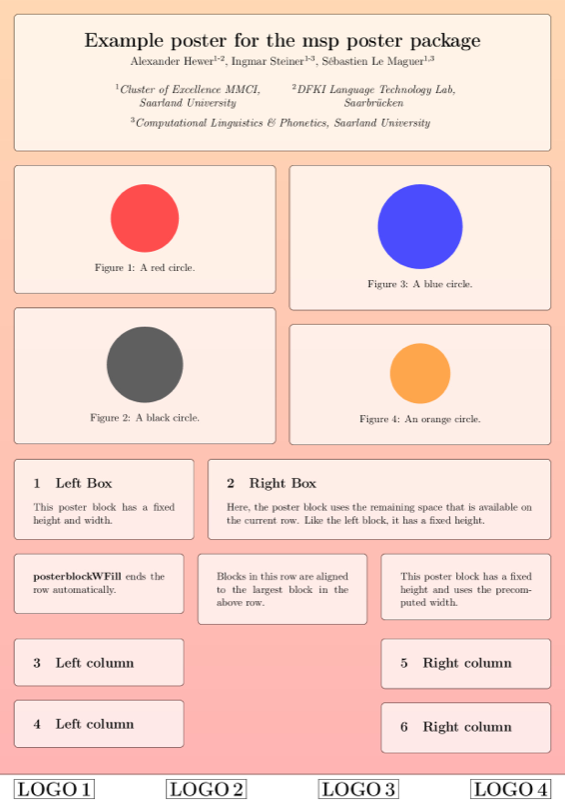
\title{Example poster for the msp poster package}
\author{
  Alexander Hewer\textsuperscript{1-2},
  Ingmar Steiner\textsuperscript{1-3},
  Sébastien Le Maguer\textsuperscript{1,3}\\
  \vspace{12pt}
  {%
    \def\arraystretch{1.5}
    \begin{tabular}{C{0.35\textwidth} C{0.35\textwidth}}
      \textsuperscript{1}\textit{Cluster of Excellence MMCI, Saarland University} &
      \textsuperscript{2}\textit{DFKI Language Technology Lab, Saarbr\"{u}cken} \\
      \multicolumn{2}{c}{\textsuperscript{3}%
        \textit{Computational Linguistics \& Phonetics, Saarland University}} \\
    \end{tabular}
  }
}

\begin{document}

\begin{poster}[themes/tholey]

  \maketitle

  \begin{postercolumns}[2]

    \begin{posterblock}
      \begin{center}
        \begin{tikzpicture}
          \node [fill=red!70, circle, text width=20pt] {};
        \end{tikzpicture}
        \captionof{figure}{A red circle.}
      \end{center}
    \end{posterblock}

    \begin{posterblock}
      \begin{center}
        \begin{tikzpicture}
          \node [fill=black!70, circle, text width=30pt] {};
        \end{tikzpicture}
        \captionof{figure}{A black circle.}
      \end{center}
    \end{posterblock}

    \posternextcolumn

    \begin{posterblock}
      \begin{center}
        \begin{tikzpicture}
          \node [fill=blue!70, circle, text width=40pt] {};
        \end{tikzpicture}
        \captionof{figure}{A blue circle.}
      \end{center}
    \end{posterblock}

    \begin{posterblock}
      \begin{center}
        \begin{tikzpicture}
          \node [fill=orange!70, circle, text width=10pt] {};
        \end{tikzpicture}
        \captionof{figure}{An orange circle.}
      \end{center}
    \end{posterblock}

  \end{postercolumns}

  \begin{posterrows}[3]

    \begin{posterblockW}{150}{45}
      \section{Left Box}
      This poster block has a fixed height and width.
    \end{posterblockW}

    \begin{posterblockWFill}{45}
      \section{Right Box}
      Here, the poster block uses the remaining space that is available on the current row.
      Like the left block, it has a fixed height.
    \end{posterblockWFill}

    \begin{posterblock}
      {\bf posterblockWFill} ends the row automatically.
    \end{posterblock}

    \begin{posterblock}
      Blocks in this row are aligned to the largest block in the above row.
    \end{posterblock}

    \begin{posterblockH}{30}
      This poster block has a fixed height and uses the precomputed width.
    \end{posterblockH}

  \end{posterrows}

  \begin{postercolumns}[3]
    \begin{posterblock}
      \section{Left column}
    \end{posterblock}
    \begin{posterblock}
      \section{Left column}
    \end{posterblock}

    \posternextcolumn
    \posternextcolumn

    \begin{posterblock}
      \section{Right column}
    \end{posterblock}
    \begin{posterblock}
      \section{Right column}
    \end{posterblock}

  \end{postercolumns}

  \begin{logobar}[logobar]
    \centering
    \fbox{\huge \bfseries LOGO 1}
    \hfill
    \fbox{\huge \bfseries LOGO 2}
    \hfill
    \fbox{\huge \bfseries LOGO 3}
    \hfill
    \fbox{\huge \bfseries LOGO 4}
  \end{logobar}

\end{poster}

% Written by Bibby AI
\end{document}
Preview

PDF Preview
Create an account to compile and preview