dissertation.texRead-only preview
% To change the dissertation to a Master's Thesis, use a documentclass option such as [masters] or [ms]. To change to a PhD candidacy proposal, use a documentclass option [candidacy]. The default option is phd. Also available are [osudraft] and [twoside]. As a reminder, documentclass options are a comma-separated list, e.g. \documentclass[ms,osudraft]{osudissert96}
\documentclass[candidacy]{osudissert96}

% SB: Put all package definitions in the following file
\input{preamble}
% SB: Input toggle-able macros
\input{toggle-macros}
% SB: Proposal-wide macros file
\input{macros}

\iftoggle{compact-space}{
  % \setlength{\pdfpagewidth}{8.5in}
  % \setlength{\pdfpageheight}{11in}
  \usepackage{setspace}
  \usepackage[compact]{titlesec}
  \usepackage[top=0.7in,bottom=0.9in,left=0.8in,right=0.8in]{geometry}
  \newcommand\compactspace{\setstretch{0.9}}
  \usepackage[font=small]{caption}
  \setlength{\abovecaptionskip}{5pt}
  \setlength{\belowcaptionskip}{-15pt}
  \titleformat{\chapter}[display]
  {\normalfont\Large\bfseries}{\chaptertitlename\ \thechapter}{20pt}{\large}
  \titlespacing*{\chapter}{0pt}{-40pt}{30pt}
}{}

%
% It is better to break up the dissertation into multiple files (e.g.,
% one file per chapter, as well as separate files for the abstract,
% acknowledgments, and vita).  These files are brought into the
% document using \include{} statements.  There will be times, however,
% when you don't want to print the ENTIRE dissertation.  You can limit
% what will actually be printed by using the \includeonly{} statement.
% This contains a list of the files you want printed.  Any file NOT
% listed will not be printed.  However, all page numbers, references,
% etc., will be preserved as though all the files were actually
% printed. For example, the line below would result only in chapters 1
% and 3 being printed (if it were uncommented).


% \includeonly{ch1.intro,ch3.implem}

% UPDATED TEXT (2010):
% In the newest format, titles should be title case everywhere.
%
% HISTORICAL TEXT (1996):
% In the new format, the titles of each chapter should appear in
% uppercase.  In the TOC, however, they should be in lowercase.
% The command below automates this behavior.  However, you'll have to be
% careful not to include \labels within your \chapter definitions or
% there will be problems.  If you don't want this to be automated, comment
% out the \typesetChapterTitle definition below and do your chapters in
% the form:
% \chapter[MY TITLE]{My Title}
%
% \renewcommand\typesetChapterTitle[1]{\uppercase{#1}}
\renewcommand\typesetChapterTitle[1]{#1}

\begin{document}

% First, declare the parts of your title page

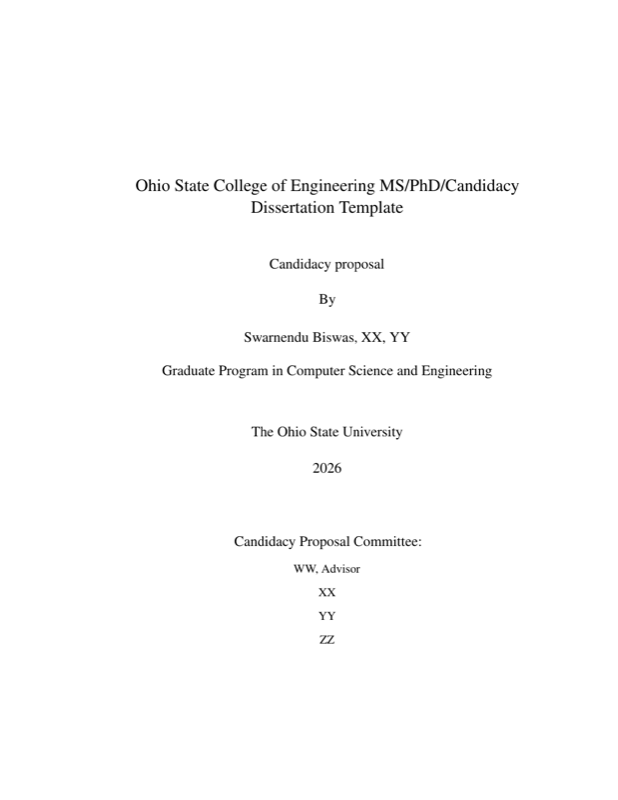
\author{Swarnendu Biswas}
\title{Ohio State College of Engineering MS/PhD/Candidacy Dissertation Template}
\authordegrees{XX, YY}  % Degrees thus far, not including this one.
\unit{Computer Science and Engineering}

\advisorname{WW}
\member{XX}
\member{YY}
\member{ZZ}
%\member{Yet another dude}      % Normally you will have advisor + 2 members


%
% The following creates the title page
%

\maketitle

% Next, EITHER a copyright or BLANK page.
%
%   The following creates a page used to copyright your dissertation
%
%   BACKGROUND: Even without this copyright page, your dissertation will
%               carry a common-law copyright. However, if your
%               dissertation ends up seeing wide distribution, your
%               common-law copyright is at risk of being expunged.
%               Adding this copyright page prevents that from happening.
%
%               There are NO DOWNSIDES to including a copyright page as
%               your document is automatically copyright by law anyway.
%               However, this copyright page is OPTIONAL. If you get rid
%               of it, uncomment the \blankpage that follows it so that
%               there is a blank page here. The graduate school requires
%               a page here that is either blank or carries the
%               copyright.
%
%   IMPORTANT NOTE: The graduate school requires either a copyright page
%                   here or a BLANK PAGE here. If you get rid of the
%                   copyright, uncomment the \blankpage that follows it.
%                   You should NOT have BOTH uncommented.
%

% If you get rid of \disscopyright, restore the \blankpage line after it
\disscopyright{}
%\blankpage

% SB: Space hack for abstract
\iftoggle{compact-space}
{\compactspace{}
  \begin{small}
    }{}

    %
    % Abstract goes here.
    %

    \begin{abstract}
      \input{abstract}
    \end{abstract}

    %
    %  My Dedication
    %
    % SB: Dedication goes after the abstract. Dedication is not needed in candidacy proposal.
    \dedication{\emph{Dedicated to all associated with The Ohio State University}}

    \iftoggle{compact-space}
    {\end{small}
}{}

%
% UPDATED TEXT (2010):
%  The graduate school does not require an external abstract. If this
%  changes, follow the old instructions below.
%
% HISTORICAL TEXT (1996):
%  Uncomment the three lines below to generate the external abstract.  Two
%  copies of this must be turned in to the graduate school.  These lines can
%  be placed pretty much anywhere, since the page numbering should be
%  independent of the rest of the thesis
%

% \begin{externalabstract}
%   \input{abstract}
% \end{externalabstract}


%
% Bring in Acknowledgment and Vita from separate files named ``ack.tex''
% and ``vita.tex''.
%

% Not sure whether we should include ack and vita in the candidacy protocol
\include{ack}

\include{vita} % Might not need for a candidacy proposal

% SB: Space hack for toc, lof
\iftoggle{compact-space}
{\compactspace{}
  \begin{small}
    }{}

    %
    % Make the Table of Contents and other good stuff
    %

    \tableofcontents
    \listoftables
    \listoffigures

    \iftoggle{compact-space}{
  \end{small}
}{}

% SB: Space hack for the body
\iftoggle{compact-space}
{\compactspace{}
  \begin{small}
    }{}

    %
    % The following is a list of chapters.  Each is brought in from a
    % separate file using the \include{} command.
    %

    \newpage
    \input{introduction}     % tell them what you are going to tell them

    \newpage

    \input{background}   % describe the problem statement

    \newpage

    \input{contrib1}    % what is your solution
    \input{contrib2}
    \input{contrib3}
    \input{relatedwork}
    \input{futurework}
    \input{conclusion}       % conclusion stuff

    %
    % If you have appendices in your dissertation, you will need the
    % following, else keep it commented. The following appendices are in
    % files called ``app1.tex'', and ``app2.tex'', and they
    % look just like any chapter.
    %

    % \appendix
    % \include{app1}
    % \include{app2}

    \iftoggle{compact-space}{
  \end{small}
}{}

%
% The all important bibliography file at the end of your document!! Use
% the bibstyle you (your department) like in the \bibliographystyle{}
% statement and list the name of your bibliography database file in
% the \bibliography{} statement.  In this example, ``bibfile.bib'' is
% the name of the database.  See the LaTeX manual appendix B for details
% about the bibliography database and BibTeX.
%

% SB: Space hack for bibliography, can't get spacing to work
\iftoggle{compact-space}{
  \begin{footnotesize}
    \begin{spacing}{0.6}
      }{}

      \bibliographystyle{plain}
      \bibliography{reference}

      \iftoggle{compact-space}{
    \end{spacing}
  \end{footnotesize}
}{}

\end{document}


%%% Local Variables:
%%% mode: latex
%%% TeX-master: t
%%% End:
Preview

PDF Preview
Create an account to compile and preview