sample.texRead-only preview
\documentclass[math,code,cn,localfonts]{twnotes} % 调用 twnotes 类

\usepackage{lipsum}

% =========================================================
% Cover Configuration
% =========================================================

% 1. Title
\title{Deep Learning\\
	\textit{\&} \\
	Computer Vision Notes}

% 2. Subtitle
\subtitle{A Comprehensive Guide to Deep Learning and Computer Vision}

% 3. Institution (Updated)
\institution{XJTU\\SCHOOL OF MATHEMATICS AND STATISTICS}

% 4. Author (Updated)
\author{TW}

% 5. Date
\date{\today}

\begin{document}

	% Generate Cover
	\maketitle

	\tableofcontents

	\chapter{Overview}

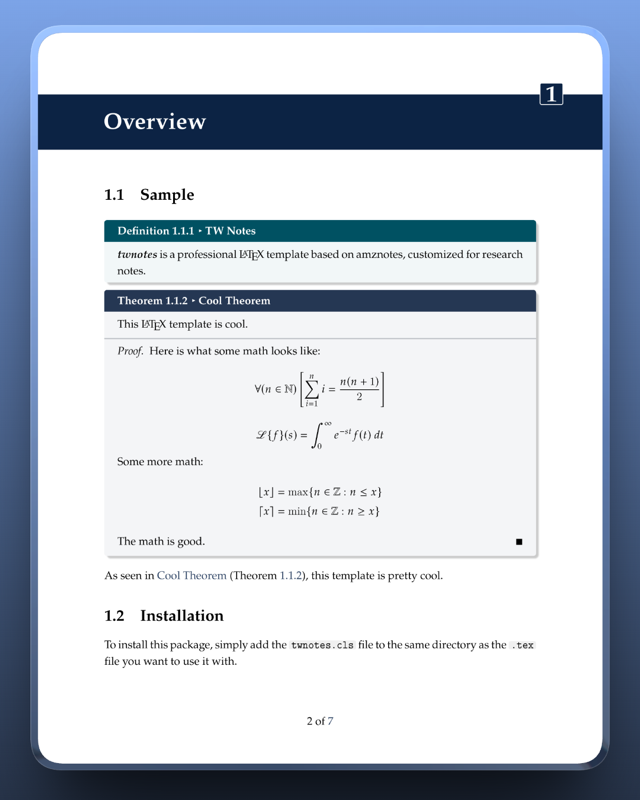
	\section{Sample}

	\begin{dfnbox}{TW Notes}{twnotes}
		\dfntxt{twnotes} is a professional \LaTeX\ template based on amznotes, customized for research notes.
	\end{dfnbox}

	\begin{thmbox}{Cool Theorem}{cool}
		This \LaTeX\ template is cool.
		\tcblower
		\begin{proof}
			Here is what some math looks like:
			\[ \forall (n \in \N) \left[ \sum_{i=1}^n i = \frac{n(n+1)}{2} \right] \]
			\[ \laplace \{ f \} (s) = \int_{0}^{\infty} e^{-st} f(t)\ dt \]
			Some more math:
			\begin{align*}
				\floor{x} &= \max \{ n \in \Z : n \leq x \} \\
				\ceil{x} &= \min \{ n \in \Z : n \geq x \}
			\end{align*}
			The math is good.
		\end{proof}
	\end{thmbox}

	As seen in \nameref{thm:cool} (Theorem \ref{thm:cool}), this template is pretty cool.

	\section{Installation}
	To install this package, simply add the \texttt{twnotes.cls} file to the same directory as the \texttt{.tex} file you want to use it with.

	\section{Usage}
	Once installed, you can use the twnotes document class with \texttt{\textbackslash documentclass\textbraceleft twnotes\textbraceright}.

\begin{codebox}{Using twnotes}{cool}
\begin{twcode}{latex}
\documentclass[math,code]{twnotes}
\end{twcode}
\end{codebox}

	The \texttt{math} option enables \texttt{thmbox} and various math macros. The \texttt{code} option enables \texttt{codebox} and code environments.

	Using the boxes is pretty straight-forward. They're based on the \texttt{tcbtheorem} from \texttt{tcolorbox}. We can see how to use one below:

\begin{codebox}{Using boxes}{boxes}
\begin{twcode}{latex}
\begin{exbox}{Cool Example}{coolexample}
    This is my example!
\end{exbox}
\nameref{ex:coolexample} (example \ref{ex:coolexample}) is pretty cool.
\end{twcode}
\end{codebox}

	This is what Code Snippet \ref{code:boxes} produces:

	\begin{notebox}
		\begin{exbox}{Cool Example}{coolexample}
			This is my example!
		\end{exbox}
		\nameref{ex:coolexample} (example \ref{ex:coolexample}) is pretty cool.
	\end{notebox}

	twnotes provides many predefined color boxes. The ones that are numbered include:
	\begin{itemize}[noitemsep]
		\item \texttt{dfnbox} -- definition box
		\item \texttt{exbox} -- example box
		\item \texttt{tecbox} -- technique box
		\item \texttt{thmbox} -- theorem box (with option \texttt{math})
		\item \texttt{codebox} -- code box (with option \texttt{code})
	\end{itemize}

	Some unnumbered/unindexed boxes include:
	\begin{itemize}[noitemsep]
		\item \texttt{genbox} -- general info box
		\item \texttt{notebox}
	\end{itemize}

	You can also easily create your own boxes with the twnotes style using the \texttt{\textbackslash newtwbox} command in the preamble. These will be numbered and indexed like the other boxes.

\begin{codebox}{Using \texttt{\textbackslash newtwbox}}{}
\begin{twcode}{latex}
\newtwbox{environment name}{title}{ref label}{color}[tcolorbox style]
\end{twcode}
\end{codebox}

	\chapter{Really really long chapter title that has to use more than one line because it is so long}
	\lipsum[100]
	\lipsum[101]

	\lipsum[102]

	\begin{notebox}
		\lipsum[21]
	\end{notebox}

	\lipsum[104]


	\twindex

\end{document}
Preview

PDF Preview
Create an account to compile and preview