main.texRead-only preview
% Written by Bibby AI
%\title{Calendario de escritorio en formato de dodecaedro regular con temática del Instituto Politécnico Nacional}

\documentclass[letter]{extarticle}
% Folding + calendar example from the PGF manual.
%
% Original Author: Till Tantau
%
% IPN Modification: @hasecilu

\usepackage[rgb,dvipsnames,svgnames]{xcolor}

%% Fonts etc
\usepackage[utf8]{inputenc}
\usepackage[T1]{fontenc}
\usepackage{carlito}
\usepackage{caladea}
\usepackage{zi4}
\usepackage{url}

%% page layouts
\usepackage[margin=1cm,bottom=2cm,footskip=1.2\baselineskip]{geometry}
\usepackage{fancyhdr}
\fancyhf{}
\renewcommand{\headrule}{}
%\rfoot{\normalsize\raisebox{-0.2ex}{\includegraphics[height=1em]{overleaf-mainlogo}} Make your own dodecahedron desk calendar at
%\url{https://www.overleaf.com/read/zhzvgdbvpypg}}
\pagestyle{fancy}

%%% Uncomment these two lines if you want localisation
%%% of the month names. And you'll then probably want to
%%% Re-define the day-heading list \dhlist below, if you're
%%% using the dayheadings toggle.
% \usepackage[french]{babel}
% \usepackage[french]{translator}
\usepackage[spanish]{babel}
\usepackage[spanish]{translator}

\usepackage{tikz}
\usetikzlibrary{calendar,folding}

%% With further mods by LianTze Lim @ Overleaf (Dec 2016)
\usepackage{OL-calendar-mods}

%%% In case you want to change the weekday headings.
%%% ALWAYS start from 0 and ALWAYS go from left to right
%%% irrespective of whether you are using sundayweek
% \AtBeginDocument{
%   \renewcommand{\dhlist}{0/D,1/L,2/M,3/M,4/J,5/V,6/S}
% }
\AtBeginDocument{
  \renewcommand{\dhlist}{0/L,1/M,2/M,3/J,4/V,5/S,6/D} % El primer día de la semana es el lunes según la norma ISO8601
}

%%%%% Customisations
\definecolor{colorIPN}{HTML}{6C1D45} % Pantone 222C
\renewcommand{\SundayColor}{colorIPN}
\renewcommand{\monthcolor}{colorIPN}
% https://www.ipn.mx/imageninstitucional/identidad-institucional.html?
\renewcommand{\watermarkfile}{LOGO POLI PANTONE 222 C}
% https://www.deviantart.com/dilvereye/art/IPN-Burrificado-622448566
% \renewcommand{\watermarkfile}{ipn_burrificado_by_dilvereye_daal8dy-fullview}

%%%%% SET THE YEAR HERE otherwise the _current_ year is used
\year=2022

%%%%% Uncomment this line to get weeks starting with Sunday
% \toggletrue{sundayweek}

%%%%% Uncomment this line to get weekday headings
\toggletrue{dayheadings}

\begin{document}
    \null\vfill\centering%
    \sffamily\small\noindent
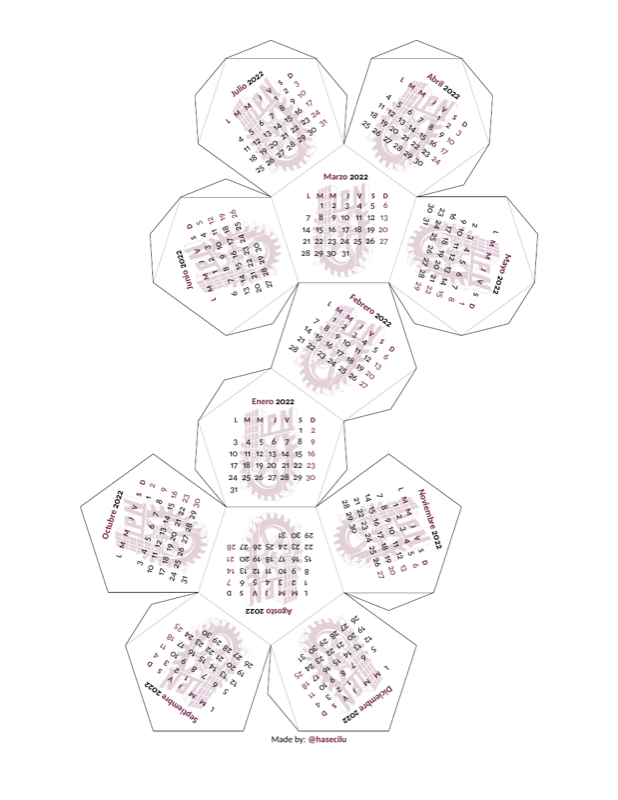
    \begin{tikzpicture}[transform shape]
    \pic [folding line length=9.95em,
        face  1={\addwatermark\calendar [dates=\the\year-01-01 to \the\year-01-last];},
        face  2={\addwatermark\calendar [dates=\the\year-02-01 to \the\year-02-last];},
        face  3={\addwatermark\calendar [dates=\the\year-03-01 to \the\year-03-last];},
        face  4={\addwatermark\calendar [dates=\the\year-04-01 to \the\year-04-last];},
        face  5={\addwatermark\calendar [dates=\the\year-05-01 to \the\year-05-last];},
        face  6={\addwatermark\calendar [dates=\the\year-06-01 to \the\year-06-last];},
        face  7={\addwatermark\calendar [dates=\the\year-07-01 to \the\year-07-last];},
        face  8={\addwatermark\calendar [dates=\the\year-08-01 to \the\year-08-last];},
        face  9={\addwatermark\calendar [dates=\the\year-09-01 to \the\year-09-last];},
        face 10={\addwatermark\calendar [dates=\the\year-10-01 to \the\year-10-last];},
        face 11={\addwatermark\calendar [dates=\the\year-11-01 to \the\year-11-last];},
        face 12={\addwatermark\calendar [dates=\the\year-12-01 to \the\year-12-last];}
    ]{dodecahedron' folding};
    \end{tikzpicture}
    \vfill
    Made by: \textcolor{colorIPN}{\textbf{@hasecilu}}

    \renewcommand{\watermarkfile}{ipn_burrificado_by_dilvereye_daal8dy-fullview}

    \newpage

    \null\vfill\centering%
    \sffamily\small\noindent
    \begin{tikzpicture}[transform shape]
    \pic [folding line length=9.95em,
        face  1={\addwatermark\calendar [dates=\the\year-01-01 to \the\year-01-last];},
        face  2={\addwatermark\calendar [dates=\the\year-02-01 to \the\year-02-last];},
        face  3={\addwatermark\calendar [dates=\the\year-03-01 to \the\year-03-last];},
        face  4={\addwatermark\calendar [dates=\the\year-04-01 to \the\year-04-last];},
        face  5={\addwatermark\calendar [dates=\the\year-05-01 to \the\year-05-last];},
        face  6={\addwatermark\calendar [dates=\the\year-06-01 to \the\year-06-last];},
        face  7={\addwatermark\calendar [dates=\the\year-07-01 to \the\year-07-last];},
        face  8={\addwatermark\calendar [dates=\the\year-08-01 to \the\year-08-last];},
        face  9={\addwatermark\calendar [dates=\the\year-09-01 to \the\year-09-last];},
        face 10={\addwatermark\calendar [dates=\the\year-10-01 to \the\year-10-last];},
        face 11={\addwatermark\calendar [dates=\the\year-11-01 to \the\year-11-last];},
        face 12={\addwatermark\calendar [dates=\the\year-12-01 to \the\year-12-last];}
    ]{dodecahedron' folding};
    \end{tikzpicture}
    \vfill
    Made by: \textcolor{colorIPN}{\textbf{@hasecilu}}
% Written by Bibby AI
\end{document}
Preview

PDF Preview
Create an account to compile and preview