template.texRead-only preview
% Written by Bibby AI
% SPDX-FileCopyrightText: 2023 Alexandru Fikl <alexfikl@gmail.com>
% SPDX-License-Identifier: CC0-1.0

\documentclass[aspectratio=169, t]{beamer}

% some nicer environments
\usepackage{booktabs}
\usepackage{tikz}

% <<< BEGIN theme

% remember to set the language if using Romanian
% \usepackage[romanian]{babel}
\usetheme[language=english, progressbar, sectiontoc]{uvt}

% remove navigation symbols
\beamertemplatenavigationsymbolsempty

% set how hidden items are displayed: invisible / transparent / dynamic
\setbeamercovered{transparent}

% >>> END

% <<< BEGIN metadata

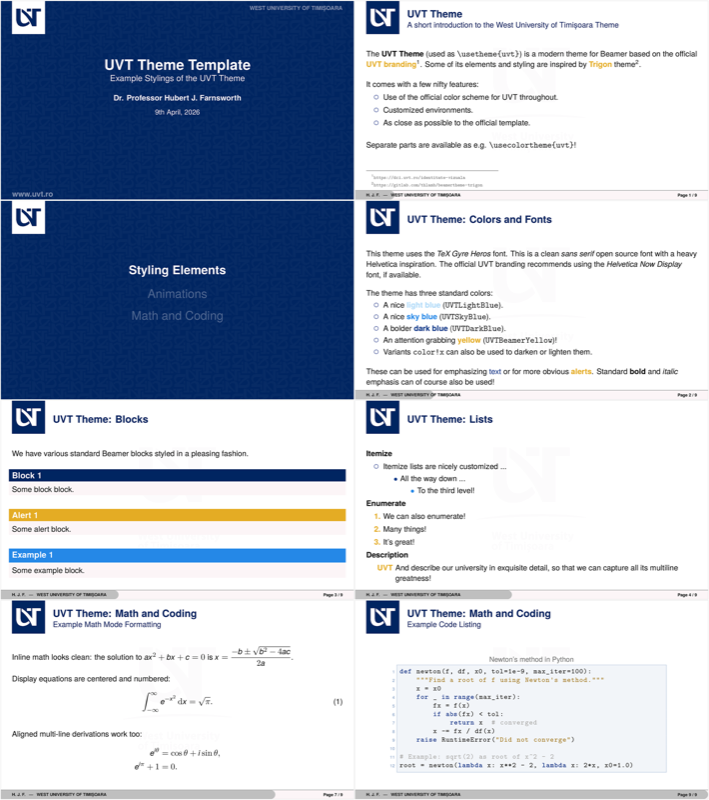
\title{UVT Theme Template}
\subtitle{Example Stylings of the UVT Theme}
\author[H. J. F.]{Dr. Professor Hubert J. Farnsworth}
\institute{West University of Timișoara}
\date{25th April, 2026}
\venue{West University of Timișoara}

% >>> END

\begin{document}

\titleframe

\begin{frame}{UVT Theme}
\framesubtitle{A short introduction to the West University of Timișoara Theme}

The \textbf{UVT Theme} (used as \texttt{\textbackslash usetheme\{uvt\}}) is a
modern theme for Beamer based on the official
\textcolor{UVTBeamerYellow}{\textbf{UVT branding}}\footnotemark[1]. Some
of its elements and styling are inspired by \textcolor{UVTBeamerYellow}{\textbf{Trigon}}
theme\footnotemark[2].

\bigskip
It comes with a few nifty features:
\begin{itemize}
    \item Use of the official color scheme for UVT throughout.
    \item Customized environments.
    \item As close as possible to the official template.
\end{itemize}

\bigskip
Separate parts are available as e.g. \texttt{\textbackslash usecolortheme\{uvt\}}!

\footnotetext[1]{\url{https://dci.uvt.ro/identitate-vizuala}}
\footnotetext[2]{\url{https://gitlab.com/thlamb/beamertheme-trigon}}
\end{frame}

\section{Styling Elements}

\begin{frame}{UVT Theme: Colors and Fonts}

This theme uses the \emph{TeX Gyre Heros} font. This is a clean \emph{sans serif}
open source font with a heavy Helvetica inspiration. The official UVT branding recommends
using the \emph{Helvetica Now Display} font, if available.

\bigskip
The theme has three standard colors:
\begin{itemize}
    \item A nice \textcolor{UVTLightBlue}{\textbf{light blue}} (\texttt{UVTLightBlue}).
    \item A nice \textcolor{UVTSkyBlue}{\textbf{sky blue}} (\texttt{UVTSkyBlue}).
    \item A bolder \textcolor{UVTDarkBlue}{\textbf{dark blue}} (\texttt{UVTDarkBlue}).
    \item An attention grabbing \textcolor{UVTBeamerYellow}{\textbf{yellow}}
        (\texttt{UVTBeamerYellow})!
    \item Variants \texttt{color!x} can also be used to darken or lighten them.
\end{itemize}

\bigskip
These can be used for emphasizing \textcolor{UVTDarkBlue}{text} or for
more obvious \alert{alerts}. Standard \textbf{bold} and \textit{italic} emphasis
can of course also be used!
\end{frame}

\begin{frame}{UVT Theme: Blocks}
We have various standard Beamer blocks styled in a pleasing fashion.

\vfill

\begin{block}{Block 1}
Some block block.
\end{block}

\vfill

\begin{alertblock}{Alert 1}
Some alert block.
\end{alertblock}

\vfill

\begin{exampleblock}{Example 1}
Some example block.
\end{exampleblock}
\end{frame}

\begin{frame}{UVT Theme: Lists}
\textbf{Itemize}

\begin{itemize}
    \item Itemize lists are nicely customized \dots
    \begin{itemize}
        \item All the way down \dots
        \begin{itemize}
            \item To the third level!
        \end{itemize}
    \end{itemize}
\end{itemize}

\textbf{Enumerate}

\begin{enumerate}
    \item We can also enumerate!
    \item Many things!
    \item It's great!
\end{enumerate}

\textbf{Description}

\begin{description}
    \item[UVT] And describe our university in exquisite detail, so that we
        can capture all its multiline greatness!
\end{description}
\end{frame}

\begin{frame}{UVT Theme: Figures}

\begin{columns}
\begin{column}{0.5\textwidth}
\begin{figure}
\begin{tikzpicture}
    % Draw axes
    \draw [<->,thick] (0,2) node (yaxis) [above] {$y$}
        |- (3,0) node (xaxis) [right] {$x$};
    % Draw two intersecting lines
    \draw (0,0) coordinate (a_1) -- (2,1.8) coordinate (a_2);
    \draw (0,1.5) coordinate (b_1) -- (2.5,0) coordinate (b_2);
    % Calculate the intersection of the lines a_1 -- a_2 and b_1 -- b_2
    % and store the coordinate in c.
    \coordinate (c) at (intersection of a_1--a_2 and b_1--b_2);
    % Draw lines indicating intersection with y and x axis. Here we use
    % the perpendicular coordinate system
    \draw[dashed] (yaxis |- c) node[left] {$y'$}
        -| (xaxis -| c) node[below] {$x'$};
    % Draw a dot to indicate intersection point
    \fill[UVTBeamerYellow] (c) circle (2pt);
\end{tikzpicture}
\caption{A simple figure.}
\end{figure}
\end{column}

\begin{column}{0.4\textwidth}
\centering
\begin{table}
\caption{Largest cities in the world (source: UN 2018 population estimates
from Wikipedia)}
\begin{tabular}{@{} lr @{}}
    \toprule
    City & Population\\
    \midrule
    Tokyo & 37,468,000 \\
    Delhi & 28,514,000 \\
    Shanghai & 25,582,000 \\
    São Paulo & 21,650,000 \\
    \bottomrule
\end{tabular}
\end{table}
\end{column}
\end{columns}

\end{frame}

\section{Animations}

\begin{frame}{UVT Theme: Animations}

You can do a standard reveal with \texttt{[<+->]}.
\bigskip

\begin{itemize}[<+->]
    \item This is\alert<4>{ really} important.
    \item Now this.
    \item And now this.
\end{itemize}

\visible<4->{
\pause
\bigskip
You can also do an alerted reveal with \texttt{[<+- | alert@+>]}.
\bigskip

\begin{itemize}[<+- | alert@+>]
    \item This is important.
    \item Now this.
    \item And now this.
\end{itemize}
}
\end{frame}

\section{Math and Coding}

\begin{frame}{UVT Theme: Math and Coding}
\framesubtitle{Example Math Mode Formatting}

Inline math looks clean: the solution to $ax^2 + bx + c = 0$ is
$x = \dfrac{-b \pm \sqrt{b^2 - 4ac}}{2a}$.

\bigskip
Display equations are centered and numbered:
\begin{equation}
    \int_{-\infty}^\infty e^{-x^2}\, \mathrm{d}x = \sqrt{\pi}.
\end{equation}

\bigskip
Aligned multi-line derivations work too:
\begin{align*}
    e^{i\theta} & = \cos\theta + i\sin\theta, \\
    e^{i\pi} + 1 & = 0.
\end{align*}

\end{frame}

\begin{frame}{UVT Theme: Math and Coding}
\framesubtitle{Example Theorem-type Environments}

We have various standard Beamer theorems styled in a pleasing fashion.

\vfill

\begin{definition}
We declare that things are defined.
\end{definition}

\vfill

\begin{theorem}[Existence \& Uniqueness]
Our theorem exists and is unique.
\end{theorem}

\vfill

\begin{lemma}
If the theorem holds, so does this lemma.
\end{lemma}

\vfill

\end{frame}

\begin{frame}[fragile]{UVT Theme: Math and Coding}
\framesubtitle{Example Code Listing}

\begin{lstlisting}[language=Python,
                   caption={Newton's method in Python},
                   linewidth=0.9\textwidth,
                   xleftmargin=0.1\textwidth,
                   basicstyle=\ttfamily\footnotesize]
def newton(f, df, x0, tol=1e-9, max_iter=100):
    """Find a root of f using Newton's method."""
    x = x0
    for _ in range(max_iter):
        fx = f(x)
        if abs(fx) < tol:
            return x  # converged
        x -= fx / df(x)
    raise RuntimeError("Did not converge")

# Example: sqrt(2) as root of x^2 - 2
root = newton(lambda x: x**2 - 2, lambda x: 2*x, x0=1.0)
\end{lstlisting}

\end{frame}

% Written by Bibby AI
\end{document}

% vim: foldmarker=<<<,>>>:foldmethod=marker
Preview

PDF Preview
Create an account to compile and preview