main.texRead-only preview
% !TEX program = xelatex
% 使用 texlive 完整编译:
% xelatex -> bibtex -> xelatex -> xelatex
% zhbook 中文书籍 LaTeX 模板

\documentclass[openany,twoside,zihao=-4]{zhbook}
%\documentclass[openright,twoside,zihao=-4]{zhbook}

% print 用于打印, 封面等生成空白页
% fonts macOS系统必选, 调用本地字体
% 需在本地文件夹 fonts 中添加字体 SimSun.ttf, KaiTi.ttf, SimHei.ttf, FangSong.ttf

% 书籍信息设置
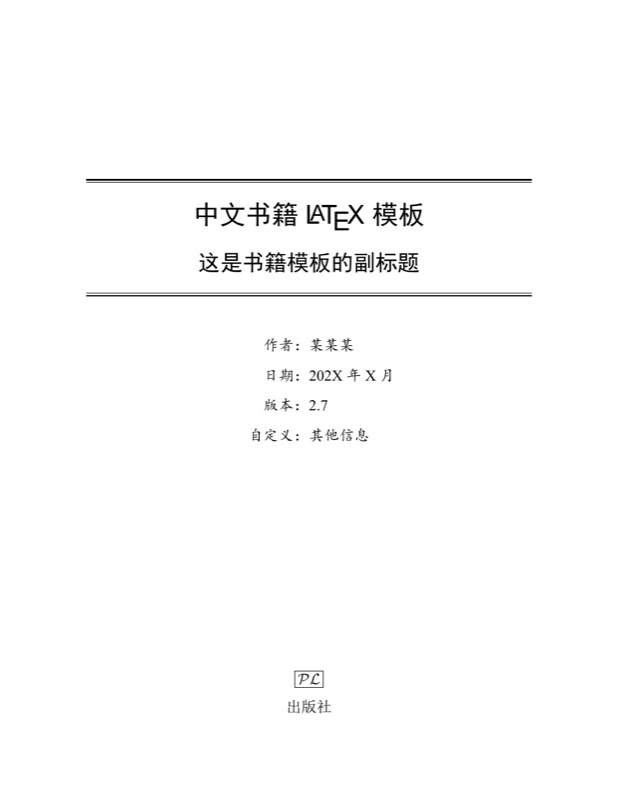
\title{中文书籍 \LaTeX{} 模板}  % 标题
\subtitle{这是书籍模板的副标题}  % 副标题
\author{某某某}  % 作者姓名
\date{202X年X月}  % 日期
\version{2.7}  % 版本
\bioinfo{自定义}{其他信息}  % 其他信息

\extrainfo{\plogo \\[8pt] 出版社}

% 通用虚拟出版商标志
\newcommand{\plogo}{\fbox{$\mathcal{PL}$}}

%----- 设置英文字体 -----
%\usepackage{newtxtext}  %New TX font for text
%\setmainfont{TeX Gyre Termes}  %Times New Roman 的开源复刻版本
%\setsansfont{TeX Gyre Heros}  %Helvetica 的开源复刻版本
%\setmonofont{TeX Gyre Cursor}  %Courier New 的开源复刻版本
\setmainfont{Times New Roman}
\setsansfont{Arial}
%\setmonofont{Courier New}

%----- 设置数学字体 -----
%\usepackage{newtxmath}
%\usepackage{mathptmx}

%----- 添加其他宏包 -----
%\usepackage[notcite,notref]{showkeys}
\usepackage{listings}
\usepackage{subfig}

%----- 取消链接颜色和方框 -----
%\hypersetup{hidelinks}

%----- 参考文献格式 -----
%\bibliographystyle{plain} % abbrv, unsrt, siam
\bibliographystyle{thuthesis-numeric}
%\bibliographystyle{thuthesis-author-year}

%----- 参考文献引用格式 -----
\usepackage[numbers,square,sort&compress]{natbib}
%\usepackage[numbers,super,square,sort&compress]{natbib}
%\usepackage[authoryear,sort&compress]{natbib}
\def\bibfont{\small}  % 修改参考文献字体
\setlength{\bibsep}{7pt plus 3pt minus 3pt}  % 调整参考文献间距

%----- 制作索引 -----
% 自动编译 (默认字符编码排序)
% 推荐使用 \index{pinyin@拼音} 命令实现按拼音排序
\usepackage{imakeidx}
\makeindex[columns=2,intoc=true,title={索~~引}]
%\indexsetup{level=\chapter*}

%----- 调整列表项的间距 -----
%\setlength{\itemsep}{3pt}

%----- 调整页面避免出现过大空白 -----
%\raggedbottom

%----- 定义符号描述命令  -----
\newcommand{\nameditem}[3][]{
\noindent\hspace{2em}\makebox[0.2\textwidth][l]{#2}{{#3}
\hfill\makebox[0.2\textwidth][l]{#1}\hspace*{2em}}\par}

%----- 插入 PDF 文件命令 -----
%\includepdf[pages=-]{pdfname.pdf}

%----- 微分算子 -----
\newcommand*{\dif}{\mathop{}\!\mathrm{d}}

%----- 自定义命令 -----
\newcommand{\CC}{\ensuremath{\mathbb{C}}}
\newcommand{\RR}{\ensuremath{\mathbb{R}}}
\newcommand{\bA}{\boldsymbol{A}}
\newcommand{\ii}{\mathrm{i}\mkern1mu}
\newcommand{\abs}[1]{\lvert#1\rvert}
\newcommand{\norm}[1]{\left\lVert#1\right\rVert}
\newcommand{\dx}[1][x]{\mathop{}\!\mathrm{d}#1}
\newcommand{\red}[1]{\textcolor{red}{#1}}


\begin{document}


% 生成封面
\maketitle

% 插入封面 PDF文件
%\thispagestyle{empty}
%\includepdf{cover.pdf}
%\cleardoublepage


%%%%%%%%%%%%%%%%%%%%%%%%%%%%%%%%%%%%%%%%%%%%%%%%%%%

\frontmatter
%\pagenumbering{Roman} % 摘要页码为大写罗马数字

%%%%%%%%%%%%%%%%%%%%%% 前言 %%%%%%%%%%%%%%%%%%%%%%%%

\input{part/preface}

%%%%%%%%%%%%%%%%% 中文摘要内容和关键字  %%%%%%%%%%%%%%

%\input{part/cnabstract}

%%%%%%%%%%%%%%%%% 英文摘要内容和关键字 %%%%%%%%%%%%%%

%\input{part/enabstract}

%%%%%%%%%%%%%%%%%%%%%%% 目录 %%%%%%%%%%%%%%%%%%%%%%%

% 生成目录
\maketoc

% 生成插图清单, 如不需要可以注释
\makelof

% 生成表格清单, 如不需要可以注释
\makelot

%%%%%%%%%%%%%%%%%%%% 主要符号表 %%%%%%%%%%%%%%%%%%%%%

% 如不需要可以注释
\input{part/denotation}


%%%%%%%%%%%%%%%%%%%%%%%%%%%%%%%%%%%%%%%%%%%%%%%%%%%%

\mainmatter

%%%%%%%%%%%%%%%%%%%% 正文内容 %%%%%%%%%%%%%%%%%%%%%%%


%----- 第1章 引言 -----
\input{part/chap01}

%----- 第2章 LaTeX 常用环境 -----
\input{part/chap02}

%----- 第3章 微分方程的数值方法 -----
\input{part/chap03}

%----- 第4章 插图环境 -----
\input{part/chap04}

%----- 第5章 表格环境 -----
\input{part/chap05}


%%%%%%%%%%%%%%%%%%%%%% 参考文献 %%%%%%%%%%%%%%%%%%%%%

% 生成参考文献, 两种方式任选一种

% 第一种方式, 使用 bib 文件
%\nocite{*}  % 可以显示全部参考文献
\bibliography{reference}

%--------------------------------------------------%

% 第二种方式, 手动添加文献信息
%\input{part/bibliography}


%%%%%%%%%%%%%%%%%%%%%% 附录 %%%%%%%%%%%%%%%%%%%%%%%%

% 添加附录, 如不需要可以注释
\input{part/appendix}


%%%%%%%%%%%%%%%%%%%%%%%%%%%%%%%%%%%%%%%%%%%%%%%%%%%%

\backmatter  % 结束章节自动编号

%%%%%%%%%%%%%%%%%%%%%% 索引  %%%%%%%%%%%%%%%%%%%%%%%%

%\clearpage
\printindex


%%%%%%%%%%%%%%%%%%%%%%% 后记 %%%%%%%%%%%%%%%%%%%%%%%%

\input{part/epilogue}


\end{document}
Preview

PDF Preview
Create an account to compile and preview