tarea06.texRead-only preview
% Written by Bibby AI
\RequirePackage{fix-cm} %to improve performance of cm-super package when you are writing in spanish or another non-english language.
\documentclass[spanish,11pt,twoside]{article}
%--------------------------------------
%Credits. This template is based in a template provided by OCW MIT
%https://ocw.mit.edu/courses/electrical-engineering-and-computer-science/6-006-introduction-to-algorithms-spring-2008/assignments/
%
% TEX: https://ocw.mit.edu/courses/electrical-engineering-and-computer-science/6-006-introduction-to-algorithms-spring-2008/assignments/ps1.tex
% PDF: https://ocw.mit.edu/courses/electrical-engineering-and-computer-science/6-006-introduction-to-algorithms-spring-2008/assignments/ps1.pdf
%--------------------------------------
%--------------------------------------
%Spanish-specific commands
%--------------------------------------
\usepackage[spanish, mexico]{babel} %for proper hyphenation and translating the names of each document elements.
\def\spanishoperators{} %Mathematical commands can also be imported specifically for the Spanish language. %https://www.sharelatex.com/learn/Spanish#Reference_guide. En este caso ya está definida previamente por otros paquetes.
%--------------------------------------
%encoding
%--------------------------------------
\usepackage[utf8]{inputenc} %Allow to input letters of national alphabets directly from the keyboard.
\usepackage[T1]{fontenc} %choose a font encoding which has to support specific characters for Spanish language
%--------------------------------------
%Colors
%--------------------------------------
%Using this package, you can set the font color, text background, or page background. You can choose from predefined colors or define your own colors using RGB, Hex, or CMYK. Mathematical formulas can also be colored.
\usepackage[usenames,dvipsnames,svgnames,table]{xcolor} %allow predefined name colors
%\usepackage[usenames,dvipsnames]{xcolor} %allow predefined
%\usepackage[dvipsnames]{xcolor} %allow predefined
%TO-DO url:https://www.sharelatex.com/learn/Using_colours_in_LaTeX#/Reference_guide
%TO-DO url:https://en.wikibooks.org/wiki/LaTeX/Colors
\definecolor{uasblue}{HTML}{19407A}
%--------------------------------------
%Table packages and style commands
%--------------------------------------
%------------style for color lines------
\usepackage[table]{xcolor} %Load the xcolor package with the tables option for table support
%disable, we'll move before table environment:
%\rowcolors{2}{gray!15}{white} %Declare alternating row colors
\newcommand{\head}[1]{ %Define a macro for the table header appearance:
\textcolor{white}{\textbf{#1}}}
\renewcommand{\arraystretch}{1.5} %Enlarge the default tabular line spacing
%------------style for clean and better legibility tables--------
\usepackage{booktabs} %has been written with good design in mind. %Specifically, it enhances lines in tables. It focuses on horizontal lines with improved spacing and adjustable thickness.
\usepackage{float} %for use H option in tables: force position "HERE"
%--------------------------------------
%blocks around text to inform or alert
%--------------------------------------
%drawing admonition blocks around text to inform or alert
%your readers about something particular. The specific aim of this package is to use
%FontAwesome 5 icons to ease the illustration of these boxes.
\usepackage{awesomebox}
%\usepackage{fontawesome5}
\newcommand{\rocketbox}[1]{
\awesomebox[uasblue]{2pt}{\faRocket}{uasblue}{#1}
}
\newcommand{\myawesomebox}[2]{ %receive icon and content(text)
\awesomebox[uasblue]{2pt}{#1}{uasblue}{#2}
}
\newcommand{\myawesomeboxshort}[3]{ %receive icon and content(text)
\awesomebox[uasblue]{2pt}{#1}{uasblue}{\textcolor{uasblue}{\textbf{\textsf{#2}}} #3}
}
\usepackage{amsmath}
%--------------------------------------
%add specific information
%--------------------------------------
%TODO Change document information
\newcommand{\myuniversity}{Universidad Autónoma de Sinaloa}
\newcommand{\myfaculty}{Facultad de Informática Culiacán}
\newcommand{\myprofs}{\{Rogelio Prieto Alvarado, Gerardo Gálvez Gámez\}}
\newcommand{\mycourse}{Algoritmia}
\newcommand{\mysubject}{5. Resolución de problemas de selección}
\newcommand{\mydate}{Diciembre 10, 2021}
\newcommand{\myhandoutnumber}{06} %Número de tarea
\newcommand{\mytitledoc}{Problemas de Selección simple, doble o múltiple}
\newlength{\toppush}
\setlength{\toppush}{2\headheight}
\addtolength{\toppush}{\headsep}
\newcommand{\htitle}[3]{\noindent\vspace*{-\toppush}\newline\parbox{6.5in}
{
\begin{wrapfigure}{l}{1.3cm}
%\caption{A wrapped figure going nicely inside the text.}\label{wrap-fig:1}
\vspace*{-2ex}\includegraphics[width=1.3cm]{assets/uasbn}
\end{wrapfigure}
\textit{\mycourse: \mysubject}\hfill\newline
\myuniversity\newline \myfaculty \hfill #3\newline
\myprofs\hfill \textcolor{uasblue}{\textbf{Tarea #1}} \newline \vspace*{-3.5ex}\newline
\mbox{}\hrulefill\mbox{}}\vspace*{1ex}\mbox{}\newline
\begin{center}{\Large\bf \textcolor{uasblue}{#2}}\end{center}}
\newcommand{\handout}[3]{\thispagestyle{empty}
\markboth{Tarea #1: #2}{Tarea #1: #2}
\pagestyle{myheadings}\htitle{#1}{#2}{#3}}
\setlength{\oddsidemargin}{0pt}
\setlength{\evensidemargin}{0pt}
\setlength{\textwidth}{6.5in}
\setlength{\topmargin}{0in}
\setlength{\textheight}{8.5in}
%--------------------------------------
%wrap text around a picture
%--------------------------------------
\usepackage{graphicx,wrapfig}
%--------------------------------------
%crear nuevas variables para ser agregadas en los metadatos del PDF.
%--------------------------------------
%\makeatletter
%\let\pdftitle\@title
%\let\pdfauthor\@author
%\makeatother
\let\pdftitle\mycourse
\let\pdfauthor\myprofs
\let\pdfsubject\mysubject
%--------------------------------------
%hyperreferences
%--------------------------------------
%\usepackage{color}
\usepackage{hyperref} %is used to handle cross-referencing commands in LaTeX to produce hypertext links in the document.
\hypersetup{
colorlinks=true, %set true if you want colored links
%allcolors=blue %set all colors options (without border and field options)
linktoc=all, %set to all if you want both sections and subsections linked
linkcolor= uasblue, %NavyBlue, %black, %choose some color if you want internal links to stand out
citecolor= blue, % blue, %color for bibliographical citations in text.
urlcolor=uasblue,%NavyBlue, %color for URL links
%--------------------------------------
%Configuración del PDF resultante
%--------------------------------------
pdfauthor ={\pdfauthor}, %, \pdfsupervisor},
pdftitle ={\pdftitle\ - Tarea \myhandoutnumber},
pdfsubject ={\pdfsubject} ,
pdfkeywords ={Algoritmos,Programación,Informática,UAS,Licenciatura},
%pdfstartview ={ FitV } ,
%pdfview ={ FitH } ,
pdfpagemode ={ FullScreen },
backref ={ true },
bookmarks={true},
%pdfpagelabels,
bookmarksnumbered=true
}
%--------------------------------------
%patch to fix showing tabs using lstlistings in beamer.
%--------------------------------------
\makeatletter
\def\beamer@verbatimreadframe{%
\begingroup%
\let\do\beamer@makeinnocent\dospecials%
\count@=127%
\@whilenum\count@<255 \do{%
\advance\count@ by 1%
\catcode\count@=11%
}%
\beamer@makeinnocent\^^L% and whatever other special cases
\beamer@makeinnocent\^^I% <-- PATCH: allows tabs to be written to temp file
\endlinechar`\^^M \catcode`\^^M=12%
\@ifnextchar\bgroup{\afterassignment\beamer@specialprocessframefirstline\let\beamer@temp=}{\beamer@processframefirstline}}%
\makeatother
%--------------------------------------
%enumerate environment setup (taken from pandoc)
%--------------------------------------
\providecommand{\tightlist}{%
\setlength{\itemsep}{3pt}\setlength{\parskip}{10pt}}
%\providecommand{\tightlist}{%
% \setlength{\itemsep}{6pt}\setlength{\parskip}{6pt}}
%--------------------------------------
%defautl bullets for itemize environment
%--------------------------------------
\renewcommand{\labelitemi}{\textcolor{darkgray}{$\bullet$}}%{$\cdotp$}%{$\cdot$}
\renewcommand{\labelitemii}{$-$}
%\renewcommand{\labelitemiii}{$\circ$}
%\renewcommand{\labelitemiv}{$\circ$}
%--------------------------------------
%set another mono font for Typewriter font (used in listings too!)
%--------------------------------------
%\usepackage{inconsolata}
%\usepackage{FiraMono}
\begin{document}
\handout{\myhandoutnumber}{\mytitledoc}{\mydate}
\setlength{\parindent}{0pt}
\newcommand{\solution}{
\medskip
{\bf Solution:}
}
%TODO Change content and questions
\textcolor{uasblue}{\faGreaterThan}
\textbf{Objetivo:} El alumno demostrará la habilidad alcanzada en clases, para analizar, construir y probar pseudocódigos de diversos problemas, utilizando procedimientos con estructuras de selección simple, doble, doble anidada o múltiple.\\
\textcolor{uasblue}{\faCalendar*[regular]}
\textbf{Fecha de entrega:} Especificada en el aula virtual.\\
\textcolor{uasblue}{\faFlagCheckered}
\textbf{Instrucciones:} Resuelva el problema 1 (obligatorio). De los restantes, elija y resuelva cuatro. Los algoritmos deberán ser resueltos según la metodología vista en clase que incluye:
a. Análisis del problema
b. Construcción del algoritmo en pseudocódigo.
c. Verificación (prueba y depuración)\\
\textcolor{uasblue}{\faPencil*}
\textbf{Instrucciones de entrega:} Deberá resolver el ejercicio y realizar las respuestas a mano.\\
%\medskip
\hrulefill
\section*{Descripción de problemas}
\begin{enumerate}
\tightlist %for reduce space between paragraphs
\item Para las soluciones a los problemas resueltos en la diapositiva \texttt{Estructuras Algoritmicas de Seleccion simples.pdf}, resolver:
\begin{enumerate}
\tightlist
\item Indique ¿cuáles problemas pueden ser resueltos usando estructura algorítmica de selección Doble?
\item Elija uno de los problemas que indicó en la pregunta 1, reescriba la «construcción del algoritmo» utilizando estructura de selección doble.
\end{enumerate}
\item Elaborar un pseudocódigo que permita leer 3 números enteros y determine cuál es mayor. Considere que los tres números son diferentes.
\item Del Libro ``Metodología de la programación'' de Osvaldo Cairo, resuelva el siguiente
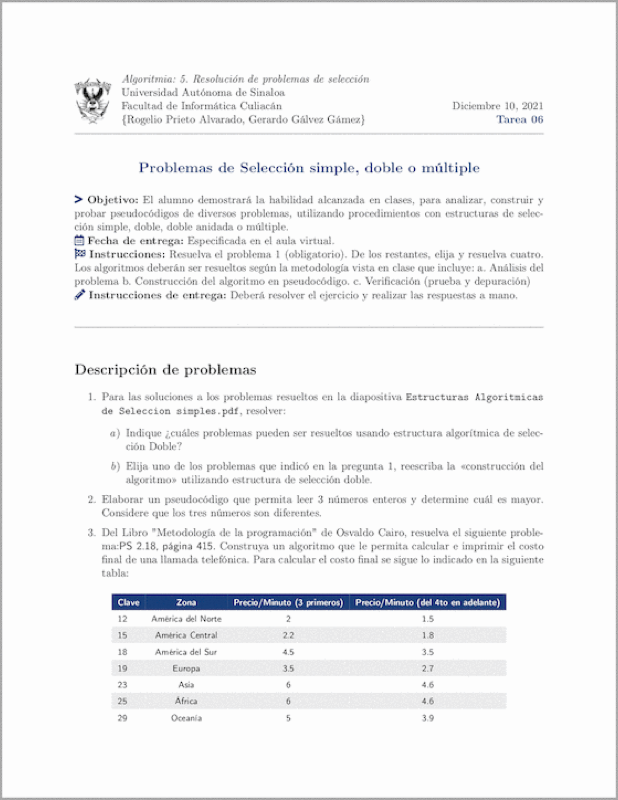
problema:\textsf{PS 2.18, página 415}. Construya un algoritmo que le permita calcular e imprimir el costo final de una llamada telefónica. Para calcular el costo final se sigue lo indicado en la siguiente tabla:
%Example, source by Stefan Kottwitz in LaTeX Cookbook 1st edition, chapter 6.
%NOTE: this table only uses table package.
\begin{table}[H]%[ht]
\rowcolors{2}{gray!15}{white} %Declare alternating row colors
\renewcommand{\arraystretch}{1.5} %Enlarge the default tabular line spacing
\centering\footnotesize%\small
\sffamily%\ttfamily
%\caption{Texto de caption, debe aparecer antes de la tabla}
\label{table:problemas:llamada}
\begin{tabular}{lccc}
\rowcolor{uasblue}%black!75
\head{Clave}& \head{Zona} & \head{Precio/Minuto (3 primeros)} & \head{Precio/Minuto (del 4to en adelante)}\\
12 & América del Norte & 2 & 1.5 \\
15 & América Central & 2.2 & 1.8 \\
18 & América del Sur & 4.5 & 3.5 \\
19 & Europa & 3.5 & 2.7 \\
23 & Asia & 6 & 4.6 \\
25 & África & 6 & 4.6 \\
29 & Oceanía & 5 & 3.9 \\
\end{tabular}
\end{table}
\end{enumerate}
\begin{noteblock} %tipblock
\textcolor{uasblue}{\textbf{\textsf{Nota.}}} Recuerde que debe elegir la estructura de selección que le permita construir la solución más eficiente posible.
\end{noteblock}
%%usar el icono de rocket
%\rocketbox{ \textcolor{uasblue}{\textbf{\textsf{Importante.}}} Si deseas practicar más, puedes consultar los libros que aparecen en la bibliografía. }
%%utilizar cualquier ícono. Puedes consultar los iconos disponibles en:
%%http://mirrors.ctan.org/fonts/fontawesome5/doc/fontawesome5.pdf
%%https://www.ctan.org/pkg/fontawesome5
%\awesomebox[uasblue]{2pt}{\faCalendar}{uasblue}{\textcolor{uasblue}{\textbf{\textsf{Fechas importantes.}}} En una semana deberá finalizar todas las tareas de la unidad.}
%%utilizar cualquier ícono, manera abreviada con un comando propio.
%\myawesomebox{\faCalendar}{\textcolor{uasblue}{\textbf{\textsf{Fechas importantes.}}} En una semana deberá finalizar todas las tareas de la unidad.}
%%utilizar cualquier ícono, manera abreviada con un comando propio.
%\myawesomeboxshort{\faCalendar}{Fechas importantes.}{En una semana deberá finalizar todas las tareas de la unidad.}
\vspace{24px}
%--------------------------------------
% Insert bibliography
%--------------------------------------
%change References heading
%\renewcommand{\bibname}{whatever} %used for book document class
\renewcommand{\refname}{Bibliografía} %used for article document class
%\addto\captionsspanish{\renewcommand{\refname}{loquesea2}}
%\addto\captionsspanish{\renewcommand{\bibname}{loquesea1}}
\nocite{battistutti2005metodologia} %makes one cite entrie.
\nocite{*} %NOTE: only works if you cite almost one key before.
%Define style and insert bibliography
\bibliographystyle{plainnat} %sets style you can use: ieeetr acmtrans apalike plainnat
\bibliography{assets/books-algoritmia} %booksIA.bib is the file containing the bibliography entries.
%----------------------------------------------------------------
% Written by Bibby AI
\end{document}
Preview

PDF Preview
Create an account to compile and preview