scutthesis.texRead-only preview
% Written by Bibby AI
% 注:1. pdfcover的内容根据学校要求自定义(参考cover_file文件夹)。2. 这里代码写得不是很完备,第二个参数只影响封面,其他内容如页眉不受影响。还需在下面代码进一步调整。这里还需完善。为简单期间,下面三个选项供选择:
% \PassOptionsToPackage{draft}{graphicx} 这句可以不显示图片,只显示占位符,从而加速编译且减小pdf体积
\documentclass[unicode,master]{scutthesis} % 硕士草稿封面,使用正式封面时注释该行
% \documentclass[unicode]{scutthesis} %  博士草稿封面,使用正式封面时注释该行
% \documentclass[unicode,blindcover]{scutthesis} %  盲审封面,使用正式封面时注释该行
% \documentclass[unicode,pdfcover]{scutthesis} %   论文正式封面(不使用选项来区分硕博士,而是大家制作自己的封面文件thesis_cover.pdf,盲审时删除必要的封面内容即可),使用草稿封面时注释该行

\usepackage{array,longtable,graphicx}
\usepackage{anyfontsize} %消除字体警告
\usepackage{enumitem}
%%%%%%%%%%%%%%%%%%%%%%%%%%%%%%%%%%%%%%%%%%%%%%%%%%%%%%%%%%%%%%%%%%%%%%%%%%%%%%%%%%
%编译范围
% \includeonly{chapter/chapter04}
%参考文献设置
\usepackage[backend=biber,style=gb7714-2015,gbalign=gb7714-2015,gbpub=false,gbnamefmt = lowercase]{biblatex}% 可试着设style=gb7714-1987
\addbibresource[location=local]{biblibrary/MyLibrary.bib} % 如果在其他盘,改为相对路径。比如F盘,改为:F/MyLibrary.bib
\addbibresource[location=local]{biblibrary/mybibfile2.bib} % 无论什么来源的bib文件,只要由参考文献的BibTeX组成,都可以使用此模板。参考文献的BibTeX获取方法可百度
%页眉页脚设置
\usepackage{fancyhdr}
\usepackage{listings}
\usepackage{xunicode}
\renewcommand{\lstlistingname}{列表}
\pagestyle{fancy}
\fancyfoot[C]{\headfont\thepage}
\renewcommand{\chaptermark}[1]{\markboth{\chaptername\ #1}{}}
\renewcommand{\sectionmark}[1]{\markright{\thesection\ #1}}
\fancyhead[RE]{}
\fancyhead[RO]{}
\fancyhead[LE]{}
\fancyhead[LO]{}
\fancyhead[CO]{\headfont{\leftmark}}
\fancyhead[CE]{\headfont{华南理工大学硕士学位论文}}% 博士自行修改
\renewcommand{\headrulewidth}{1.5pt}
\renewcommand{\footrulewidth}{0pt}
%%%%%%%%%%%%%%%%%%%%%%%%%%%%%%%%%%%%%%%%%%%%%%%%%%%%%%%%%%%%%%%%%%%%%%%%%%%%%%%%%%
\usepackage[unicode=true,bookmarks=true,bookmarksnumbered=true,bookmarksopen=false,breaklinks=false,pdfborder={0 0 1},backref=false,colorlinks=true]{hyperref}
%  \hypersetup{...}主要影响生成的 PDF 文件的元数据(PDF属性)和超链接样式,不会影响论文正文内容的显示。
\hypersetup{pdftitle={LaTeX模板使用说明},
	pdfauthor={姓名}, % 可能会泄露作者信息,盲审时请注意
	pdfsubject={华南理工大学硕士学位论文}, % 博士自行修改
	pdfkeywords={PDF关键字1;PDF关键字2},
%%		linkcolor=black, anchorcolor=black, citecolor=black, filecolor=black, menucolor=black, urlcolor=black, pdfstartview=FitH}% 黑白,提交版
	linkcolor=blue, anchorcolor=black, citecolor=red, filecolor=magenta, menucolor=red, urlcolor=magenta, pdfstartview=FitH}% 彩色

\makeatletter
%%%%%%%%%%%%%%%%%%%%%%%%%%%%%% LyX specific LaTeX commands.
\providecommand{\LyX}{\texorpdfstring%
	{L\kern-.1667em\lower.25em\hbox{Y}\kern-.125emX\@}
	{LyX}}
%% Because html converters don't know tabularnewline
\providecommand{\tabularnewline}{\\}
\makeatother
\begin{document}
	%%%%%%%%%%%%%草稿封面设置%%%%%%%%%%%%%使用“正式封面”时不需要理会这部分
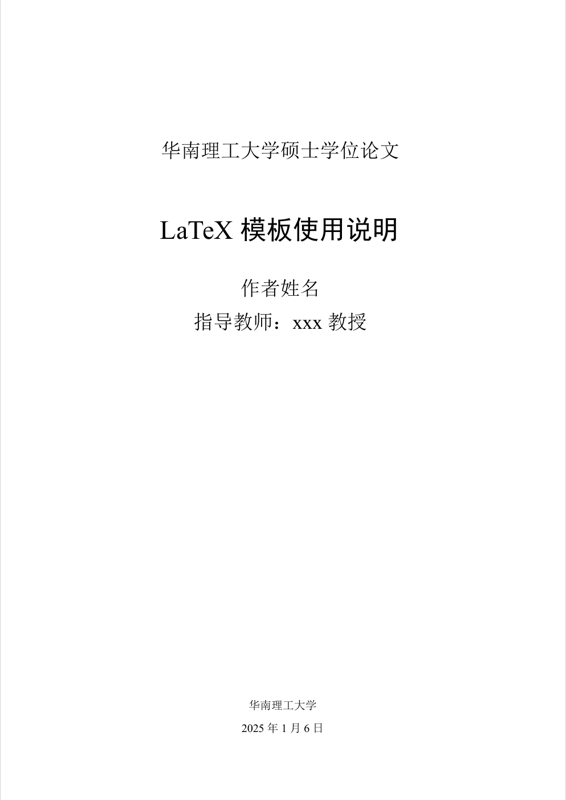
	\title{LaTeX模板使用说明}
	\author{作者姓名}
	\supervisor{指导教师:xxx\ 教授}
	\institute{华南理工大学}
	\date{2025年1月6日}
	%%%%%%%%%%%%%%%%%%%%%%%%%%%%%%%%%%%%%
	\maketitle
	\frontmatter	%此后为罗马数字页码,页面类型为plain
	\include{chapter/abstract} % 中英文摘要
	%%%%%%%%%%%%%%%%%%%%%%%%%%%%%%%%%%%%%%%%%%%%%%%%
	% 目录、表格目录、插图目录这几个字本身的大纲级别是一级的,即和章名有相同的字号字体。目录表的内容通过titletoc宏包在。cls文件设置了。
	%\cleardoublepage % pdfbookmark可能需要这一条才能正常工作
	\pdfbookmark{\contentsname}{toc} %为目录添加pdf文件书签
	\tableofcontents	%目录
    %插图目录(可选)、 表格目录(可选)
	\begingroup
		\renewcommand*{\addvspace}[1]{}
		\newcommand{\loflabel}{图}
		\renewcommand{\numberline}[1]{\loflabel~#1\hspace*{1em}}
		\listoffigures

		\newcommand{\lotlabel}{表}
		\renewcommand{\numberline}[1]{\lotlabel~#1\hspace*{1em}}
		\listoftables
	\endgroup

	%%%%%%%%%%%%%%%%%%%%%%%%%%%%%%%%%%%%%%%%%%%%%%%%%
	\include{chapter/symbols}	% 符号对照表(可选)
	\include{chapter/abbreviation} 	% 缩略词

	\mainmatter %此后为阿拉伯数字页码

    %%%%%%%%%%%%%%%%%%%%%%%%%%%%%%%%%%%%%%%%%%%%%%页眉页脚设置
    \fancypagestyle{plain}{
    	\pagestyle{fancy}
    }	% 每章的第一页会默认使用plain,没有页眉。通过重定义plain为fancy解决
    \pagestyle{fancy}	%设置页眉页脚为fancy
    %%%%%%%%%%%%%%%%%%%%%%%%%%%%%%%%%%%%%%%%%%%%%%分章节,结合导言区的\includeonly命令可仅编译部分章节,编译时不用切换界面,直接在相应章节编译即可。
	\include{chapter/chapter01}%第一章
	\include{chapter/chapter02}%第二章
	\include{chapter/chapter03}%第三章
	\include{chapter/chapter04}
	% \include{chapter/chapter05} % 新增公式字体设置,需要引入字体包unicode-math然后通过setmainfont设置不同字体(unicode-math包默认Latin Modern Math字体,而latex默认Computer Modern Math字体), Computer Modern Math也是模板一直以来使用的字体。这里提供给需要更多字体的同学探索。模版的修改在scutthesis.cls文件82-85行。若希望探索各种常用数学符号的区别,直接编译math_font文件夹的各种测试文件。注意新的字体包unicode-math包下,加粗,花体等命令都有一定的改变,要适当替换一下。可以在测试文件做好测试再使用。
	% 自行根据需要添加章节。注意要包含正确路径

	\backmatter %章节不编号但页码继续
	%%%%%%%%%%%%%%%%%%%%%%%%%%%%%%%%%%%%%%%%%%%%%%%%%%%%%%%%%%%%%%    微调,使得后续章节的页眉不带章号
	\renewcommand{\chaptermark}[1]{\markboth{#1}{}}
	%%%%%%%%%%%%%%%%%%%%%%%%%%%%%%%%%%%%%%%%%%%%%%%%%%%%%%%%%%%%%%
	\include{chapter/conclusion} %结论
	 %%%%%%%%%%%%%%%%%%%%%%%%%%%%%%%%%%%%%%%%%%%%%% bibtex参考文献设置  (原版)
%%	\bibliographystyle{scutthesis}
%%	\bibliography{F:/MyLibrary}
	%%%%%%%%%%%%%%%%%%%%%%%%%%%%%%%%%%%%%%%%%%%%%%
	%%%%%%%%%%%%%%%%%%%%%%%%%%%%%%%%%%%%%%%%%%%%%% biber参考文献设置
	%\renewcommand*{\bibfont}{\refbodyfont}			% 设置文献著录字号比正文小一号(五号),需要小四号请注释该行. % 不推荐使用small,而是使用cls文件中精确定义了的字号。
	\phantomsection % “目录”中的链接能正确跳转,需要添加 \phantomsection 否则点击参考文献会跳转到结论
	\addcontentsline{toc}{chapter}{参考文献}	%目录中添加参考文献
	\printbibliography	% 参考文献著录
 	%%%%%%%%%%%%%%%%%%%%%%%%%%%%%%%%%%%%%%%%%%%%%%
 	% 只有一个附录
% 	\include{chapter/appendix}
 	% 有多个附录
	\include{chapter/appendix1} %附录1
	\include{chapter/appendix2} %附录2
 	%%%%%%%%%%%%%%%%%%%
	\include{chapter/pub} %成果
	\include{chapter/ack} %致谢
% Written by Bibby AI
\end{document}
Preview

PDF Preview
Create an account to compile and preview