slide.texRead-only preview
% Written by Bibby AI
%==============================================================================
%  slide.tex  --  Unofficial SMU (Southern Methodist University) Beamer theme
%
%  Self-contained: stock beamer + tikz.  The brand assets SMUbg.png /
%  SMU-Dedman.jpg / SMUlogoWhite.png are picked up automatically if present,
%  and the deck degrades gracefully without them.
%
%  Build:  pdflatex slide   (run twice so the tikz overlays settle)
%==============================================================================
\documentclass[aspectratio=43,11pt]{beamer}

\usepackage[T1]{fontenc}
\usepackage[scaled]{helvet}  % Helvetica (text)
\usepackage{courier}         % Courier (code)
\renewcommand{\familydefault}{\sfdefault}
\usepackage{tikz}
\usepackage{fancyvrb}
\usepackage{amsmath}
\usepackage[authordate, backend=biber]{biblatex-chicago}  % Chicago author-date (run biber)
\addbibresource{slide.bib}
\setlength{\bibitemsep}{3pt}   % tighter spacing between reference entries
\AtBeginBibliography{\color{black}}

%--- SMU brand colours --------------------------------------------------------
\definecolor{SMUblue}{HTML}{354CA1}   % official SMU blue
\definecolor{SMUred}{HTML}{CC0035}    % SMU crimson accent

%--- Palette ------------------------------------------------------------------
\setbeamercolor{normal text}{fg=black!88, bg=white}
\setbeamercolor{structure}{fg=SMUblue}
\setbeamercolor{itemize item}{fg=SMUred}
\setbeamercolor{itemize subitem}{fg=SMUred}
\setbeamercolor{enumerate item}{fg=SMUblue}
\setbeamercolor{block title}{fg=white, bg=SMUblue}
\setbeamercolor{block body}{bg=SMUblue!8}
\setbeamercolor{block title example}{fg=white, bg=SMUred}
\setbeamercolor{block body example}{bg=SMUred!8}
\setbeamercolor{footline}{fg=black!45}

\setbeamertemplate{navigation symbols}{}
\setbeamertemplate{itemize items}[circle]
\setbeamertemplate{blocks}[rounded][shadow=false]
\setbeamertemplate{bibliography item}{\textbullet}  % plain dot, not the doc/article icon
\setbeamercolor{bibliography item}{fg=black}
\setbeamercolor{bibliography entry author}{fg=black}
\setbeamercolor{bibliography entry title}{fg=black}
\setbeamercolor{bibliography entry location}{fg=black}
\setbeamercolor{bibliography entry note}{fg=black}
\setbeamertemplate{section in toc}[sections numbered]

%--- Faded background watermark (only if SMUbg.png is present) -----------------
\setbeamertemplate{background}{%
  \IfFileExists{SMUbg.png}{%
    \begin{tikzpicture}[remember picture, overlay]
      \node[opacity=0.07] at ([yshift=-0.3cm]current page.center)
        {\includegraphics[height=0.92\paperheight]{SMUbg.png}};
    \end{tikzpicture}%
  }{}%
}

%--- Navy header bar with crimson left stripe + white "SMU" wordmark -----------
\newlength{\smubarht}\setlength{\smubarht}{1.05cm}
\newlength{\smuprog}          % computed width of the progress-bar fill
\def\smuprogh{1pt}            % progress-bar thickness (along header's bottom edge)
% Remember the total number of sections (for the section-divider bar) and the
% number of subsections in each section (for the header bar) -- both recorded
% to the .aux on one run and read back on the next.
\makeatletter
\providecommand{\totalsections}{1}
\newcommand{\smudefsubsec}[2]{\expandafter\gdef\csname subseccount@#1\endcsname{#2}}% global: section -> #subsecs
\newcommand{\smunsubof}[1]{\ifcsname subseccount@#1\endcsname
  \csname subseccount@#1\endcsname\else 1\fi}% look up (>=1 to avoid div by zero)
\AtEndDocument{%
  \immediate\write\@auxout{\noexpand\gdef\noexpand\totalsections{\the\value{section}}}%
}
\AtBeginSubsection{%
  \immediate\write\@auxout{%
    \noexpand\smudefsubsec{\the\value{section}}{\the\value{subsection}}}%
}
\makeatother
\setbeamertemplate{frametitle}{%
  \nointerlineskip%
  % header bar tracks subsection progress within the current section
  % (computed BEFORE the picture so the length survives to \fill)
  \edef\smunsub{\smunsubof{\insertsectionnumber}}%
  \pgfmathsetlength{\smuprog}%
    {\paperwidth*min(\insertsubsectionnumber,\smunsub)/\smunsub}%
  \begin{tikzpicture}[remember picture, overlay]
    \fill[SMUblue] (current page.north west)
      rectangle ([yshift=-\smubarht]current page.north east);
    \fill[SMUred] (current page.north west)
      rectangle ([xshift=0.14cm, yshift=-\smubarht]current page.north west);
    \node[anchor=west, text=white, font=\large\bfseries, inner sep=0pt]
      at ([xshift=0.45cm, yshift=-0.5\smubarht]current page.north west)
      {\insertframetitle};
    \node[anchor=east, inner sep=0pt]
      at ([xshift=-0.45cm, yshift=-0.5\smubarht]current page.north east)
      {\IfFileExists{SMUlogoWhite.png}%
        {\includegraphics[height=0.52\smubarht]{SMUlogoWhite.png}}%
        {\textcolor{white}{\Large\bfseries SMU}}};
    % progress bar along the bottom edge of the header (follows subsection progress)
    \fill[SMUred!25] ([yshift=-\smubarht]current page.north west)
      rectangle ([yshift=\dimexpr-\smubarht+\smuprogh\relax]current page.north east);
    \fill[SMUred] ([yshift=-\smubarht]current page.north west)
      rectangle ([xshift=\smuprog, yshift=\dimexpr-\smubarht+\smuprogh\relax]current page.north west);
  \end{tikzpicture}%
  \vspace*{\dimexpr\smubarht+0.15cm\relax}%
}

%--- Footline: page number bottom-right ---------------------------------------
\setbeamertemplate{footline}{%
  \hfill\usebeamercolor[fg]{footline}\footnotesize
  \insertframenumber/\inserttotalframenumber\hspace*{2.2ex}\vspace*{1.4ex}%
}

%--- Title page ---------------------------------------------------------------
\setbeamertemplate{title page}{%
  \vfill
  \begin{centering}
    {\usebeamercolor[fg]{structure}\Large\bfseries\inserttitle\par}
    \vspace{0.6em}
    {\color{black!70}\small\bfseries\insertsubtitle\par}
    \vspace{0.9em}
    {\color{SMUred}\rule{\textwidth}{1pt}\par}
    \vspace{1.1em}
    {\large\insertauthor\par}
    \vspace{0.4em}
    {\small\insertinstitute\par}
    \vfill
    % Title logo: real asset if available, text fallback otherwise
    \IfFileExists{SMU-Dedman.jpg}{\includegraphics[height=1.1cm]{SMU-Dedman.jpg}}{%
      {\bfseries\textcolor{SMUblue}{SMU}\hspace{0.4em}%
       \textcolor{SMUred}{\footnotesize Dedman College\\[-0.2em]
       \hspace*{2.4em}of Humanities \& Sciences}}%
    }
    \par\vspace{0.4em}
  \end{centering}
}

%--- Metadata (fill in as needed) ---------------------------------------------
\title{Long title \\ Secondary title}
\subtitle{Additional notes}
\author{Author Name}
\institute{Department of Statistics and Data Science,\\
           Southern Methodist University}
\date{}

%--- Code listing look (numbered Verbatim) ------------------------------------
\fvset{numbers=left, numbersep=6pt, fontsize=\small, frame=single,
       framesep=3mm, rulecolor=\color{black!25}}

%--- Section divider: own page, no header (frame carries no frametitle).
%--- The line under the title doubles as a "sections to go" progress bar:
%--- the crimson fill = sections already completed, so the empty remainder
%--- shows how many sections are still ahead. -----------------------------------
\def\smudivh{1.5pt}   % thickness of the divider progress line
\AtBeginSection[]{%
  \begin{frame}[plain]% no header/footer; \vfill centers the block over the page
    \vfill
    \centering
    \begin{minipage}{0.8\textwidth}
      \raggedright
      {\color{black}\Large\bfseries\insertsection\par}
      \vspace{0.6em}
      \pgfmathsetlength{\smuprog}%
        {\linewidth*min(\insertsectionnumber,\totalsections)/\totalsections}%
      \begin{tikzpicture}
        \fill[SMUred!25] (0,0) rectangle (\linewidth,\smudivh);
        \fill[SMUred]    (0,0) rectangle (\smuprog,\smudivh);
      \end{tikzpicture}
    \end{minipage}
    \vfill
  \end{frame}%
}

\begin{document}

% ---- Title (no header, footer, or watermark) --------------------------------
{\setbeamertemplate{footline}{}\setbeamertemplate{frametitle}{}%
 \setbeamertemplate{background}{}
\begin{frame}[plain]
  \titlepage
\end{frame}}

% ---- Table of contents ------------------------------------------------------
\begin{frame}{Table of contents}
  \tableofcontents[subsectionstyle=hide]% sections only here; subsections still in PDF bookmarks
\end{frame}

%==============================================================================
%  HOW TO STRUCTURE YOUR SLIDES  -- read this before adding content
%
%  Required hierarchy:   \section  ->  \subsection  ->  \begin{frame}{...}
%
%  1. Every content frame must live inside a \subsection, which lives inside a
%     \section.  Declare \section / \subsection on their OWN line, BEFORE the
%     \begin{frame} they introduce -- never put them inside a frame.
%
%  2. Do NOT place a frame directly under a \section with no \subsection.
%     The header progress bar measures the current subsection's position within
%     its section, so a frame with no subsection shows an EMPTY bar.
%
%  3. A subsection MAY contain several frames.  The header bar simply holds that
%     subsection's number across all of them -- that is expected, not a bug.
%
%  4. The \subsection name drives the table of contents, the PDF bookmarks, and
%     the header progress-bar steps.  The frame title in \begin{frame}{...} is
%     only the on-slide header.  They may match or differ -- you do NOT have to
%     repeat the subsection name as the frame title.
%
%  5. Keep the title page and table-of-contents frames (the [plain] ones above)
%     ABOVE the first \section so they stay out of the TOC and bookmarks.
%
%  6. The TOC and both progress bars are computed from slide.aux across runs.
%     After you add, remove, or reorder any (sub)section, compile twice
%     (or run `latexmk -pdf slide.tex`) so they settle to the right values.
%==============================================================================

% =============================================================================
\section{Blocks}
% =============================================================================
\subsection{Blocks}
\begin{frame}{Blocks}
  \begin{exampleblock}{Exercise block}
    Some exercise
  \end{exampleblock}
  \begin{block}{Definition block}
    Some definition
  \end{block}
\end{frame}

% =============================================================================
\section{Adding extras}
% =============================================================================
\subsection{Adding codes}
\begin{frame}[fragile]{Adding codes}
  \begin{Verbatim}
> print("Hello world")
[1] "Hello world"
  \end{Verbatim}
\end{frame}

\subsection{Table}
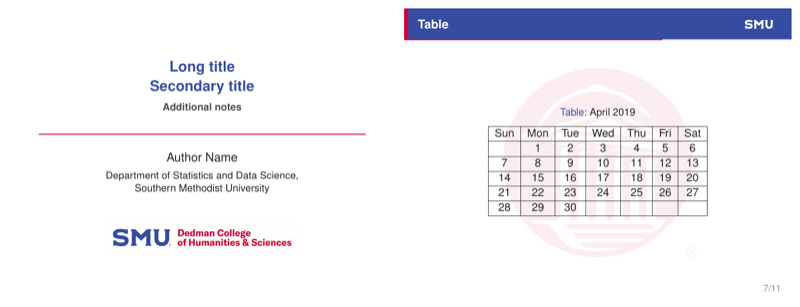
\begin{frame}{Table}
  \begin{table}
    \centering
    \caption{April 2019}
    \begin{tabular}{|c|c|c|c|c|c|c|}
      \hline
      Sun & Mon & Tue & Wed & Thu & Fri & Sat \\ \hline
          & 1  & 2  & 3  & 4  & 5  & 6  \\ \hline
      7   & 8  & 9  & 10 & 11 & 12 & 13 \\ \hline
      14  & 15 & 16 & 17 & 18 & 19 & 20 \\ \hline
      21  & 22 & 23 & 24 & 25 & 26 & 27 \\ \hline
      28  & 29 & 30 &    &    &    &    \\ \hline
    \end{tabular}
  \end{table}
\end{frame}

\subsection{Equation}
\begin{frame}{Equation}
  \[
    \int_{-\infty}^{\infty}\frac{1}{\sqrt{2\pi\sigma^{2}}}\,
      e^{-\frac{(x-\mu)^{2}}{2\sigma^{2}}}\,dx = 1
  \]
\end{frame}

% =============================================================================
\section{References}
% =============================================================================
\subsection{Citations}
\begin{frame}{Citations}
  \begin{itemize}
    \item Cite a work in the text with \texttt{\textbackslash textcite}:
          \textcite{example2021} report a related result.
    \item Or parenthetically with \texttt{\textbackslash parencite}
          \parencite{example2019, examplebook2018}.
    \item All entries live in \texttt{slide.bib}; run \texttt{biber} to build
          the list below.
  \end{itemize}
\end{frame}

% ---- References (placeholder entries from slide.bib) ------------------------
\subsection{Bibliography}
\begin{frame}[allowframebreaks]{References}
  \footnotesize
  \nocite{*}% list every entry in slide.bib, even if not cited
  \setlength{\leftskip}{1.5em}% nudge entries in from the left edge
  \printbibliography[heading=none]
\end{frame}

% Written by Bibby AI
\end{document}
Preview

PDF Preview
Create an account to compile and preview