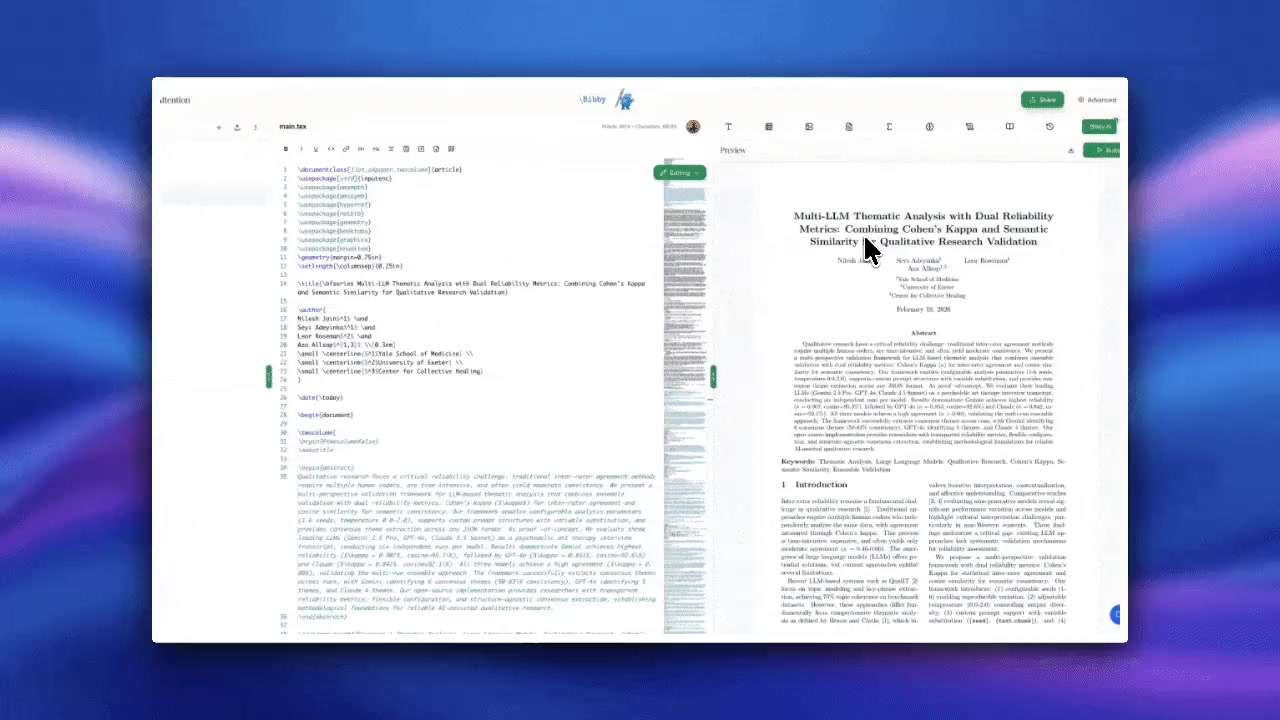
Bibby AI vs Google Docs for papers
| Feature | Google Docs | Bibby AI |
|---|---|---|
| Real-time co-authoring and comments | Yes — the benchmark everyone else is judged against | Yes — live cursors on the same project |
| Suggestion mode your supervisor already knows | Yes — suggest, accept, reject, resolve | Comments and version history; no identical suggest mode |
| Learning curve | None — everyone can already use it | You need to be willing to write LaTeX |
| Works offline and on mobile | Yes — mature apps on every platform | Browser-based; no offline mobile app |
| Real LaTeX typesetting | ||
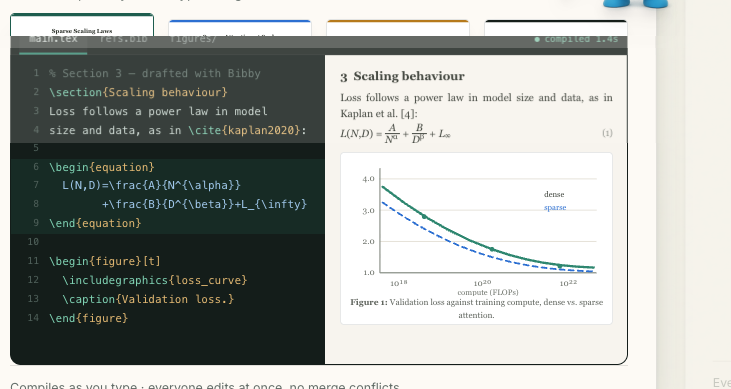
| Equations | Basic equation editor, slow for heavy math | Full LaTeX math, plus image and handwriting to LaTeX |
| Citations and bibliography | Add-ons; references formatted in the text | Citation search writes BibTeX into your .bib |
| Journal and conference templates | — | Yes — class files, journal specs, arXiv-ready output |
| Cross-references, numbering, and labels | Manual for figures, tables, and equations | Yes — \label and \ref renumber themselves |
| AI help aware of the document structure | Gemini, on paid Workspace plans | Yes — writes valid LaTeX, tables, and figures |
| Submission-ready PDF | Export to PDF, layout not journal-specific | Compiled from the journal's own template |
Google Docs is a trademark of Google LLC. Comparison reflects our understanding as of November 2026; check each vendor for current details.
Where Google Docs wins
Three cases where we would tell you to stay in Docs.
Co-authors who will never write LaTeX
A grant narrative circulating among six people, two of whom have never seen a backslash, belongs in Docs. LaTeX is worth it when the document has math, references, and a template — not for every piece of writing.
Suggestion mode and comment threads
Docs' suggest-and-resolve workflow is the thing supervisors know by heart. Bibby has comments and full version history, but not an identical track-changes experience.
Offline, mobile, and already paid for
Docs works on a phone on a plane, and your institution probably already licenses Workspace. If the paper is short and the deadline is tomorrow, that counts for something.
Pricing, side by side
Google Docs
As listed in November 2026
$0/month
Free with a personal account; Workspace Business Starter $7 per user per month annually, $8.40 monthly
- Unlimited documents and collaborators
- Gemini AI features on paid Workspace plans
- Citations via third-party add-ons
- No LaTeX, no BibTeX, no journal class files
Bibby AI
Current list price
$18/month
Pro, or $16.25/month billed annually
- Free plan: 2 projects and 40 compiles a month
- Pro: unlimited projects, compiles, and collaborators
- AI co-author, citation search, paper review, figures, posters
- Replaces the editor, reference manager, and compiler
Google figures are list prices from Google's pricing pages in November 2026 and vary by region and commitment. Ours come straight from our pricing page.
Why researchers move off Docs
Keep the collaboration, lose the formatting fights
Co-authors still edit live and leave comments. What goes away is the afternoon spent re-numbering figures, fixing a bibliography by hand, and nudging an equation back into place.
Math that does not punish you
Type LaTeX directly, paste a screenshot of an equation, or upload a handwritten derivation. For a methods-heavy paper this is the difference between an hour and a day.
References that survive a style change
Sources live in a .bib file, so switching from a numeric style to author-year is one line in the preamble rather than a manual pass over fifty citations.
The output journals actually accept
Start from the journal or conference template, compile, and submit the PDF or the LaTeX source. No reformatting a Docs export at the deadline.
Move a Google Doc over in about 2 minutes
Three steps, and your co-authors keep working the way they are used to.
- Export and convert. In Docs, File → Download → Microsoft Word (.docx), then run it through DOCX to LaTeX. Headings, lists, and most equations come across as editable LaTeX.
- Choose the real template. Pick a journal or conference template and compile once to see the submission layout.
- Invite your co-authors. They edit live alongside you. Add sources with citation search, and send a .docx export to anyone who insists on commenting in Word.
Frequently asked questions
Why not just write the paper in Google Docs?
It is fine for an outline, a grant narrative, or a paper with little math. It falls down on heavy equations, BibTeX bibliographies, journal class files, and cross-references — and most journals and arXiv expect LaTeX source or a template-matched PDF. See LaTeX vs Word for the same trade-off in more detail.
Do I lose real-time collaboration?
No. Co-authors edit the same project at once with live cursors, and every change is in version history. What is different is suggestion mode: Docs' accept/reject flow has no exact equivalent here.
How does the pricing compare?
Google Docs is free with a personal Google account; Workspace Business Starter listed at $7 per user per month on an annual commitment, or $8.40 month to month, as of November 2026. Bibby is free for 2 projects and 40 compiles a month, and Pro is $18/month, or $16.25/month billed annually. Honest version: Docs is cheaper, and Bibby replaces the editor, the reference manager, and the compiler.
Can I bring an existing Google Doc across?
Yes. Download it as .docx and run it through DOCX to LaTeX, then pick a template and compile. Headings, lists, and most equations come across as LaTeX you can edit.
What if a co-author refuses to leave Word or Docs?
Export with LaTeX to Word, collect their comments, and fold them back in. The LaTeX source stays the record of truth.
Is Bibby affiliated with Google?
No. Google Docs is a trademark of Google LLC. Bibby is an independent tool and is not affiliated with, endorsed by, or sponsored by Google. This page exists to help researchers compare options.